
Modern web design has become faster and more accessible thanks to artificial intelligence. Businesses, startups, designers, and developers no longer need to spend weeks creating wireframes and user interface layouts manually. AI-powered design platforms can now generate professional website and application interfaces within minutes. One of the most recognised tools in this category is Uizard.
This Uizard UI Design Review explores whether Uizard is a good choice for modern web design. We will examine its AI-powered design capabilities, key features, ease of use, templates, customisation options, and overall user experience. By the end of this review, you will understand whether Uizard can help you design professional websites and applications more efficiently.
What Is Uizard UI Design?
Uizard is an AI-powered UI and UX design platform that enables users to create websites, mobile applications, dashboards, prototypes, and wireframes without advanced design skills. Instead of designing every screen manually, users can generate interfaces from text prompts, sketches, screenshots, or pre-built templates.
The platform is designed for startups, product managers, UX designers, web designers, developers, agencies, and entrepreneurs who want to accelerate the design process. Uizard combines artificial intelligence with a visual drag-and-drop editor, allowing users to customise every screen before sharing prototypes with team members or clients.
Because collaboration, prototyping, and AI-powered design are integrated into one platform, Uizard simplifies the product design workflow while maintaining professional design quality.
Why Uizard Is Popular
Uizard has become popular because it combines artificial intelligence with an intuitive design environment. Instead of requiring extensive UI design experience, the platform enables users to generate attractive interfaces quickly while maintaining flexibility for further editing.
AI UI Generation
Uizard uses artificial intelligence to generate website layouts, application screens, dashboards, and user interface components from simple text prompts. This dramatically reduces the time required to begin new design projects.
Beginner-Friendly Interface
The platform has a clean visual editor that is easy to understand. Beginners can create wireframes, mock-ups, and prototypes without mastering professional design software or complex interface design principles.
Rapid Prototyping
Uizard enables teams to move quickly from ideas to interactive prototypes. Businesses can validate concepts, collect client feedback, and refine products much earlier in the development process.
Real-Time Collaboration
Multiple team members can collaborate on projects simultaneously. Designers, developers, product managers, and stakeholders can review, edit, and comment on designs together, improving communication throughout the design process.
AI Productivity Tools
Beyond interface generation, Uizard includes AI-powered features that accelerate repetitive design tasks, helping users produce high-quality mock-ups while reducing manual editing and improving overall productivity.
Key Features of Uizard
Uizard offers a comprehensive collection of tools that simplify modern UI and UX design while helping teams produce professional prototypes more efficiently.
AI UI Generator
The AI UI Generator creates complete website layouts and application interfaces from text prompts. Artificial intelligence automatically selects layouts, colour schemes, typography, spacing, and interface components based on the project description.
AI App Generator
Users can generate mobile application screens using artificial intelligence. The platform creates navigation structures, onboarding screens, dashboards, login pages, and user interface components suitable for different application categories.
Drag-and-Drop Editor
The visual editor enables users to move interface elements, resize components, edit typography, replace colours, and update layouts without writing code. This makes Uizard suitable for beginners and experienced designers alike.
Wireframe Generator
Users can rapidly build low-fidelity and high-fidelity wireframes for websites, mobile applications, dashboards, and software products. Wireframes help teams validate ideas before beginning development.
Screenshot to Editable Design
One of Uizard’s most impressive features converts screenshots into editable UI designs. Existing interfaces can be recreated and customised, saving significant design time.
Sketch to Wireframe
Hand-drawn sketches can be transformed into digital wireframes using artificial intelligence. This feature allows brainstorming sessions to move directly into editable digital prototypes.
Interactive Prototypes
Designs can be connected into interactive prototypes that simulate the user journey. These prototypes help teams demonstrate functionality before software development begins.
AI UI Generator
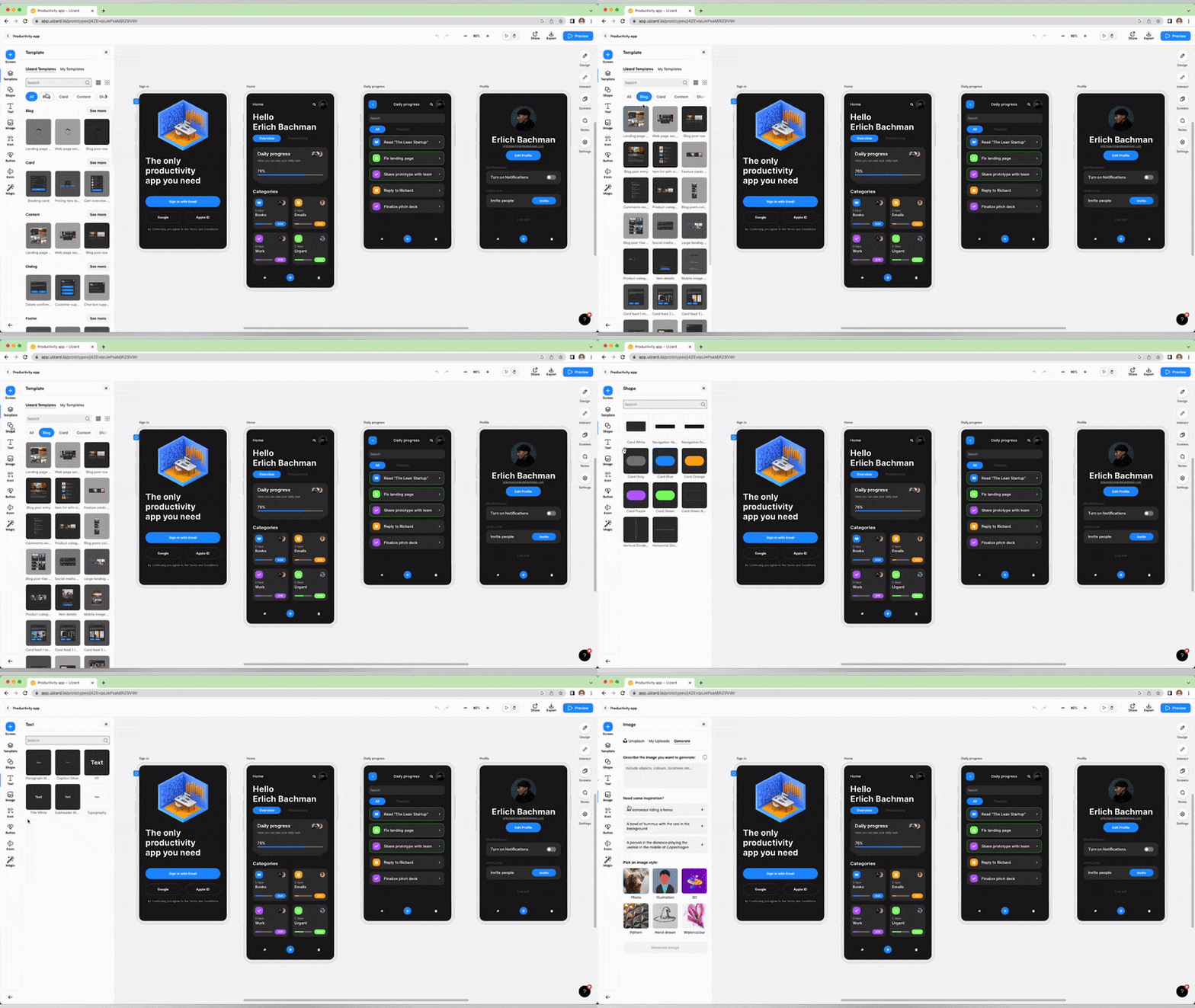
Artificial intelligence is the foundation of Uizard’s design workflow. Instead of manually building interfaces from empty canvases, users describe the project and allow AI to generate complete layouts automatically.
The AI creates website pages, mobile application screens, navigation menus, forms, buttons, typography, icons, and spacing based on the provided description. This significantly reduces project setup time while providing an excellent starting point for customisation.
Although AI performs much of the initial design work, users maintain complete creative control. Every interface element can be edited using Uizard’s visual editor to better match brand guidelines, usability requirements, and project objectives.
Is Uizard Easy to Use?
Ease of use is one of the strongest advantages highlighted in this Uizard UI Design Review. The platform has been designed for users with varying levels of design experience, making professional UI creation accessible without steep learning curves.
The interface is organised logically, with AI tools, templates, editing controls, and collaboration features available from one central workspace. Most users can begin creating functional prototypes within a short period.
Step 1: Create a Uizard Account
Register for a Uizard account and access the dashboard. After signing in, users can start new projects, explore templates, use AI tools, and manage collaborative design work from one workspace.
Step 2: Generate a Design with AI
Enter a text prompt describing your website, application, or interface. The AI analyses the description and automatically generates professionally designed layouts, interface components, and navigation structures.
Step 3: Choose a Template
Alternatively, users can browse professionally designed templates suitable for websites, ecommerce platforms, dashboards, SaaS products, mobile applications, and landing pages before customising them.
Step 4: Customise the Interface
Modify colours, typography, spacing, buttons, icons, forms, images, navigation menus, and page layouts using the drag-and-drop editor. Every interface element can be adjusted without coding knowledge.
Step 5: Build Interactive Prototypes
Connect individual screens using interactive links to simulate real user journeys. These prototypes help teams test usability, gather feedback, and present concepts to stakeholders.
Step 6: Share Your Project
Once complete, share the design with colleagues, clients, or developers for collaboration and review. Teams can provide comments, suggest revisions, and continue refining the project before development begins.
Templates and Design Customisation
Uizard includes a large collection of professionally designed templates that help users begin projects quickly while maintaining modern interface design standards. Combined with AI-generated layouts, these templates significantly reduce the time required to build high-quality prototypes.
Popular template categories include:
- Business websites
- SaaS platforms
- Ecommerce stores
- Mobile applications
- Landing pages
- Dashboards
- Admin panels
- Personal portfolios
- Startup websites
- Healthcare applications
- Education platforms
- Productivity tools
Every template supports extensive customisation through the visual editor. Users can modify colours, typography, spacing, layouts, icons, navigation, forms, images, buttons, and interface components while maintaining responsive design principles.
Combined with AI-powered interface generation, flexible templates, and intuitive editing tools, Uizard provides an efficient solution for designers, startups, and businesses looking to create modern web and mobile interfaces without the complexity of traditional UI design software.
UI and UX Features
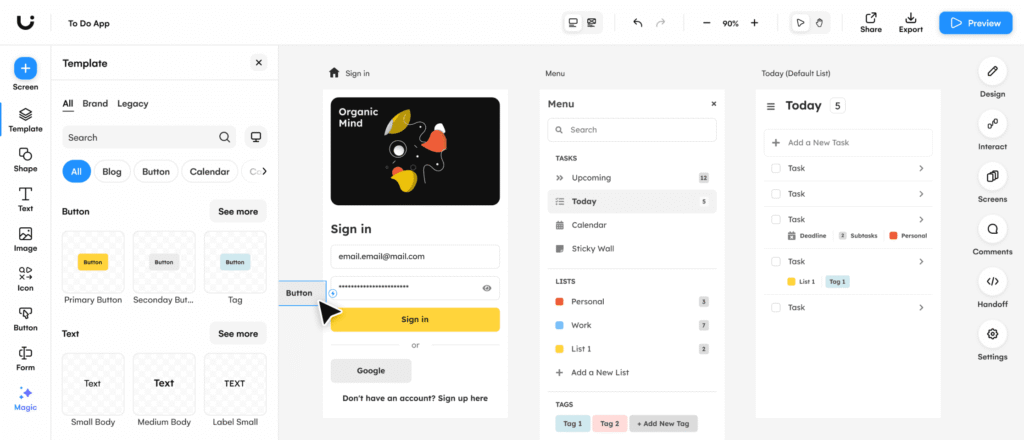
A modern design tool should do more than create attractive screens. It should also help teams build user-friendly experiences that improve usability and productivity. Uizard includes several UI and UX features that simplify the design process while supporting rapid product development.
Interactive Prototyping
Uizard allows users to connect multiple screens into interactive prototypes that simulate real user journeys. These prototypes help designers test navigation, user flows, and interface behaviour before development begins, reducing costly design changes later.
Smart UI Components
The platform provides a library of reusable interface components such as buttons, forms, navigation menus, cards, icons, tables, and input fields. These components help maintain consistency while significantly reducing design time.
Responsive Design
Designs created with Uizard can be adapted for desktop, tablet, and mobile devices. Responsive layouts help teams visualise how interfaces will appear across different screen sizes before development starts.
Team Collaboration
Multiple users can work on the same project simultaneously. Team members can review designs, leave comments, suggest improvements, and collaborate in real time, making communication more efficient throughout the design process.
Design System Support
Reusable styles, colours, typography, and UI components help teams maintain consistency across large projects. Design systems reduce repetitive work while ensuring a professional and unified user experience.
Performance and Productivity
Performance is an important consideration when working on large design projects. Uizard is built as a cloud-based platform, allowing users to access projects from different devices without installing complex software.
Artificial intelligence accelerates repetitive design tasks such as creating layouts, generating screens, and producing interface suggestions. These automation features allow designers to spend more time refining user experiences rather than building basic interface structures manually.
Cloud-based collaboration also improves productivity by enabling designers, developers, product managers, and clients to review projects together without exchanging multiple file versions.
Pricing and Plans
Uizard offers several pricing plans designed for individuals, startups, freelancers, and larger teams. Users can begin with a free plan before upgrading to access premium AI features and collaboration tools.
Premium plans generally include:
- AI UI Generator
- AI App Generator
- Premium templates
- Interactive prototypes
- Unlimited projects
- Team collaboration
- Advanced export options
- Design system tools
- Priority customer support
- Additional AI credits
The flexible pricing makes Uizard suitable for both independent designers and growing businesses.
Advantages of Uizard
Uizard offers numerous strengths that make it one of the leading AI-powered UI design platforms available today.
AI-Powered Interface Generation
Artificial intelligence generates complete user interfaces from simple text prompts. This dramatically reduces project setup time while giving designers a professional foundation that can be customised according to project requirements.
Extremely Easy to Use
The clean drag-and-drop editor and intuitive interface make Uizard accessible to beginners. Users with little or no design experience can quickly build attractive wireframes, mock-ups, and interactive prototypes.
Rapid Prototyping
Teams can transform ideas into working prototypes within minutes. Rapid prototyping improves collaboration, accelerates product validation, and helps businesses collect valuable feedback before software development begins.
Screenshot Conversion
Uizard converts screenshots into editable interface designs, allowing teams to recreate existing products, analyse competitor interfaces, or modernise legacy applications without starting from scratch.
Sketch Recognition
Hand-drawn sketches can be transformed into digital wireframes using AI. This feature speeds up brainstorming sessions and enables teams to move directly from paper concepts to editable digital prototypes.
Team Collaboration
Cloud-based collaboration allows multiple stakeholders to review, edit, and comment on designs in real time. Improved collaboration reduces communication delays while helping projects move forward more efficiently.
Beginner-Friendly Learning Curve
Unlike many professional UI design applications, Uizard focuses on simplicity. Most users can begin creating professional-looking interfaces after only a short period of learning.
Disadvantages of Uizard
Although Uizard offers many benefits, there are several limitations that users should consider before choosing the platform.
Limited Advanced Design Control
Professional UI designers working on highly detailed interface systems may find fewer advanced design capabilities compared to specialised software such as Figma.
Smaller Plugin Ecosystem
Uizard supports fewer third-party plugins and integrations than larger design platforms. Users depending on specialised workflows may encounter some limitations.
Premium AI Features
Some of the most powerful AI capabilities require paid subscriptions. Teams relying heavily on AI-generated designs may need premium plans to unlock the platform’s full potential.
Not Intended for Final Development
Uizard focuses on interface design and prototyping rather than complete software development. Developers still need separate tools to build fully functional applications.
Uizard vs Figma
Both Uizard and Figma are excellent UI design platforms, but they serve different audiences.
Uizard focuses on AI-assisted design, beginner-friendly workflows, and rapid prototyping. Its AI tools simplify interface creation, making it particularly attractive for startups, entrepreneurs, and product managers.
Figma provides more advanced design capabilities, greater precision, larger plugin support, and extensive collaboration features. Professional UI and UX designers working on complex design systems often prefer Figma.
Uizard vs Canva
Although both platforms use artificial intelligence, Uizard and Canva target different design requirements.
Uizard specialises in websites, mobile applications, dashboards, wireframes, and user interface design. Its AI tools focus on product design and digital experiences.
Canva focuses primarily on marketing materials, presentations, social media graphics, documents, and branding. While Canva includes website creation features, it is not designed specifically for professional UI and UX design workflows.
Who Should Use Uizard?
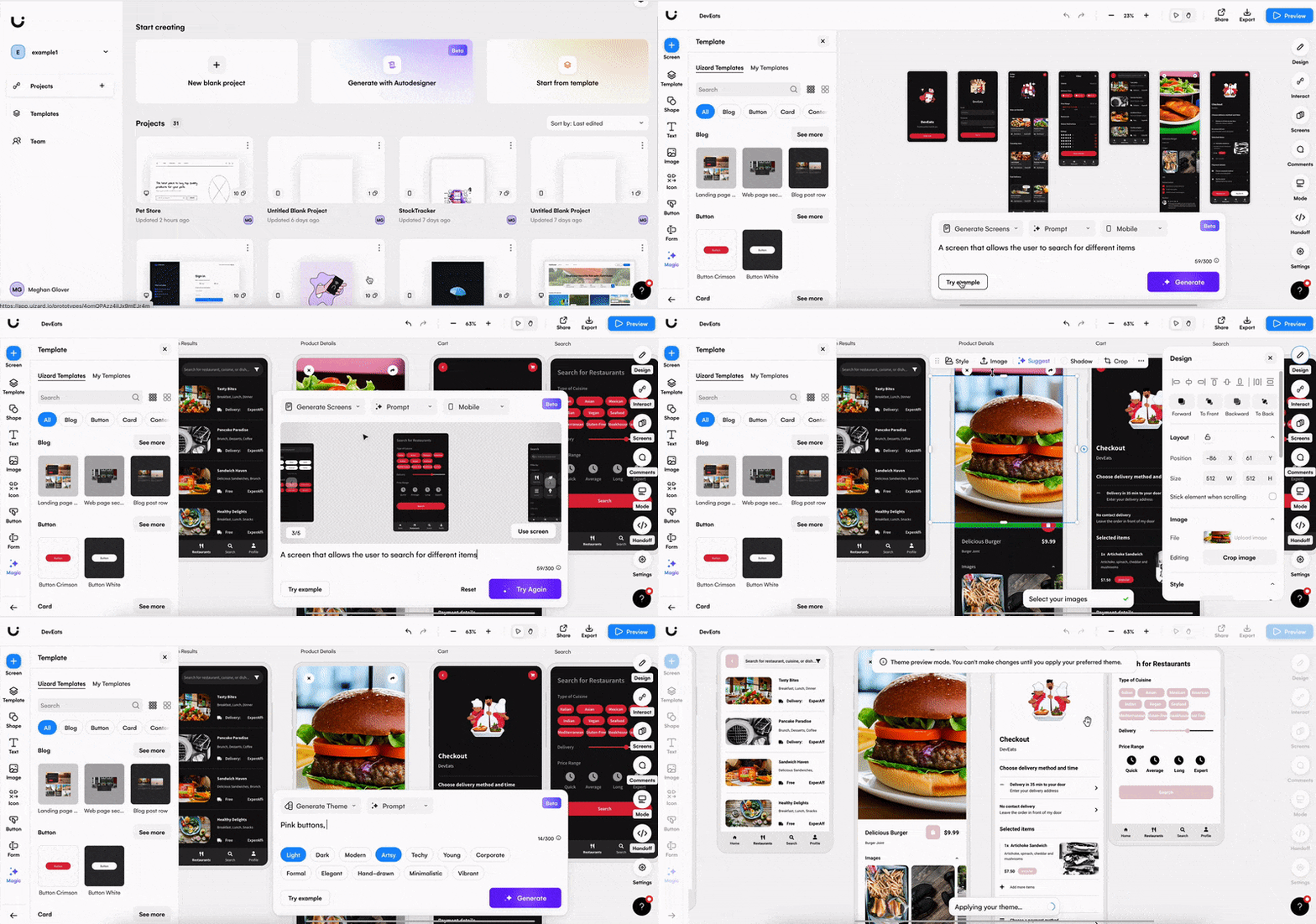
Uizard is an excellent solution for users looking to create interfaces quickly while benefiting from AI-powered automation.
It is particularly suitable for:
- Startup founders
- Product managers
- UX designers
- UI designers
- Web designers
- Mobile app developers
- Freelancers
- Design agencies
- Students
- SaaS businesses
- Entrepreneurs
- Software teams
These users benefit from rapid interface generation, collaborative workflows, and simplified prototyping.
Who Should Avoid Uizard?
Although Uizard is suitable for many users, it may not meet every design requirement.
It may be less suitable for:
- Advanced UI specialists requiring pixel-perfect control
- Large enterprise design systems
- Developers expecting production-ready code
- Complex animation projects
- Graphic designers creating print materials
- Teams relying heavily on specialised plugins
These projects often require more advanced design platforms or specialised software.
Customer Support
Uizard provides several support resources that help users learn the platform and resolve technical questions efficiently.
Support options generally include:
- Help Centre
- Documentation
- Tutorials
- Email support
- Community resources
- Premium customer assistance
These resources make it easier for beginners to become productive while supporting experienced design teams.
Security
As a cloud-based platform, Uizard includes security features that help protect projects and collaborative workspaces.
Security features generally include:
- Secure cloud storage
- User authentication
- Encrypted data transfer
- Regular platform updates
- Reliable infrastructure
- Workspace management
These measures help protect design projects while supporting safe collaboration among distributed teams.
Final Verdict:
This Uizard UI Design Review demonstrates that Uizard is an excellent AI-powered platform for creating modern websites, mobile applications, dashboards, and interactive prototypes. Its AI-generated layouts, drag-and-drop editor, screenshot conversion, sketch recognition, and collaboration tools significantly reduce design time while making professional UI design accessible to beginners.
Although advanced designers working on highly complex interface systems may still prefer Figma or other specialised design software, Uizard offers outstanding value for startups, freelancers, product managers, agencies, and businesses seeking faster design workflows. The combination of artificial intelligence, intuitive editing, rapid prototyping, and collaborative features makes it one of the strongest AI design tools currently available.
Overall, Uizard is a smart choice for anyone looking to design modern web interfaces efficiently while benefiting from AI-powered productivity.
Must Read:
- Hocoos AI Website Builder Review: Best Choice for Startups?
- Readdy AI Website Builder Review: Can It Grow Your Business?
- Brizy AI Website Builder Review: Can It Build a Professional Website?
FAQs:
Is Uizard suitable for beginners?
Yes. Uizard is designed for beginners and includes AI-powered interface generation, a visual drag-and-drop editor, templates, and interactive prototyping tools that simplify UI and UX design without requiring advanced design experience.
Can Uizard design professional websites?
Yes. Uizard can generate modern website layouts, responsive interfaces, landing pages, dashboards, and application screens. Users can customise every design element to create professional interfaces that match their brand and project goals.
Can Uizard convert sketches into digital designs?
Yes. One of Uizard’s standout features is its ability to transform hand-drawn sketches into editable digital wireframes, allowing teams to move quickly from ideas to interactive prototypes.
Is Uizard better than Figma?
It depends on your needs. Uizard is ideal for AI-assisted design, rapid prototyping, and beginner-friendly workflows, while Figma offers more advanced design control, extensive plugins, and professional-level collaboration features.
Is Uizard good for modern web design?
Yes. Uizard provides AI-powered interface generation, responsive layouts, reusable UI components, interactive prototyping, and collaborative design tools that make it highly suitable for creating modern web and application interfaces.