
Managing bookmarks has become more challenging than ever. Most internet users save hundreds or even thousands of websites for work, research, shopping, education, and entertainment. While every web browser offers a built-in bookmark feature, these tools often become cluttered and difficult to organise over time.
This is where Raindrop Bookmark Manager stands out. It offers a modern solution that goes beyond simply saving web pages. With collections, tags, advanced search, cloud synchronisation, and rich previews, it transforms bookmarks into a well-organised knowledge library.
In this Raindrop Bookmark Manager Review, we’ll explore whether it is genuinely capable of replacing traditional browser bookmarks. We’ll examine its features, usability, pricing, advantages, disadvantages, and who should consider using it.
If you’ve ever struggled to find an important website saved months ago, this review is for you.
What Is Raindrop Bookmark Manager?
Raindrop Bookmark Manager is a cloud-based bookmark management platform designed to help users save, organise, search, and access bookmarks across multiple devices.
Unlike Chrome Bookmarks or Firefox Bookmarks, Raindrop creates a complete bookmark library instead of a simple folder system.
Users can save:
- Websites
- Blog articles
- YouTube videos
- Images
- PDF documents
- Online tools
- Products
- Research papers
- Social media posts
Everything is synchronised automatically across desktops, laptops, tablets, and smartphones.
Whether you’re a student, content creator, marketer, developer, or business owner, Raindrop Bookmark Manager makes organising online resources much easier.
Why Traditional Browser Bookmarks Are No Longer Enough
Most browsers include a bookmarking feature, but they were designed for basic use.
As your bookmark collection grows, finding specific pages becomes increasingly difficult.
Common problems include:
Poor Organisation
Most browsers only allow folders and subfolders.
After saving hundreds of bookmarks, folders become overcrowded.
Difficult Search Experience
Searching browser bookmarks usually depends on page titles or URLs.
If you don’t remember the exact title, locating a bookmark becomes frustrating.
Limited Visual Experience
Traditional bookmarks appear as plain text lists.
Without thumbnails or previews, recognising websites quickly becomes harder.
Browser Dependency
Chrome bookmarks remain within Chrome.
Firefox bookmarks remain within Firefox.
Although synchronisation exists, switching browsers isn’t always convenient.
No Productivity Features
Traditional bookmarks lack:
- Smart tags
- Collections
- Highlights
- Notes
- Duplicate detection
- Reading reminders
- Rich previews
This limits their usefulness for professional users.
Key Features of Raindrop Bookmark Manager
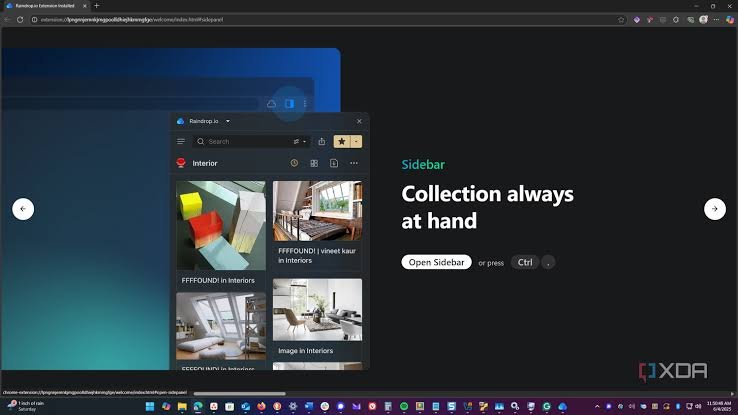
Raindrop Bookmark Manager offers a comprehensive collection of features designed for productivity.
Beautiful Collections
Instead of plain folders, Raindrop uses Collections.
Collections are visually appealing and easier to browse.
Examples include:
- SEO
- AI Tools
- Recipes
- Travel
- Finance
- Shopping
- Research
- Personal
Each collection can have its own icon and cover image.
This makes navigation faster.
Smart Tagging System
One bookmark can belong to multiple categories using tags.
For example:
A single SEO article may have tags such as:
- SEO
- Content Marketing
- AI
- Blogging
This removes the need to duplicate bookmarks across folders.
Rich Link Preview
Every saved webpage automatically displays:
- Thumbnail
- Website icon
- Description
- Title
- Reading estimate
Instead of browsing text links, users can recognise websites visually.
Full-Text Search
One of Raindrop’s strongest features is search.
Instead of searching only titles, it indexes page content.
Even if you remember only one phrase from an article, there’s a good chance Raindrop can find it.
This is a major improvement over browser bookmarks.
Cloud Synchronisation
Your bookmark library remains synchronised across:
- Windows
- macOS
- Linux
- Android
- iPhone
- Chrome
- Edge
- Firefox
- Safari
You never lose access to saved websites.
Browser Extensions
Raindrop extensions make saving websites effortless.
With one click, users can:
- Save pages
- Add tags
- Select collections
- Edit titles
- Save screenshots
No manual organisation is required later.
Duplicate Detection
Over time, duplicate bookmarks become unavoidable.
Raindrop automatically identifies duplicates.
Cleaning your library becomes much easier.
Broken Link Detection
Many saved websites eventually disappear.
Raindrop identifies broken links so your collection remains useful.
Traditional browser bookmarks offer no such feature.
Permanent Copy (Pro Feature)
Premium users can store archived versions of web pages.
Even if the original website disappears, the saved copy remains available.
Researchers and journalists especially benefit from this feature.
User Interface and Experience
One of the biggest reasons people switch to Raindrop Bookmark Manager is its interface.
Everything feels modern and intuitive.
Bookmarks appear as cards instead of simple lists.
Users can customise:
- Grid View
- Masonry View
- Headline View
- List View
Dark Mode is available for comfortable viewing at night.
The interface remains fast even with thousands of saved bookmarks.
Navigation feels natural, making the platform suitable for both beginners and advanced users.
Browser Compatibility
Raindrop Bookmark Manager supports nearly every major browser.
Compatible browsers include:
- Google Chrome
- Microsoft Edge
- Mozilla Firefox
- Safari
- Brave
- Opera
- Vivaldi
This flexibility makes switching browsers effortless.
Unlike traditional browser bookmarks, your collection isn’t tied to one ecosystem.
Mobile Experience
Many bookmark managers perform well on desktops but disappoint on mobile devices.
Raindrop is different.
Its Android and iOS applications provide nearly identical functionality.
Users can:
- Save websites instantly
- Search bookmarks
- Read saved articles
- Organise collections
- Add tags
- Share links
Everything synchronises within seconds.
Whether you’re travelling or working remotely, your bookmark library stays accessible.
Productivity Benefits of Using Raindrop Bookmark Manager

One of the biggest strengths of Raindrop Bookmark Manager is how it improves daily productivity. Instead of wasting time searching through cluttered bookmark folders, users can locate information quickly using tags, filters, and full-text search.
Here are a few examples of how different users benefit:
Bloggers and Content Writers
Bloggers often save hundreds of resources, including keyword research, competitor articles, royalty-free images, and writing references. Raindrop keeps these organised in separate collections, making research much faster.
Students
Students can save lecture notes, research papers, study materials, and educational videos in one place. Tags make it easy to organise resources by subject, semester, or project.
Digital Marketers
Marketing professionals regularly save SEO guides, analytics dashboards, advertising resources, landing page inspiration, and social media tools. Raindrop helps keep everything organised for quick access.
Designers
Graphic and UI designers can build collections of colour palettes, typography inspiration, website layouts, icons, and branding ideas without losing track of useful resources.
Developers
Developers can organise programming documentation, GitHub repositories, tutorials, APIs, and coding references using tags and collections instead of relying on scattered browser bookmarks.
By reducing the time spent searching for saved links, Raindrop allows users to focus more on productive work.
Comparing Raindrop Bookmark Manager with Traditional Browser Bookmarks
To determine whether Raindrop Bookmark Manager can replace traditional browser bookmarks, it’s important to compare the two side by side.
| Feature | Traditional Browser Bookmarks | Raindrop Bookmark Manager |
|---|---|---|
| Cloud Sync | Limited to browser account | Yes, across multiple browsers and devices |
| Collections | Basic folders | Advanced collections with icons and covers |
| Tags | No | Yes |
| Rich Previews | No | Yes |
| Full-Text Search | No | Yes |
| Duplicate Detection | No | Yes |
| Broken Link Detection | No | Yes |
| Permanent Archive | No | Yes (Premium) |
| Notes | Limited or unavailable | Yes |
| Cross-Browser Support | Limited | Excellent |
| Mobile Apps | Browser dependent | Dedicated Android and iOS apps |
| Team Collaboration | No | Yes |
The comparison clearly shows that Raindrop is designed for modern users who work across multiple browsers and devices. While traditional browser bookmarks are suitable for saving a few favourite websites, they become difficult to manage once your collection grows.
Free vs Premium Plans
One of the biggest advantages of Raindrop Bookmark Manager is that the free version is generous enough for most users.
Free Plan
The free version includes many essential features, such as:
- Unlimited bookmarks
- Unlimited collections
- Tags
- Browser extensions
- Cloud synchronisation
- Mobile applications
- Cross-platform access
- Basic search
- Sharing collections
For casual users, students, and individuals, the free plan is often sufficient.
Premium Plan
Users who need advanced functionality can upgrade to the Premium plan.
Premium features include:
- Full-text search inside saved pages
- Permanent copies of webpages
- Duplicate bookmark finder
- Broken link checker
- AI-powered suggestions (where available)
- Advanced organisation tools
- Daily backups
- Priority support
If your work depends on research or maintaining a large knowledge library, the Premium plan offers excellent value.
Security and Privacy
Security is an important consideration when choosing a bookmark manager.
Raindrop Bookmark Manager focuses on protecting user data through secure cloud infrastructure and encrypted connections. Users retain control over their collections and can choose whether they remain private or are shared publicly.
Privacy features include:
- Secure HTTPS connections
- Password-protected account
- Optional two-factor authentication
- Private collections
- Controlled sharing permissions
- Regular cloud backups
Unlike many productivity tools, Raindrop does not flood users with advertisements or unnecessary tracking, creating a cleaner and more trustworthy experience.
Collaboration Features
Raindrop is not only useful for individuals but also for teams.
Users can share collections with colleagues, friends, or clients. Team members can access shared resources from anywhere, making it ideal for collaborative projects.
Examples include:
- Marketing teams sharing campaign inspiration
- Designers sharing visual references
- Teachers distributing study materials
- Businesses maintaining knowledge bases
- Families organising travel plans
This collaborative approach is something traditional browser bookmarks cannot offer.
Real-World Use Cases
Content Creators
Content creators often save hundreds of references before producing videos, blogs, or social media posts.
With Raindrop, everything remains organised by topic, making research faster.
Researchers
Researchers collect articles, journals, reports, and references from many sources.
Instead of managing endless folders, they can use tags like:
- Research
- Healthcare
- Climate
- Education
- AI
- Statistics
Finding information later becomes effortless.
Online Shoppers
Many people save products before making purchasing decisions.
Collections such as:
- Furniture
- Electronics
- Clothing
- Home Decor
help compare products over time.
Business Owners
Business owners regularly save:
- Competitor websites
- Marketing ideas
- Supplier links
- Financial resources
- Productivity tools
Raindrop becomes a central knowledge hub instead of relying on scattered browser bookmarks.
Pros of Raindrop Bookmark Manager
- Easy-to-use and modern interface
- Organises bookmarks with collections and tags
- Powerful full-text search
- Works across Chrome, Edge, Firefox, Safari, Brave, and Opera
- Automatic cloud synchronisation
- Rich previews with thumbnails and metadata
- Fast one-click bookmark saving
- Detects duplicate and broken links
- Dedicated Android and iOS apps
- Generous free plan with unlimited bookmarks
Cons of Raindrop Bookmark Manager
- No lifetime licence option
- Some advanced features require a Premium subscription
- New users may need time to learn advanced organisation tools
- Best experience requires an internet connection for syncing
- More features than casual users may need
Who Should Use Raindrop Bookmark Manager?
Raindrop Bookmark Manager is suitable for anyone who regularly saves and organises online resources. Here are the users who can benefit the most.
Bloggers
Bloggers can organise research articles, writing resources, keyword lists, competitor content, and publishing tools into collections, making content planning faster and keeping valuable references easy to access.
SEO Professionals
SEO professionals can save keyword research, backlink resources, Google documentation, SEO tools, and competitor websites in organised collections, helping them manage projects and improve workflow efficiency.
Students
Students can organise lecture notes, research papers, online courses, educational videos, and study materials by subject, making revision easier and reducing the time spent searching for resources.
Teachers
Teachers can save lesson plans, classroom activities, educational websites, worksheets, and teaching resources in one place, allowing quick access when preparing lessons or sharing materials with students.
Researchers
Researchers can organise journals, reports, case studies, academic papers, and reference websites with tags and collections, making large research projects more structured and easier to manage.
Journalists
Journalists can collect news sources, interviews, reports, official statements, and background research in organised collections, helping them quickly retrieve reliable information while writing stories.
Developers
Developers can save programming documentation, GitHub repositories, coding tutorials, API references, and troubleshooting guides, keeping technical resources organised for faster development and problem-solving.
Graphic Designers
Graphic designers can organise design inspiration, typography examples, colour palettes, icon libraries, branding references, and creative resources, making it easier to find ideas for future projects.
Content Creators
Content creators can save video ideas, social media inspiration, scripts, editing tools, royalty-free resources, and trending content, helping them produce engaging content more efficiently.
Digital Marketers
Digital marketers can organise campaign ideas, advertising resources, analytics dashboards, email marketing tools, and competitor strategies, making it easier to manage multiple marketing projects effectively.
Affiliate Marketers
Affiliate marketers can save product pages, affiliate dashboards, promotional materials, review examples, and campaign resources, helping them create better content and manage multiple affiliate programmes.
Business Owners
Business owners can organise supplier websites, financial tools, marketing resources, competitor research, customer support platforms, and business documents, creating a central knowledge library for daily operations.
Project Managers
Project managers can save project documentation, collaboration tools, meeting notes, client resources, workflow guides, and productivity platforms, helping teams stay organised throughout every project.
Freelancers
Freelancers can organise client resources, invoices, contracts, design inspiration, research materials, and productivity tools, making it easier to manage multiple clients and deliver projects on time.
Who Might Prefer Traditional Browser Bookmarks?
Despite its advantages, Raindrop may not be necessary for everyone.
Traditional browser bookmarks are still suitable if you:
- Save fewer than 20–30 websites
- Always use the same browser
- Rarely organise bookmarks
- Do not need advanced search
- Never switch between devices
For these users, built-in browser bookmarks may be sufficient.
Is Raindrop Bookmark Manager Worth It?
For most users, the answer is yes.
Raindrop Bookmark Manager delivers far more than basic bookmark storage. It helps transform a collection of random saved links into a structured, searchable knowledge library.
Its combination of cloud sync, visual organisation, smart tagging, powerful search, and cross-browser compatibility makes it one of the best bookmark management solutions available today.
The free plan is impressive, and the Premium plan provides additional features that are especially useful for professionals, researchers, and power users.
If your daily workflow involves researching, learning, creating content, or managing online resources, Raindrop can save time and improve productivity.
FAQs:
Is Raindrop Bookmark Manager free?
Yes. Raindrop offers a free plan with unlimited bookmarks, collections, tags, browser extensions, and cloud synchronisation. Premium features are available through a paid subscription.
Can Raindrop replace Chrome Bookmarks?
Yes. Raindrop can import Chrome bookmarks and offers significantly more organisation, search, and productivity features.
Does Raindrop work on mobile devices?
Yes. Dedicated applications are available for Android and iPhone, allowing users to access and organise bookmarks anywhere.
Can I import bookmarks from other browsers?
Yes. Raindrop supports importing bookmarks from Chrome, Edge, Firefox, Safari, Opera, Brave, and other browsers.
Is Raindrop safe?
Yes. Raindrop uses secure cloud synchronisation, encrypted connections, and privacy controls to protect user data.
Does Raindrop work offline?
Some features are available offline, but cloud synchronisation and the latest updates require an internet connection.
Must Read:
- Relume AI Website Builder Review: Is It Good for Web Designers?
- Uizard UI Design Review: Is It Good for Modern Web Design?
- Hocoos AI Website Builder Review: Best Choice for Startups?
Final Verdict:
After comparing it with traditional browser bookmarks, Raindrop Bookmark Manager clearly comes out ahead for anyone who regularly saves online resources.
Traditional browser bookmarks are simple and convenient, but they lack the organisation, search capabilities, and cross-platform flexibility needed by modern internet users. As bookmark collections grow, managing them with basic folders quickly becomes inefficient.
Raindrop solves these challenges with smart collections, tags, rich previews, full-text search, cloud synchronisation, and dedicated apps for desktop and mobile. Its clean interface and generous free plan make it accessible to beginners, while its Premium features provide powerful tools for professionals.
If you are a blogger, student, marketer, researcher, developer, or anyone who relies on saving and revisiting web content, Raindrop Bookmark Manager is a worthwhile upgrade. It not only replaces traditional browser bookmarks but also transforms them into an organised, searchable, and highly productive digital library.
For users seeking a smarter way to manage online information, Raindrop Bookmark Manager is one of the best bookmark management solutions available today.