
Artificial intelligence is transforming the way websites are planned and designed. Instead of spending hours creating sitemaps, wireframes, and page layouts from scratch, designers can now use AI-powered platforms to generate professional website structures within minutes. This allows businesses and agencies to accelerate projects while maintaining high design standards. One of the leading platforms in this category is Relume AI.
This Relume AI Website Builder Review explores whether Relume is a good choice for web designers, agencies, startups, and freelancers. We will examine its AI-powered features, website planning capabilities, ease of use, design workflow, component library, and integrations with popular design tools. By the end of this review, you will understand whether Relume AI can improve your website design process.
What Is Relume AI?
Relume AI is an AI-powered website planning and design platform that helps users create website sitemaps, wireframes, and page structures using simple text prompts. Unlike traditional website builders that focus on publishing websites, Relume concentrates on the planning and design stages of website development.
The platform is widely used by web designers, UX designers, agencies, product teams, startups, freelancers, and Webflow developers. It combines artificial intelligence with a large library of reusable website components, allowing users to create professional website layouts much faster than manual design methods.
Relume also integrates with popular tools such as Figma and Webflow, enabling users to continue refining and developing their AI-generated website designs.
Why Relume AI Is Popular
Relume AI has become increasingly popular because it simplifies one of the most time-consuming parts of web design. Artificial intelligence helps generate website structures quickly while allowing designers to customise every detail before development begins.
AI Website Planning
Relume uses artificial intelligence to generate complete website structures based on short project descriptions. It automatically creates logical page hierarchies, helping designers organise website content more efficiently.
AI Wireframe Generation
Instead of drawing wireframes manually, users can generate complete page layouts within minutes. The AI produces professional website sections that provide an excellent starting point for further design.
Massive Component Library
Relume includes an extensive collection of professionally designed website components. These reusable sections help designers build consistent layouts while reducing repetitive design work.
Figma Integration
The platform integrates directly with Figma, allowing designers to transfer AI-generated wireframes into a familiar design environment where they can continue refining layouts and branding.
Webflow Integration
Webflow users can export Relume-generated website structures into Webflow, significantly reducing development time while maintaining responsive design quality.
Key Features of Relume AI
Relume AI offers a powerful collection of website planning and design tools that simplify the entire design workflow from sitemap creation to interactive layouts.
AI Sitemap Generator
The AI Sitemap Generator creates organised website structures based on simple business descriptions. It automatically suggests page hierarchies that improve navigation, user experience, and website organisation.
AI Wireframe Generator
Users can generate complete website wireframes using AI. These wireframes include professionally arranged page sections, navigation, content areas, call-to-action blocks, and layout recommendations.
Website Component Library
Relume provides hundreds of reusable website components suitable for business websites, landing pages, SaaS products, portfolios, ecommerce websites, agencies, and service businesses. These components help accelerate website design while maintaining consistency.
Drag-and-Drop Editing
Generated wireframes can be customised using intuitive editing tools. Users can rearrange sections, replace components, update layouts, and personalise website structures according to project requirements.
Responsive Website Layouts
Website structures are designed with responsiveness in mind, helping designers create layouts that work effectively across desktop, tablet, and mobile devices before development begins.
Team Collaboration
Multiple team members can review website structures, suggest changes, and collaborate throughout the planning process. This improves communication between designers, developers, clients, and project stakeholders.
Export Options
Projects can be exported to Figma or Webflow, allowing designers and developers to continue working within their preferred professional design environments.
AI Sitemap Generator
One of the most valuable features discussed in this Relume AI Website Builder Review is the AI Sitemap Generator.
Instead of manually organising dozens of website pages, users simply describe their project, business, or service. The AI analyses the information and automatically generates a logical sitemap with organised page hierarchies.
This feature is especially useful for agencies working on large websites because it speeds up planning while ensuring navigation remains organised and user-friendly.
The generated sitemap also serves as an excellent communication tool between clients, designers, developers, and content teams before visual design work begins.
AI Wireframe Generator
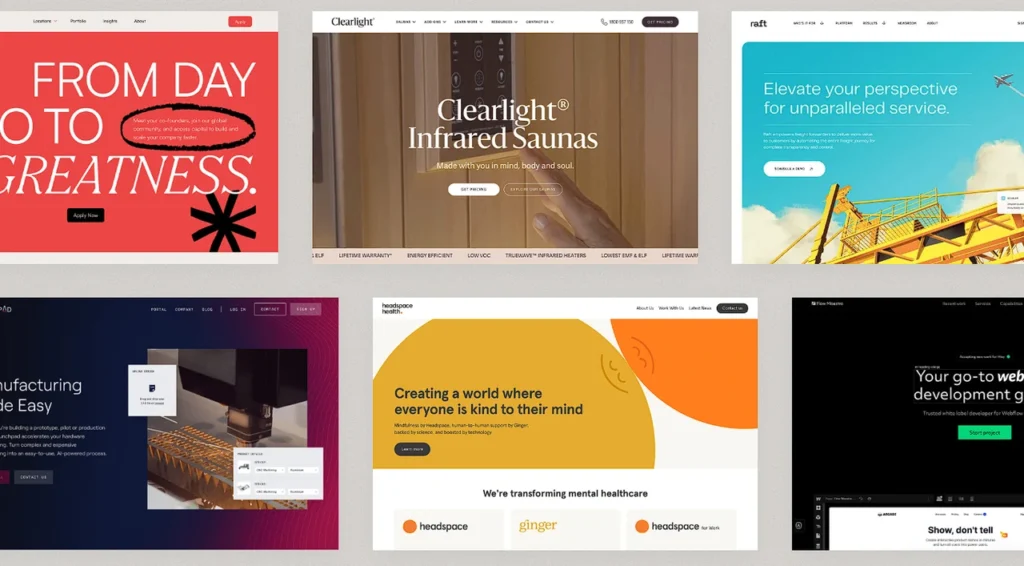
Relume AI automatically converts website planning into visual wireframes.
Once the sitemap has been generated, artificial intelligence creates page layouts containing navigation menus, hero sections, content blocks, testimonials, pricing tables, contact forms, and calls to action.
Rather than beginning with a blank canvas, designers receive professionally structured page layouts that can be customised according to branding guidelines and project objectives.
Although AI creates the initial design, every section remains editable, allowing designers to maintain full creative control throughout the project.
Is Relume AI Easy to Use?
Ease of use is one of Relume’s strongest advantages. The platform has been designed to simplify website planning while reducing repetitive design work.
The interface is clean, organised, and easy to navigate, making it suitable for experienced designers as well as beginners exploring AI-assisted website planning.
Step 1: Create a Relume Account
Register for a Relume account and access the dashboard. Users can immediately begin creating new website projects using the AI planning tools.
Step 2: Describe Your Website
Enter a short description of your business, website purpose, services, or project requirements. The AI analyses this information before generating an organised sitemap.
Step 3: Generate the Sitemap
Review the AI-generated website structure. Users can add pages, rename sections, reorganise navigation, or customise the hierarchy according to project needs.
Step 4: Generate Wireframes
Transform the approved sitemap into complete website wireframes. The AI automatically builds professional page layouts using reusable design components.
Step 5: Edit the Layout
Modify page sections, replace components, rearrange layouts, and customise the overall structure using the visual editor before exporting the project.
Step 6: Export to Figma or Webflow
Once the design structure is complete, export the project directly into Figma or Webflow for detailed visual design, branding, responsive adjustments, and website development.
Component Library and Design Customisation
Relume AI includes one of the largest component libraries available for AI-assisted website planning. These professionally designed sections help designers build complete websites quickly while maintaining consistency across every page.
Popular component categories include:
- Hero sections
- Navigation menus
- Pricing tables
- Testimonials
- Contact forms
- Feature sections
- Call-to-action blocks
- Team profiles
- FAQs
- Blog layouts
- Portfolio sections
- Footer designs
Every component supports extensive customisation. Designers can modify layouts, typography, colours, spacing, content, buttons, imagery, and section arrangements before exporting the project.
The combination of AI-generated sitemaps, intelligent wireframes, reusable components, and flexible editing tools enables designers to create professional website structures far more efficiently than traditional manual workflows.
Figma and Webflow Integration
One of Relume AI’s greatest strengths is its seamless integration with professional design tools.
Designers working in Figma can export AI-generated wireframes directly into editable Figma files for detailed UI design and branding.
Webflow developers can transfer website structures into Webflow, where layouts can be transformed into fully responsive websites ready for publishing.
These integrations eliminate repetitive design work while preserving the flexibility required for professional web design projects. As a result, agencies, freelancers, and design teams can significantly reduce project timelines without sacrificing design quality.
SEO Benefits
Although Relume AI is primarily a website planning and wireframing platform rather than a traditional website builder, it can still contribute to better search engine optimisation. Well-organised website structures and logical page hierarchies improve user experience, making it easier for search engines to crawl and understand website content.
Better Website Structure
Relume AI generates organised sitemaps that help designers create logical navigation. Well-structured websites improve visitor experience and support efficient search engine crawling.
Improved User Experience
Clear navigation, consistent layouts, and properly organised page structures make websites easier to use. Better user experience often leads to longer visitor sessions and lower bounce rates.
Mobile-First Planning
Responsive layouts are considered during the planning stage, helping designers prepare websites that perform well across desktops, tablets, and smartphones.
Faster Design Workflow
Artificial intelligence reduces planning time, allowing teams to spend more time improving website content, branding, accessibility, and SEO rather than creating wireframes manually.
Content Organisation
The AI-generated sitemap encourages better organisation of service pages, landing pages, blog sections, and navigation menus, helping businesses plan websites that support long-term content growth.
Performance and Workflow

One of the biggest strengths of Relume AI is its ability to accelerate the website planning process. Instead of starting with blank documents or manually building navigation structures, users receive professionally organised website frameworks within minutes.
The cloud-based platform enables teams to collaborate from different locations while maintaining a centralised project workspace. Designers, developers, content writers, and clients can review sitemaps and wireframes together before moving into detailed design or development.
By reducing repetitive planning work, Relume AI allows creative teams to focus more on branding, usability, content strategy, and customer experience.
Pricing and Plans
Relume AI offers pricing plans designed for freelancers, startups, agencies, and larger design teams. Users can explore the platform before upgrading to premium plans that unlock additional AI capabilities and collaboration features.
Premium plans generally include:
- AI Sitemap Generator
- AI Wireframe Generator
- Unlimited projects
- Component library access
- Figma export
- Webflow export
- Team collaboration
- Advanced editing tools
- Priority customer support
- Additional AI generations
The pricing remains competitive for agencies and designers seeking to reduce planning time while improving workflow efficiency.
Advantages of Relume AI
Relume AI provides several strengths that make it one of the leading AI-powered website planning platforms available today.
AI Sitemap Generation
The AI automatically creates organised website structures from simple project descriptions. This significantly reduces planning time while helping teams build logical navigation that supports both user experience and future content growth.
AI Wireframe Creation
Relume generates complete wireframes for websites in minutes. Designers receive professionally structured page layouts that serve as an excellent starting point for further visual design and branding.
Extensive Component Library
Hundreds of professionally designed website components help users build complete websites efficiently. Reusable sections improve consistency while reducing repetitive design work across projects.
Figma Integration
Direct export to Figma allows designers to continue refining layouts using one of the industry’s most popular UI design tools. This integration fits naturally into existing professional workflows.
Webflow Integration
Webflow developers can export website structures directly into Webflow, reducing development time while preserving responsive layouts and organised page structures.
Team Collaboration
Designers, developers, content writers, clients, and project managers can collaborate throughout the planning stage. Shared workspaces improve communication and reduce misunderstandings before development begins.
Beginner-Friendly Workflow
Although designed for professionals, Relume AI remains easy to learn. The clean interface, AI assistance, and visual editing tools allow new users to become productive quickly.
Disadvantages of Relume AI
Despite its many advantages, Relume AI also has several limitations that potential users should consider.
Not a Complete Website Builder
Relume focuses on planning, wireframing, and website structure rather than publishing complete websites. Users still require platforms such as Webflow or Figma to complete the design and development process.
Limited Visual Design Features
The platform excels at website planning but offers fewer advanced visual design capabilities than dedicated UI design software such as Figma.
Premium Features Require Paid Plans
Many advanced AI features, collaboration tools, and export capabilities are available only through premium subscriptions, increasing costs for larger teams.
Smaller Integration Ecosystem
Although Figma and Webflow integration is excellent, the platform currently supports fewer third-party integrations than some larger website design ecosystems.
Relume AI vs Figma
Relume AI and Figma are complementary tools rather than direct competitors.
Relume specialises in AI-generated sitemaps, wireframes, website planning, and reusable website components. It dramatically speeds up the early planning stages of website projects.
Figma focuses on detailed UI design, branding, interface precision, interactive prototyping, and collaborative visual design. Professional designers typically use Relume to begin projects before refining them inside Figma.
Relume AI vs Uizard
Both Relume AI and Uizard use artificial intelligence to simplify website design, but they target different stages of the design process.
Relume focuses primarily on website planning, sitemaps, wireframes, reusable components, and Webflow workflows.
Uizard specialises in UI generation, application design, wireframes, prototypes, and interface creation. Product designers building mobile applications and software interfaces may find Uizard more suitable, while web agencies often prefer Relume for website planning.
Who Should Use Relume AI?
Relume AI is an excellent solution for professionals seeking to accelerate website planning through artificial intelligence.
It is particularly suitable for:
- Web designers
- UX designers
- UI designers
- Webflow developers
- Design agencies
- Startup founders
- SaaS companies
- Freelancers
- Product teams
- Marketing agencies
- Consultants
- Digital studios
These users benefit from AI-generated planning, reusable components, collaborative workflows, and seamless integration with professional design tools.
Who Should Avoid Relume AI?

Although Relume AI is highly effective for website planning, it may not suit every type of user.
It may be less suitable for:
- Beginners wanting complete website publishing
- Businesses seeking all-in-one website builders
- Graphic designers creating marketing materials
- Developers expecting production-ready code
- Ecommerce businesses requiring complete online store functionality
- Users needing integrated hosting services
These users may prefer traditional website builders that combine design, hosting, ecommerce, and publishing within a single platform.
Customer Support
Relume AI provides several support resources to help users learn the platform and resolve technical questions efficiently.
Support options generally include:
- Help Centre
- Documentation
- Video tutorials
- Community resources
- Email support
- Premium customer assistance
These resources enable both beginners and experienced professionals to become productive quickly while improving their design workflows.
Security
Relume AI uses cloud-based infrastructure designed to protect user projects and collaborative workspaces.
Security features generally include:
- Secure cloud storage
- User authentication
- Encrypted data transfer
- Reliable infrastructure
- Regular platform updates
- Workspace management
These features help protect website planning projects while supporting secure collaboration across distributed design teams.
Final Verdict:
This Relume AI Website Builder Review demonstrates that Relume is one of the most effective AI-powered platforms for website planning, sitemap generation, and wireframe creation. Its AI-generated website structures, extensive component library, intuitive workflow, and seamless integration with Figma and Webflow allow designers to complete projects significantly faster than traditional planning methods.
Although it is not a complete website builder and requires additional tools for final design and development, Relume excels at simplifying the early stages of web design. Agencies, freelancers, Webflow developers, startups, and UX professionals can all benefit from its AI-powered planning capabilities.
Overall, Relume AI is an excellent investment for web designers who want to accelerate project planning, improve collaboration, and create professional website structures with greater efficiency.
Must Read:
- Uizard UI Design Review: Is It Good for Modern Web Design?
- Hocoos AI Website Builder Review: Best Choice for Startups?
- Readdy AI Website Builder Review: Can It Grow Your Business?
FAQs:
Is Relume AI suitable for beginners?
Yes. Relume AI has a clean and intuitive interface that allows beginners to generate website sitemaps and wireframes easily, although users may benefit from some basic understanding of website design concepts.
Can Relume AI build a complete website?
No. Relume AI focuses on website planning, sitemaps, wireframes, and reusable components. Users typically export projects to Figma or Webflow for detailed design, development, and website publishing.
Does Relume AI integrate with Figma?
Yes. One of Relume AI’s strongest features is its direct Figma integration, allowing designers to continue refining AI-generated wireframes within a professional UI design environment.
Is Relume AI good for Webflow?
Yes. Relume AI integrates seamlessly with Webflow, enabling developers to export website structures directly into Webflow and accelerate responsive website development.
Is Relume AI worth using for web designers?
Yes. Relume AI provides excellent value for web designers by reducing website planning time, generating professional sitemaps and wireframes, improving collaboration, and integrating smoothly with industry-standard design tools such as Figma and Webflow.