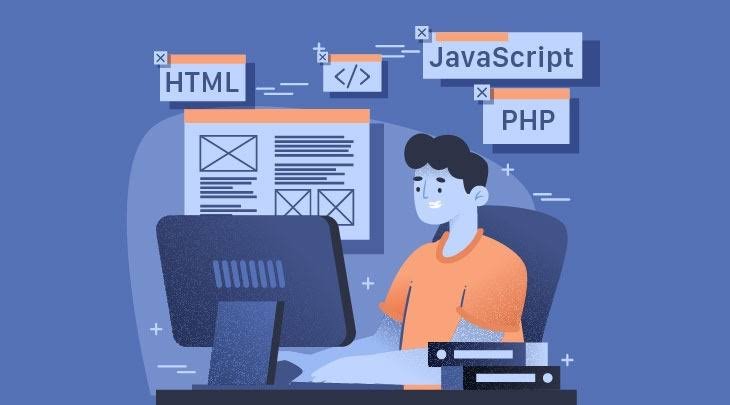
Building a website from scratch is easier than ever because artificial intelligence can help with coding, design, debugging, and website development. In the past, creating a professional website required a strong understanding of HTML, CSS, JavaScript, and several web development tools. Today, AI coding assistants can help beginners and experienced developers complete these tasks more efficiently.
If you want to learn HTML, CSS, and JavaScript and build a website from scratch with AI, you can use AI tools to generate website layouts, write code, create responsive designs, add interactive features, and identify errors. You do not need to understand every programming concept before starting your first project. However, learning the fundamentals will help you customize your website and maintain it over time.
HTML provides the structure of a website, CSS controls its appearance, and JavaScript adds interactive functionality. When these three technologies work together, you can create landing pages, business websites, portfolios, blogs, product pages, and many other types of websites.
AI tools such as ChatGPT, GitHub Copilot, Cursor, and Google Gemini can assist throughout the development process. You can describe your website idea in plain English, request the code, test the results, and improve the design through follow-up instructions.
In this guide, you will learn how to build a website from scratch with AI, understand the role of HTML, CSS, and JavaScript, choose suitable AI coding tools, create a working website, and prepare it for publication.
What Are HTML, CSS, and JavaScript?
Before using AI to create a website, it is important to understand the three main technologies used in front-end web development. Each technology performs a different role, and together they form the foundation of most interactive websites.
HTML: The Structure of a Website
HTML stands for HyperText Markup Language. It defines the structure and content of a web page, including headings, paragraphs, images, links, navigation menus, forms, and buttons.
For example, when you open a business website, HTML determines which text appears as a heading, where the service descriptions are displayed, and which links visitors can click.
A simple HTML element looks like this:
<h2>Welcome to My Website</h2>
<p>Learn how to build websites with AI.</p>
<a href="services.html">View Our Services</a>
AI coding tools can generate HTML structures based on your requirements. You can ask an assistant to create a navigation menu, a contact form, a product listing, or a complete landing page structure.
However, generated HTML should use meaningful elements and a logical heading hierarchy. Good HTML improves accessibility, makes the code easier to maintain, and helps search engines understand the content.
CSS: The Design and Appearance
CSS stands for Cascading Style Sheets. It controls how HTML elements look on a screen.
With CSS, you can change colors, fonts, spacing, backgrounds, borders, layouts, and animations. It also allows you to create responsive designs that adapt to different screen sizes.
For example, you can use CSS to create a professional navigation bar, a colorful call-to-action button, or a grid of product cards.
body {
    font-family: Arial, sans-serif;
    margin: 0;
    color: #222;
    background: #f7f9fc;
}

h2 {
    color: #2563eb;
}

a {
    display: inline-block;
    padding: 10px 16px;
    background: #2563eb;
    color: white;
    text-decoration: none;
    border-radius: 6px;
}
AI can help generate CSS styles that match your preferred design. You can request a minimal layout, a modern business theme, a dark interface, or a mobile-friendly website.
JavaScript: The Interactive Features
JavaScript adds behavior to a website. It allows users to interact with page elements without requiring every action to load a completely new page.
JavaScript can control navigation menus, form validation, tabs, accordions, sliders, interactive calculators, and other dynamic features.
For example, the following JavaScript displays a message when a visitor clicks a button:
document.querySelector("#myButton")
    .addEventListener("click", function () {
        alert("Welcome to my website!");
    });
AI tools can help generate JavaScript functionality and explain how different events work. They can also help troubleshoot errors that prevent interactive elements from working correctly.
When you combine HTML, CSS, and JavaScript, you have the essential tools required to build many types of front-end websites from scratch with AI.
Best AI Tools for Building a Website From Scratch

Choosing the right AI tool can make website development easier. Some tools are designed for conversational coding assistance, while others integrate directly into code editors or provide browser-based development environments.
1. ChatGPT
ChatGPT is useful for generating HTML, CSS, and JavaScript code from natural-language instructions. You can describe a website idea, request a complete page structure, and ask for improvements as you develop the project.
For example, you can ask ChatGPT to create a responsive landing page for a digital marketing agency with a navigation menu, service cards, testimonials, and a contact section.
ChatGPT can also explain code, troubleshoot JavaScript errors, improve accessibility, and help you understand how different website components work together.
Best for: Beginners, website planning, code generation, debugging, and learning front-end development.
2. GitHub Copilot
GitHub Copilot helps developers write and complete code inside supported development environments. It can suggest HTML elements, CSS rules, and JavaScript functions while you work.
It is particularly useful when you already have a project and want to add features or improve existing code. You can use it to generate reusable components, write form validation, and complete repetitive programming tasks.
Best for: Developers who want AI assistance directly inside their code editor.
3. Cursor
Cursor is an AI-focused code editor that helps developers create and modify code with project context. It can assist with editing multiple files, understanding existing website structures, and implementing features across HTML, CSS, and JavaScript.
For example, you can ask Cursor to update the design of your navigation bar, improve mobile responsiveness, and modify related styles without manually searching through every line.
Best for: Developers building websites with multiple files and components.
4. Google Gemini
Google Gemini can generate website code, explain front-end concepts, and help troubleshoot common development problems.
You can ask Gemini to create a basic portfolio website, improve CSS spacing, add JavaScript interactions, or explain why a layout does not work properly on mobile devices.
Best for: Beginners and developers who want conversational coding assistance.
5. Replit
Replit offers a browser-based coding environment with AI-assisted development features. It can be useful if you want to experiment with HTML, CSS, and JavaScript without setting up a complete local development environment.
You can create small projects, run code, test changes, and build prototypes within a supported online workspace.
Best for: Beginners who want to experiment with website development in a browser.
The features, usage limits, and pricing of these tools may change, so review the current plans before selecting a tool for a long-term project.
How to Build a Website From Scratch With AI
Building a website with AI becomes easier when you follow a structured process. Instead of asking an AI assistant to create everything at once, divide the project into manageable steps.
Step 1: Define Your Website Idea
Start by deciding what type of website you want to create. Your goal will influence the layout, features, content, and technologies required.
Common website ideas include:
- Personal portfolio websites.
- Business and agency websites.
- Affiliate marketing websites.
- Blogs and content websites.
- Online product catalogs.
- Landing pages for marketing campaigns.
- Educational websites.
- Service-based websites.
For example, if you want to create a website for a digital marketing agency, you may need a homepage, services section, about page, case studies, contact form, and call-to-action buttons.
A clear project description helps AI generate more relevant results.
You can use the following prompt:
“Help me plan a responsive website for a digital marketing agency. Include a homepage, services section, about section, testimonials, contact form, and footer. Use HTML, CSS, and vanilla JavaScript. Suggest a clean design, accessible colors, and a mobile-friendly layout.”
Review the proposed structure before generating the code.
Step 2: Generate the HTML Structure With AI
Once you have planned your website, ask your AI assistant to create the HTML file.
A basic project can use three files:
my-website/
├── index.html
├── style.css
└── script.js
The index.html file contains the website structure, style.css controls its appearance, and script.js handles interactive features.
Keeping these files separate makes the website easier to understand and maintain.
Ask AI to generate semantic HTML elements such as header, nav, main, section, and footer. These elements help organize content and improve accessibility.
You can also request meaningful page titles, meta descriptions, image alternative text, and a logical heading structure.
After generating the HTML, inspect the code to confirm that the links, element IDs, and class names are consistent with the CSS and JavaScript files.
Step 3: Design the Website With CSS
The next step is to use AI to create a consistent visual design.
Tell your coding assistant which colors, fonts, spacing, and layout style you prefer. For example, a business website might use a white background, dark text, blue buttons, and a spacious layout.
Ask AI to include responsive CSS so the website works on desktop computers, tablets, and smartphones.
A simple responsive rule looks like this:
.container {
    width: min(1100px, 92%);
    margin-inline: auto;
}

@media (max-width: 600px) {
    .container {
        width: 94%;
    }
}
This example limits the content width on larger screens while allowing it to fit smaller screens.
You can also ask AI to improve navigation spacing, align service cards, create consistent buttons, and reduce unnecessary visual elements.
Test the design at several screen sizes. AI-generated CSS may require adjustments when text becomes longer, images have different dimensions, or navigation items do not fit on smaller screens.
Step 4: Add JavaScript Functionality
Once the HTML structure and CSS design are ready, identify the features that require JavaScript.
A simple business website might need a mobile navigation menu, a testimonial slider, a frequently asked questions accordion, and basic contact form validation.
You can ask AI to implement each feature separately. This approach makes debugging easier because you can test one interaction at a time.
For example, the following code toggles a mobile navigation menu:
<button id="menuButton"
        aria-expanded="false"
        aria-controls="siteMenu">
    Menu
</button>

<nav id="siteMenu" hidden>
    <a href="#home">Home</a>
    <a href="#services">Services</a>
    <a href="#contact">Contact</a>
</nav>

<script>
const menuButton = document.querySelector("#menuButton");
const siteMenu = document.querySelector("#siteMenu");

menuButton.addEventListener("click", () => {
    const isOpen = menuButton.getAttribute("aria-expanded")
        === "true";

    menuButton.setAttribute("aria-expanded", String(!isOpen));
    siteMenu.hidden = isOpen;
});
</script>
This example provides a basic working menu. You can ask AI to improve the styling and behavior, including closing the menu after a link is selected.
For larger projects, keep JavaScript in a separate script.js file rather than placing all functionality inside the HTML document.
Step 5: Connect HTML, CSS, and JavaScript
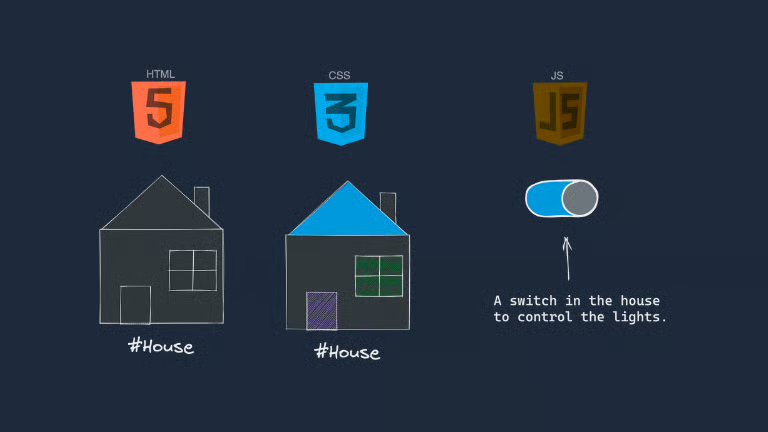
The three technologies must be connected correctly for the website to work.
Your HTML file should link to the CSS stylesheet in the document’s <head> section and load the JavaScript file near the end of the body or with an appropriate script attribute.
For example:
<link rel="stylesheet" href="style.css">
<script src="script.js" defer></script>
The href and src values must match the actual file names and paths in your project.
If a CSS rule does not apply or a button fails to respond, ask AI to check the file paths, selectors, element IDs, browser console errors, and JavaScript event handlers.
Providing the exact error message and the relevant code will usually produce a more useful debugging response than asking the assistant to fix the entire website without context.
Step 6: Test and Improve the Website
Testing is an important part of building a website from scratch with AI. A page may look correct in a code editor but still contain broken links, layout problems, or JavaScript errors.
Open the website in a browser and check every major section.
Test the following elements:
- Navigation links.
- Buttons and call-to-action elements.
- Forms and validation messages.
- Images and other media.
- Mobile and tablet layouts.
- Text readability and contrast.
- Browser console errors.
- Keyboard navigation.
- Page loading performance.
AI tools can help troubleshoot problems when you describe the issue clearly.
For example, you could ask: “My website navigation works on desktop but overlaps the content on mobile screens. Review the following HTML and CSS and suggest the smallest reliable fix.”
Make one change at a time and retest the affected section. This reduces the chance of introducing new problems while fixing existing ones.
Complete Example: Build a Simple Website With HTML, CSS, and JavaScript
The following example demonstrates how the three technologies work together to create a basic responsive website. You can ask an AI coding assistant to customize the content, colors, and layout for your own project.
Create a folder called my-website and add the following three files.
HTML File: index.html
<!DOCTYPE html>
<html lang="en">
<head>
<meta charset="UTF-8">
<meta name="viewport" content="width=device-width, initial-scale=1.0">
<meta name="description"
content="Learn how to build a simple website with HTML, CSS, JavaScript, and AI.">
<title>My Website | Build With AI</title>
<link rel="stylesheet" href="style.css">
<script src="script.js" defer></script>
</head>
<body>
<header class="header">
<div class="container navigation">
<a class="logo" href="#home">MyWebsite</a>
<nav aria-label="Main navigation">
<a href="#home">Home</a>
<a href="#services">Services</a>
<a href="#contact">Contact</a>
</nav>
</div>
</header>
<main>
<section class="hero container" id="home">
<h1>Build Your Website With AI</h1>
<p>
Create modern websites using HTML, CSS, JavaScript,
and AI-powered coding assistance.
</p>
<a class="button" href="#services">Explore Services</a>
</section>
<section class="services container" id="services">
<h2>Our Services</h2>
<div class="cards">
<article class="card">
<h3>Web Design</h3>
<p>Create clean and responsive website layouts.</p>
</article>
<article class="card">
<h3>Web Development</h3>
<p>Build interactive websites with modern code.</p>
</article>
<article class="card">
<h3>AI Assistance</h3>
<p>Use AI tools to improve your development workflow.</p>
</article>
</div>
</section>
<section class="contact container" id="contact">
<h2>Get in Touch</h2>
<p>Have a project idea? Start planning your website today.</p>
<button class="button" id="contactButton">
Contact Us
</button>
<p id="message" role="status" aria-live="polite"></p>
</section>
</main>
<footer class="footer">
<p>© 2026 MyWebsite. All rights reserved.</p>
</footer>
</body>
</html>CSS File: style.css
* {
    box-sizing: border-box;
}

html {
    scroll-behavior: smooth;
}

body {
    margin: 0;
    font-family: Arial, sans-serif;
    color: #1f2937;
    line-height: 1.6;
    background: #f8fafc;
}

.container {
    width: min(1100px, 92%);
    margin: 0 auto;
}

.header {
    background: #ffffff;
    border-bottom: 1px solid #e5e7eb;
}

.navigation {
    display: flex;
    justify-content: space-between;
    align-items: center;
    gap: 20px;
    padding: 18px 0;
}

.logo {
    color: #2563eb;
    font-size: 1.3rem;
    font-weight: 700;
    text-decoration: none;
}

nav {
    display: flex;
    flex-wrap: wrap;
    gap: 18px;
}

nav a {
    color: #374151;
    text-decoration: none;
}

.hero {
    padding-top: 90px;
    padding-bottom: 90px;
    text-align: center;
}

.hero h1 {
    font-size: clamp(2rem, 5vw, 3.5rem);
    line-height: 1.15;
}

.hero p {
    max-width: 650px;
    margin: 20px auto 28px;
}

.button {
    display: inline-block;
    padding: 12px 22px;
    border: 0;
    border-radius: 7px;
    background: #2563eb;
    color: #ffffff;
    font: inherit;
    text-decoration: none;
    cursor: pointer;
}

.services,
.contact {
    padding-top: 45px;
    padding-bottom: 55px;
}

.services h2,
.contact h2 {
    text-align: center;
}

.cards {
    display: grid;
    grid-template-columns: repeat(3, minmax(0, 1fr));
    gap: 20px;
}

.card {
    padding: 24px;
    border: 1px solid #e5e7eb;
    border-radius: 12px;
    background: #ffffff;
}

.contact {
    text-align: center;
}

.footer {
    padding: 22px;
    text-align: center;
    background: #111827;
    color: #ffffff;
}

@media (max-width: 650px) {
    .navigation {
        align-items: flex-start;
        flex-direction: column;
    }

    .cards {
        grid-template-columns: 1fr;
    }

    .hero {
        padding-top: 55px;
        padding-bottom: 55px;
    }
}
JavaScript File: script.js
const contactButton = document.querySelector("#contactButton");
const message = document.querySelector("#message");

contactButton.addEventListener("click", () => {
    message.textContent =
        "Thanks for your interest! Add your contact form to continue.";
});
How to Run the Website
Save the three files in the same folder. Open index.html in a modern web browser to view the website.
You should see a navigation bar, a hero section, three service cards, and a contact section. The JavaScript code displays a message when the contact button is clicked.
This is a front-end demonstration rather than a complete business website. The contact button does not send an email or store user information. To collect actual enquiries, you would need a properly implemented form connected to a backend service or a trusted form provider.
You can now use AI to customize the project with your brand name, business content, preferred colors, additional pages, and other features. Test every change before publishing the website.
How to Make an AI-Built Website SEO-Friendly

Creating a website is only the first step. If you want visitors to find your pages through search engines, you should follow basic SEO practices during development.
Write Clear Page Titles and Meta Descriptions
Every important page should have a unique title and a useful meta description. These elements help describe the page to search engines and potential visitors.
For example, a page about website development might use a title such as “Website Development Services for Small Businesses.”
Ask AI to suggest relevant titles and descriptions based on the page’s actual content. Review them for accuracy and avoid repeating the same keywords unnaturally.
Use a Logical Heading Structure
Organize content with clear headings and subheadings. Use one descriptive H1 heading for the main page title, H2 headings for major sections, and H3 headings for related subsections where appropriate.
A logical structure improves readability and helps visitors understand the content.
Optimize Images
Compress images to reduce file sizes and improve loading speed. Use descriptive file names and meaningful alternative text when an image communicates useful information.
Avoid adding unnecessary images that slow down the page without improving the user experience.
Make the Website Mobile-Friendly
Responsive design is essential because visitors use different screen sizes. Test menus, forms, buttons, text, and layouts on both desktop and mobile devices.
AI can suggest responsive CSS, but real browser testing is still necessary.
Improve Loading Performance
Use optimized images, remove unnecessary scripts, minimize excessive dependencies, and avoid loading resources that the page does not need.
Tools such as browser developer tools and website performance testing services can help identify problems.
Publish Useful and Original Content
A technically sound website still needs useful content that satisfies the visitor’s intent. Use AI to help organize ideas, improve clarity, and identify missing information, but review the final content for originality, accuracy, and genuine value.
SEO performance depends on many factors, including content quality, usability, technical accessibility, and competition. Using AI does not guarantee higher search rankings.
How to Deploy Your AI-Built Website
After building and testing your website, the next step is making it accessible online. The right hosting option depends on whether your project is a static website or requires a backend.
Free Hosting Options
For a basic website built with HTML, CSS, and JavaScript, static hosting platforms can provide a straightforward way to publish your project.
Options include GitHub Pages, Cloudflare Pages, and Netlify. Each platform has its own configuration process, limitations, and deployment features.
You can generally upload your files through a supported workflow or connect a Git repository. Some platforms also support automatic deployment when you update your code.
Custom Domain Setup
A custom domain gives your website a professional address. You can register a domain through a domain registrar and connect it to your hosting provider by following the provider’s DNS instructions.
After connecting the domain, verify that the website loads correctly and that HTTPS is configured.
When You Need Backend Hosting
A static website is sufficient for many landing pages, portfolios, and informational websites. However, features such as user accounts, database storage, private dashboards, and server-side processing generally require a backend or a suitable third-party service.
For example, a JavaScript contact form alone does not securely process and deliver messages to a business email address. You need a server-side endpoint or a trusted form service to handle submissions.
Choose your hosting setup according to the website’s actual requirements rather than adding unnecessary technologies.
Common Mistakes to Avoid When Building Websites With AI
AI can speed up website development, but it does not guarantee a perfect result. Avoiding common mistakes can save time and prevent problems after publication.
Generating the entire website without reviewing the code: Large code outputs may include unnecessary elements, broken links, or inconsistent styling. Build and test the website in stages.
Ignoring responsive design: A website that looks good on a desktop may be difficult to use on a mobile phone. Test several screen sizes.
Using too many animations: Excessive animation can distract visitors and affect performance. Use effects only when they support the user experience.
Forgetting accessibility: Use meaningful HTML elements, visible keyboard focus, readable contrast, and appropriate labels for forms and controls.
Publishing untested JavaScript: A single error can prevent interactive features from working. Check the browser console and test all buttons and links.
Exposing private information: Never publish passwords, API keys, or private customer information in website code. Public front-end JavaScript cannot securely hide secret credentials.
Ignoring website maintenance: Review dependencies, update content, test forms, and check for broken links after deployment.
FAQs:
Can I build a website from scratch with AI without coding experience?
Yes. AI tools can generate HTML, CSS, and JavaScript from natural-language instructions. Beginners can start with a simple landing page and learn the fundamentals while customizing the code. Understanding basic programming concepts will make it easier to troubleshoot errors and maintain the website.
Which AI tool is best for building a website?
ChatGPT and Gemini are useful for conversational coding assistance. GitHub Copilot can help with code completion, while Cursor is designed for AI-assisted editing across project files. Replit provides a browser-based coding environment. The best option depends on your preferred workflow and project requirements.
Can AI generate HTML, CSS, and JavaScript together?
Yes. AI coding assistants can generate all three technologies for a website. You should check that the HTML references the correct stylesheet, the JavaScript targets the correct elements, and the final website behaves as expected.
Can I build a website for free with AI?
Yes. You can use an AI tool with free access, write the website using HTML, CSS, and JavaScript, and publish a basic static site through a suitable free hosting service. Some tools and platforms impose usage limits, and custom domains or advanced features may cost money.
How long does it take to build a website with AI?
A basic landing page may take a few hours to create and test, while a larger website can require considerably more time. The timeline depends on the design, content, functionality, integrations, and testing requirements.
Do I need JavaScript for every website?
No. A simple informational website can work with HTML and CSS alone. JavaScript is useful when you need interactive features such as menus, dynamic content, form validation, or calculators.
Is AI-generated website code safe to use?
AI-generated code should be reviewed before publication. Check for broken functionality, insecure data handling, unnecessary dependencies, and exposed credentials. Test the website in a controlled environment before deploying it publicly.
Must Read:
- Best AI Tools for Python Programming and Automation
- How to Deploy an AI-Built Website for Free?
- AI-Generated Code vs Human-Written Code
Conclusion:
Building a website from scratch with AI is a practical way to learn web development and create useful online projects. HTML provides the structure, CSS controls the appearance, and JavaScript adds interactive functionality. AI coding assistants can help you generate these elements, troubleshoot errors, and improve the website step by step.
Start by defining your website’s purpose and planning its main sections. Generate the HTML structure, style the page with responsive CSS, and add JavaScript only where it improves functionality. Test the finished website, optimize it for search engines, and publish it using a hosting platform that matches your requirements.
You do not need to master every programming concept before building your first website. However, understanding the generated code will help you make better decisions, fix problems, and maintain your project over time.
With the right AI tools, a clear plan, and careful testing, you can create a responsive, SEO-friendly website that looks professional and provides a useful experience for visitors.