Learning how to build an e-commerce website with AI has become much easier as artificial intelligence tools can now assist with website design, content creation, product descriptions, images, coding, SEO, customer support, and marketing. Instead of building every part of an online store manually, business owners can use AI to automate repetitive tasks and create a professional shopping experience in less time.
An AI-powered e-commerce website can help businesses sell physical products, digital products, subscriptions, services, and customized items online. AI website builders can generate layouts from simple prompts, while other AI tools can help create product pages, write marketing copy, organize categories, improve images, and analyze customer behavior.
However, building an e-commerce website with AI is not simply about asking an AI tool to create a store and publishing the result. A successful online store needs a clear business model, reliable payment processing, secure checkout, mobile-friendly design, useful product information, search engine optimization, and a smooth customer journey.
This guide explains how to build an e-commerce website with AI step by step, from choosing your business idea and platform to adding products, setting up payments, optimizing your store, and launching it.
Why Build an E-commerce Website With AI?
The main advantage of learning how to build an e-commerce website with AI is speed. Traditional ecommerce development can require designers, developers, copywriters, SEO specialists, and marketing professionals. AI can assist with many of these tasks from one workflow.
AI can generate a starting website structure based on your business description. For example, you can tell an AI website builder that you want an online fashion store with product categories, product filters, customer reviews, a shopping cart, checkout, and a responsive mobile design.
The tool may then generate the basic structure that you can customize.
AI can also help with tasks that often take considerable time. Product descriptions can be drafted automatically, images can be improved, marketing emails can be created, and SEO ideas can be generated quickly.
Another benefit is accessibility. Small businesses and entrepreneurs can start building an online store without having extensive technical knowledge. While technical expertise remains valuable for advanced ecommerce projects, AI reduces the amount of manual work required for basic website creation.
Step 1: Define Your E-commerce Business Idea
Before using AI to build your online store, define what you are going to sell. This is one of the most important steps because AI can create the website, but it cannot decide whether your business model is suitable for your target customers.
Start by identifying your product category. You might sell clothing, home decor, electronics, beauty products, health-related products, digital downloads, accessories, or handmade products.
Next, identify your target audience. Consider their age range, location, purchasing habits, problems, preferences, and price expectations.
You should also define your unique selling proposition. Ask yourself why customers should purchase from your store instead of another ecommerce website.
Once you have this information, AI can help organize your ideas into a clear ecommerce strategy.
For example, you can provide AI with information about your products and ask it to create a customer persona, product category structure, homepage sections, content ideas, and marketing angles.
The clearer your business information is, the more useful AI-generated recommendations are likely to be.
Step 2: Choose an AI E-commerce Website Builder
The next step in learning how to build an e-commerce website with AI is choosing the right platform.
AI ecommerce website builders vary significantly in their capabilities. Some focus on generating website designs, while others provide complete ecommerce functionality, including product management, payments, inventory, shipping, and order management.
When evaluating an AI ecommerce platform, consider the following features:
- AI website generation
- Product management
- Shopping cart functionality
- Secure checkout
- Payment gateway integration
- Inventory management
- Shipping options
- Mobile-responsive design
- SEO controls
- Analytics
- Marketing integrations
- Customer accounts
- Discount codes
- Product search and filtering
- Custom domain support
Your choice should depend on the size and requirements of your store.
A small online shop may only need basic ecommerce features. A larger store may require advanced inventory management, multiple payment methods, customer accounts, automation, analytics, and third-party integrations.
Step 3: Create Your Website With an AI Prompt

One of the easiest ways to build an e-commerce website with AI is through natural-language prompts.
Instead of manually creating every section, describe the website you want.
For example, your prompt could be:
“Create a modern ecommerce website for a home decor brand selling cushion covers, rugs, wall decor, and decorative accessories. Use a clean and elegant design with a mobile-friendly layout. Include a hero section, product categories, featured products, customer reviews, promotional banner, best-selling products, FAQ section, newsletter signup, and footer.”
An AI website builder can use this information to create an initial website structure.
You can improve the result by providing additional instructions. Mention your preferred design style, brand colors, typography, target customers, product categories, and desired calls to action.
AI-generated designs should be treated as a starting point. After generation, review every section and customize the website according to your brand.
Step 4: Design a Professional Homepage
Your ecommerce homepage is often the first major interaction customers have with your business.
When you build an e-commerce website with AI, use AI to create a homepage structure that clearly communicates what you sell.
A strong ecommerce homepage can include:
Hero Section
The hero section should immediately explain your product or value proposition. Include a clear headline, supporting text, product image, and call-to-action button.
Instead of generic text, focus on the customer’s benefit.
For example, an online furniture store could use a headline such as “Modern Furniture Designed for Comfortable Living.”
Product Categories
Make it easy for visitors to find the products they want. Display important categories using images or product cards.
Featured Products
Show selected products that you want customers to consider. Include product images, names, prices, ratings, and relevant promotional information.
Best Sellers
Displaying popular products can help visitors understand which products other customers are purchasing.
Customer Reviews
Reviews can provide social proof and help shoppers feel more comfortable purchasing from an unfamiliar store.
Promotional Sections
If you offer discounts, seasonal products, bundles, or free shipping, highlight these offers in appropriate sections.
Newsletter Signup
An email signup can help you build a customer audience and communicate future promotions, product launches, and useful content.
AI can help generate the initial copy for each section, but you should edit it so that it sounds authentic to your brand.
Step 5: Add Products Using AI
Product pages are one of the most important parts of an ecommerce website.
When you build an e-commerce website with AI, you can use AI to accelerate product page creation.
Provide the AI tool with basic product information such as:
- Product name
- Materials
- Size
- Color
- Features
- Benefits
- Price
- Target customer
- Product use
- Care instructions
- Warranty information
AI can then generate a draft product description.
For example, if you sell a cotton cushion cover, AI can create a product description explaining its fabric, design, size, usage, styling possibilities, and care instructions.
Always verify AI-generated product information before publishing it. AI should not invent specifications, materials, certifications, warranties, or product benefits.
Step 6: Optimize Product Images With AI
High-quality product images are essential for ecommerce websites because customers cannot physically inspect products before purchasing.
AI image tools can help improve product photography by removing backgrounds, adjusting lighting, creating consistent backgrounds, resizing images, and preparing different image variations.
For some products, AI can also help create lifestyle-style visuals. However, businesses should make sure that generated images accurately represent the actual product.
Avoid using AI-generated images that make a product appear significantly different from what customers will receive.
Your product images should be clear, appropriately sized, optimized for website performance, and consistent across product pages.
Step 7: Create Ecommerce Categories and Navigation
Good navigation helps visitors find products quickly.
When you build an e-commerce website with AI, ask the AI tool to organize products into logical categories and subcategories.
For example, a fashion ecommerce store might use:
- Women’s Clothing
- Men’s Clothing
- Shoes
- Accessories
- New Arrivals
- Sale
A home decor store might use:
- Cushion Covers
- Rugs
- Wall Decor
- Lighting
- Furniture
- Decorative Accessories
Avoid creating too many categories. The navigation should be simple enough for customers to understand immediately.
AI can suggest category structures, but review the recommendations based on your actual product catalog and customer behavior.
Step 8: Add Shopping Cart and Checkout
The shopping cart allows customers to review their selected products before completing their purchases.
A well-designed cart should show product names, quantities, prices, variations, shipping information, discounts, and the total order amount.
The checkout process should be simple and clear.
When building an ecommerce website with AI, make sure your platform supports secure payment processing and appropriate checkout functionality.
Depending on your location and customer base, you may want to offer multiple payment methods such as credit cards, debit cards, digital wallets, bank transfers, or other supported payment solutions.
Avoid adding unnecessary checkout steps. A complicated checkout experience can cause customers to abandon their carts.
Step 9: Set Up Shipping and Delivery
Shipping is an important part of ecommerce operations.
Before launching your website, decide where you will deliver products and how shipping charges will be calculated.
You may offer:
- Free shipping
- Flat-rate shipping
- Location-based shipping
- Weight-based shipping
- Free shipping above a minimum order value
- Local delivery
AI can help you write shipping policies and customer-facing explanations, but the actual shipping rules should match your logistics setup.
Clearly explain estimated delivery times, shipping charges, tracking options, and delivery areas.
Step 10: Create Important Store Pages
A professional ecommerce website needs more than product pages.
When you build an e-commerce website with AI, create the essential supporting pages as well.
About Us
Explain your brand, business story, values, and what makes your store different.
Contact Us
Provide a simple way for customers to reach your business. Include relevant contact methods and a contact form if appropriate.
Shipping Policy
Explain delivery locations, shipping costs, estimated delivery times, and tracking information.
Return and Refund Policy
Clearly explain eligibility, return timelines, refund methods, and any applicable conditions.
Privacy Policy
Explain how customer information is collected, used, stored, and processed according to applicable requirements.
Terms and Conditions
Set out the rules governing purchases and website usage.
AI can help draft these pages, but legal and regulatory documents should be reviewed against the laws and requirements applicable to your business.
Step 11: Use AI for Ecommerce SEO
SEO is important when you build an e-commerce website with AI because search engines can become a valuable source of qualified traffic.
AI can help you generate keyword ideas, product page structures, title suggestions, meta descriptions, category content, FAQ ideas, and internal linking suggestions.
Start by identifying keywords that potential customers use when searching for your products.
For example, a business selling home decor may target phrases related to cushion covers, decorative cushion covers, cotton cushion covers, modern home decor, and other relevant product searches.
Use keywords naturally. Avoid repeating the same phrase excessively.
Each product page should have a descriptive title, useful product content, optimized images, clear headings, relevant internal links, and accurate metadata.
AI can support your SEO workflow, but the content should remain useful to actual customers.
Step 12: Make Your Store Mobile-Friendly
A significant amount of ecommerce browsing happens on smartphones, so mobile optimization should be a priority.
The Best AI Website Builders and AI ecommerce platforms can often generate responsive designs automatically, but you should still test your website manually.
Check:
- Mobile navigation
- Product images
- Product filters
- Buttons
- Forms
- Checkout
- Font sizes
- Page spacing
- Pop-ups
- Shopping cart
- Product variations
Make sure customers can browse products and complete purchases without unnecessary zooming or scrolling.
Step 13: Improve Website Speed
Website performance can affect both user experience and ecommerce conversions.
Large images, unnecessary scripts, excessive animations, poorly optimized themes, and third-party integrations can slow down a website.
AI can help identify potential performance issues, but technical optimization may still require manual configuration.
Compress images, use efficient formats, minimize unnecessary elements, and choose reliable hosting.
A fast ecommerce website gives customers a smoother browsing experience and can make it easier for them to move from product discovery to checkout.
Step 14: Add AI-Powered Customer Support
AI can also help after your website has been launched.
An AI chatbot can answer common customer questions about products, shipping, returns, availability, and order processes.
For example, customers might ask:
“How long does delivery take?”
“Do you offer returns?”
“What size should I choose?”
“Is this product available?”
An AI assistant can answer common questions instantly when it has access to accurate information.
However, customers should have a clear way to contact a human support representative when an issue requires personal assistance.
Step 15: Use AI for Ecommerce Marketing
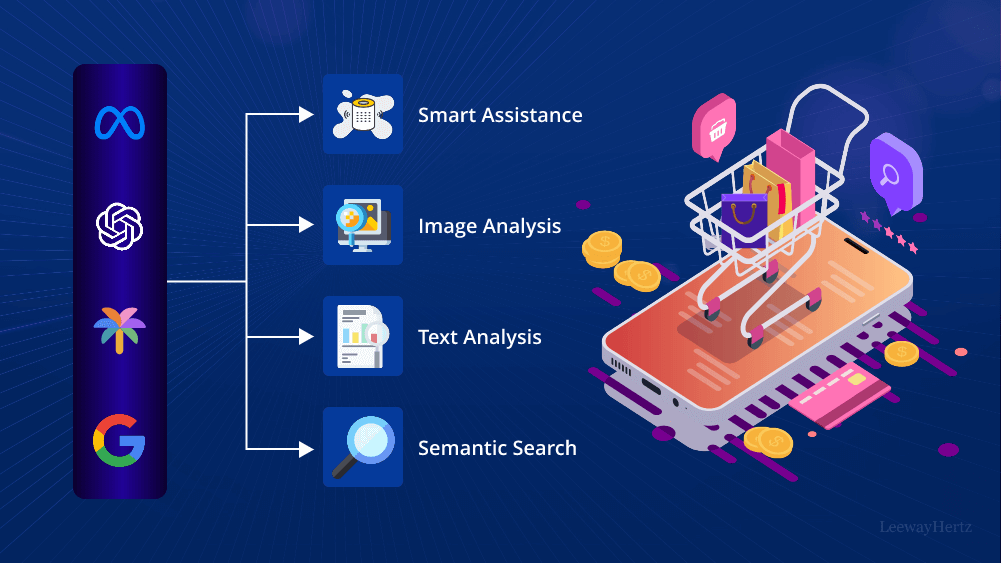
Building the website is only the beginning. You also need to bring customers to your store.
AI can support ecommerce marketing in several ways.
You can use AI to create:
- Email campaigns
- Social media captions
- Product promotions
- Advertising copy
- Blog topics
- Video scripts
- Promotional banners
- Abandoned cart messages
- Customer segmentation ideas
For example, AI can create several versions of an advertising headline and description for a new product launch.
You can then test different versions to see which messaging performs better.
AI can save time, but marketing decisions should be based on real customer behavior and performance data rather than relying entirely on automatically generated content.
Step 16: Test Your AI E-commerce Website Before Launch
Before launching your store, test every important customer journey.
Visit your website as if you were a first-time customer.
Check whether you can:
- Find a product.
- Open the product page.
- Select the correct variation.
- Add the product to your cart.
- Change the quantity.
- Apply a discount code.
- Complete checkout.
- Receive confirmation.
- Understand shipping information.
- Find return and refund details.
Also check your website on different browsers and devices.
Test every important link, form, menu, button, image, and checkout feature.
Do not assume that an AI-generated website is automatically error-free.
Common Mistakes When Building an E-commerce Website With AI
AI can make ecommerce website development easier, but there are several mistakes you should avoid.
Publishing AI Content Without Review
AI-generated content may contain inaccurate information or sound generic. Review and edit every important page.
Using Generic Product Descriptions
Product descriptions should explain the actual product and help customers make informed decisions.
Ignoring Mobile Users
Always test the mobile version of your website.
Making Checkout Too Complicated
Reduce unnecessary checkout steps and provide clear information about prices and delivery.
Using Poor Product Images
Product visuals strongly influence ecommerce purchasing decisions. Use clear and accurate images.
Ignoring SEO
A beautiful website will not automatically receive search traffic. Optimize product pages, category pages, technical elements, and content.
Relying Entirely on AI
AI is a powerful assistant, but human review remains essential for business strategy, branding, product accuracy, customer service, and quality control.
Benefits of Building an E-commerce Website With AI
There are several reasons businesses are adopting AI for ecommerce development.
Faster Development
AI can create initial designs, content, and page structures quickly.
Lower Initial Workload
Automation can reduce repetitive manual tasks.
Easier Content Creation
AI can help create product descriptions, blog content, promotional messages, and FAQs.
Faster Testing
Businesses can quickly create alternative layouts and messaging ideas.
Better Productivity
Teams can spend more time on strategy and customer experience instead of repetitive tasks.
Easier Website Maintenance
AI can assist with updating content, creating new product descriptions, generating promotional campaigns, and identifying areas for improvement.
Is It Possible to Build a Complete E-commerce Website With AI?
Yes, AI can assist with many parts of creating a complete ecommerce website, including design, content, product organization, SEO, images, and marketing.
However, the level of automation depends on the platform and complexity of the store.
A simple ecommerce store with a limited number of products can potentially be created largely through AI-assisted tools.
A large ecommerce operation with complex inventory systems, custom payment workflows, advanced customer accounts, international shipping, multiple currencies, subscriptions, or custom integrations may require professional development in addition to AI tools.
The best approach is to use AI where it provides genuine value while maintaining human oversight for important business and technical decisions.
Must Read:
- Best AI Web Design Tools for Creating Modern Websites
- How Much Does an AI Website Builder Cost in 2026?
- Best AI Website Builders for Landing Pages
Final Thoughts:
Learning how to build an e-commerce website with AI can significantly simplify the process of creating an online store. AI can help generate website layouts, product descriptions, images, SEO ideas, marketing content, customer support responses, and other important elements.
The process starts with a clear business idea and continues through platform selection, website generation, product setup, payment configuration, shipping, SEO, mobile optimization, testing, and marketing.
The most important point is that AI should be used as a practical assistant rather than an automatic replacement for planning and quality control. Your website should accurately represent your products, communicate your brand clearly, provide a secure purchasing experience, and make it easy for customers to find what they need.
Whether you are launching your first online store or improving an existing ecommerce business, AI can reduce repetitive work and help you move from an idea to a functioning website more efficiently.
With a clear strategy, accurate product information, responsive design, strong SEO, reliable payment processing, and continuous optimization, an AI-assisted ecommerce website can provide a strong foundation for growing an online business.