
Managing payments has become more complex as businesses sell through physical stores, websites, mobile apps, and social media platforms. Customers expect fast, secure, and flexible payment options, while business owners need tools that simplify transactions, inventory management, invoicing, and reporting. Using multiple systems for these tasks can increase costs and reduce efficiency.
This is where Square stands out. Square is an all-in-one payment and business management platform that combines payment processing, point-of-sale (POS) software, invoicing, online selling, inventory tracking, customer management, and business analytics into one ecosystem. Whether you run a retail shop, café, restaurant, salon, freelance business, or online store, Square aims to simplify day-to-day operations while helping businesses accept payments quickly and securely.
In this Square Review, we'll explore its features, payment processing capabilities, POS system, online selling tools, ease of use, and overall value to determine whether it can simplify your business payments.
What Is Square?
Square is a cloud-based payment processing and business management platform developed to help businesses accept payments and manage daily operations from a single system. Originally launched as a mobile card payment solution, it has expanded into a complete business ecosystem that supports both online and in-person commerce. Block, Inc. develops and operates Square.
Today, businesses use Square for:
- Point-of-sale transactions
- Online payments
- Mobile payments
- Contactless payments
- Invoicing
- Inventory management
- Customer relationship management
- Appointment scheduling
- Payroll
- Business reporting
The platform serves businesses of all sizes, from independent freelancers to growing retail chains.
Key Features of Square
One of Square's biggest strengths is its comprehensive feature set. Instead of purchasing separate software for payments, inventory, customer management, and reporting, businesses can manage everything from one platform.
Point of Sale (POS)
Square POS provides an easy-to-use checkout system for retail stores, restaurants, cafés, beauty salons, and service businesses.
Users can:
- Accept payments
- Manage products
- Process refunds
- Print receipts
- Apply discounts
- Track sales
The software works with Square's hardware devices or compatible mobile devices.
Payment Processing
Square supports a wide range of payment methods.
Businesses can accept:
- Credit cards
- Debit cards
- Contactless payments
- Mobile wallets
- Digital wallets
- Tap-to-pay
- Chip cards
This flexibility allows customers to pay using their preferred payment method.
Online Payments
Businesses selling online can accept secure payments through:
- Online stores
- Payment links
- Checkout pages
- Website integrations
This makes Square suitable for both physical and digital businesses.
Invoicing
Square enables businesses to create and send professional invoices.
Invoices support:
- Online payments
- Automatic reminders
- Partial payments
- Payment tracking
This feature is particularly useful for freelancers and service providers.
Inventory Management
Managing inventory manually becomes increasingly difficult as businesses grow.
Square helps track:
- Product quantities
- Variations
- Stock levels
- Low inventory alerts
- Product categories
This reduces stock shortages and improves operational efficiency.
Customer Management
Square stores customer information automatically after purchases.
Businesses can view:
- Purchase history
- Customer profiles
- Contact details
- Loyalty activity
These insights help improve customer relationships and personalised marketing.
Business Analytics
Square includes reporting tools that monitor:
- Sales
- Revenue
- Products
- Employees
- Inventory
- Customer activity
These reports help businesses make better operational decisions.
Appointments
Service-based businesses can manage bookings directly through Square.
Examples include:
- Hair salons
- Medical clinics
- Consultants
- Fitness trainers
- Beauty professionals
Appointments integrate with payment processing for a seamless customer experience.
How Does Square Work?
Square is designed to simplify payment acceptance for businesses of all sizes.
The typical workflow includes:
- Create a Square account.
- Set up your business profile.
- Add products or services.
- Connect Square hardware or use a mobile device.
- Accept customer payments.
- Track sales automatically.
- Review reports and analytics.
For online businesses, Square also supports website integration, payment links, and online checkout without requiring advanced technical knowledge.
Because the platform operates in the cloud, sales data synchronises across devices in real time.
User Interface and Ease of Use
Ease of use is one of Square's biggest advantages.
The dashboard is designed for business owners rather than technical users.
The main interface includes:
- Dashboard
- Sales
- Orders
- Inventory
- Customers
- Invoices
- Reports
- Online Store
- Banking
- Settings
Navigation is intuitive, allowing even first-time users to process payments within minutes.
Most features are accessible through a clean visual interface with minimal setup.
Point of Sale (POS)

Square POS is the foundation of the platform.
The software allows businesses to process sales quickly using computers, tablets, smartphones, or dedicated Square hardware.
Key POS features include:
- Fast checkout
- Barcode scanning
- Product management
- Discount support
- Gift cards
- Split payments
- Receipt printing
- Tax calculation
- Refund processing
Different versions of Square POS are available for:
- Retail stores
- Restaurants
- Cafés
- Beauty salons
- Professional services
This industry-specific approach makes the software suitable for a wide range of businesses.
Payment Processing
Reliable payment processing is essential for any business.
Square supports numerous payment methods through one integrated platform.
Businesses can accept:
- Visa
- Mastercard
- American Express
- Discover
- Contactless cards
- Apple Pay
- Google Pay
- Mobile wallets
- Chip cards
- Tap-to-pay transactions
Payments are processed securely using encryption and fraud protection measures.
One major advantage is that businesses do not need to negotiate separate merchant account agreements for standard payment processing.
This makes onboarding significantly faster than many traditional payment providers.
Online Payments
One of the biggest advantages highlighted in this Square Review is the platform's ability to support online payments across multiple sales channels. Today's customers expect businesses to accept payments through websites, mobile devices, email, and social media. Square makes this possible by providing several flexible payment solutions that help businesses sell online without investing in complex payment infrastructure.
Whether you're running a small online shop, a service-based business, or a growing eCommerce store, Square offers tools that simplify online transactions while maintaining a secure checkout experience.
Online Store
Square allows businesses to create a fully functional online store that integrates directly with its payment processing system. Products, inventory, and orders automatically sync with the Square dashboard, making it easier to manage both online and in-person sales from a single platform.
With an online store, businesses can:
- Display products and services
- Accept secure online payments
- Manage product categories
- Track inventory automatically
- Process customer orders
- Monitor sales performance
This is an ideal solution for businesses looking to launch an online presence quickly without requiring advanced technical knowledge.
Payment Links
For businesses that do not operate a website, Square offers payment links that make collecting payments simple and convenient.
Users can generate a secure payment link and share it through:
- SMS
- Other social media platforms
Customers simply click the link, complete their payment through Square's secure checkout page, and receive confirmation instantly. This feature is especially useful for freelancers, consultants, service providers, and small businesses that want a quick and professional way to collect payments online.
Checkout Pages
Square also provides dedicated checkout pages that streamline the online purchasing process. These pages are designed to minimise distractions and make it easier for customers to complete transactions.
Checkout pages are commonly used for:
- One-time purchases
- Event registrations
- Service bookings
- Donations
- Digital products
- Promotional offers
By reducing the number of steps required to complete a purchase, businesses can improve the customer experience and potentially increase conversion rates.
Website Integration
Businesses that already have an existing website can easily integrate Square's payment processing into their online store. Square works with a variety of popular website builders and eCommerce platforms, allowing businesses to add secure payment functionality without rebuilding their websites.
Website integration offers several benefits, including:
- Secure online checkout
- Real-time payment processing
- Automatic order tracking
- Inventory synchronisation
- Customer data management
- Unified sales reporting
Because all transactions flow into the same Square dashboard, businesses can monitor both online and in-store sales from one central location.
Secure Payment Processing
Security is a critical part of any online payment system. Square uses advanced encryption, fraud detection, and secure payment processing technologies to help protect customer information and reduce the risk of fraudulent transactions. Businesses can accept payments with confidence while providing customers with a safe and reliable checkout experience.
Multi-Channel Selling Made Simple
One of Square's greatest strengths is its ability to support multi-channel commerce. Whether customers purchase through an online store, payment link, checkout page, or physical location, all transactions are synchronised automatically within the Square ecosystem. This centralised approach simplifies business management, reduces manual work, and provides valuable insights into sales performance across every channel.
For businesses looking to expand beyond traditional in-store sales, Square's online payment tools offer an efficient and user-friendly solution that can help increase revenue while delivering a seamless customer experience.
Invoicing
Businesses providing professional services often rely on invoices instead of immediate payments.
Square Invoices simplifies this process.
Users can:
- Create branded invoices
- Add payment due dates
- Accept online payments
- Send automatic reminders
- Monitor payment status
- Manage recurring invoices
Invoices are mobile-friendly, allowing customers to pay quickly using secure online payment methods.
This feature is particularly valuable for:
- Consultants
- Designers
- Contractors
- Freelancers
- Service providers
Inventory Management
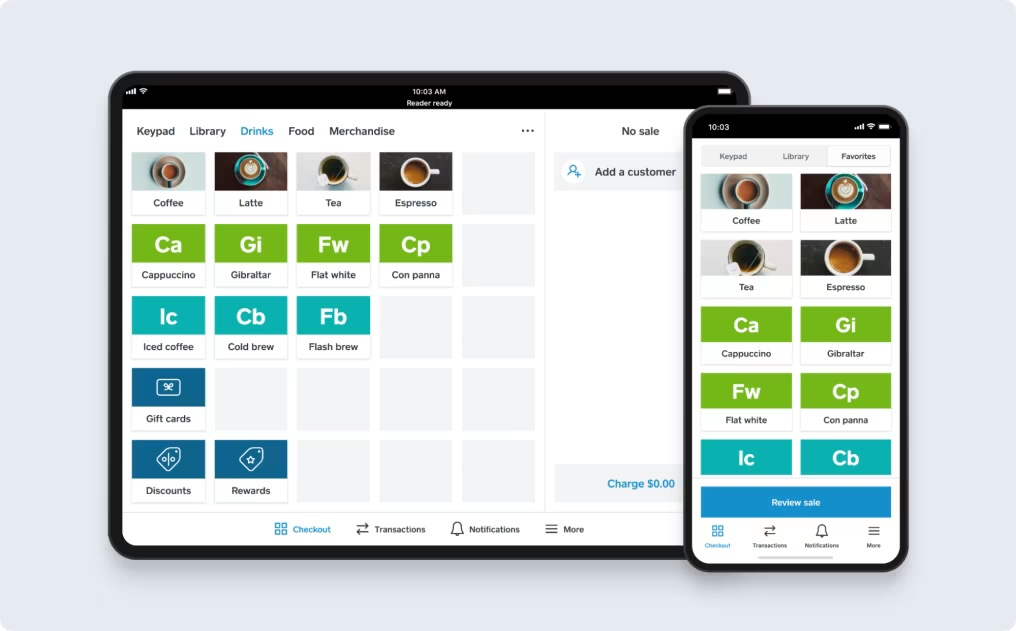
Managing inventory accurately helps prevent lost sales and unnecessary stock purchases.
Square provides built-in inventory management tools that automatically update stock levels after each sale.
Users can monitor:
- Product availability
- Inventory counts
- Variants
- Categories
- Low-stock alerts
- Purchase trends
Retail businesses operating across multiple locations can also manage inventory more efficiently through centralised reporting.
The ability to combine payment processing with inventory tracking reduces manual work and improves operational accuracy.
Early Impressions
After examining its core features, Square makes a strong first impression as a complete payment and business management platform rather than simply a payment processor. Its combination of point-of-sale software, online payments, invoicing, inventory management, customer tools, and business reporting provides a unified solution for businesses looking to streamline operations.
The platform's intuitive interface, flexible payment options, and cloud-based synchronisation make it accessible to beginners while still offering enough functionality for growing businesses. Whether you're running a retail shop, restaurant, service business, or online store, Square provides a solid foundation for managing sales and daily business activities.
Square Pricing
Pricing is one of the main reasons many small businesses choose Square. The platform offers a straightforward pricing model with no long-term contracts for its standard payment processing services. Businesses can start accepting payments with a free Square account and only pay transaction fees when they process sales.
Additional software products and premium features are available through paid subscriptions, allowing businesses to expand the platform as they grow. Availability of plans and services may vary by country.
The core Square account generally includes:
- Point of Sale software
- Payment processing
- Online payment acceptance
- Basic inventory management
- Customer directory
- Sales reporting
- Mobile app access
Businesses that require more advanced capabilities can subscribe to specialised products such as:
- Square for Retail
- Square for Restaurants
- Square Appointments
- Square Payroll
- Marketing tools
- Loyalty programmes
Before choosing a plan, consider:
- Monthly sales volume
- Business type
- Number of employees
- Inventory requirements
- Appointment scheduling needs
- Online selling requirements
Because businesses only pay for the features they need, Square remains a flexible option for companies at different stages of growth.
Pros and Cons
Every payment platform has strengths and limitations. Understanding both will help determine whether Square is the right choice for your business.
Pros
Square combines payment processing with powerful business management tools in one platform.
- Easy to set up and use.
- No long-term contracts for standard payment processing.
- Excellent POS software.
- Supports online and in-person payments.
- Built-in inventory management.
- Professional invoicing tools.
- Customer management features.
- Detailed business reporting.
- Mobile payment support.
- Suitable for multiple industries.
Cons
Although Square offers excellent value, there are a few limitations to consider.
- Transaction fees may be higher than some traditional merchant accounts for businesses with very high sales volumes.
- Premium business features require paid subscriptions.
- Hardware devices represent an additional investment.
- Some services are available only in supported countries.
Overall, Square offers a strong balance of simplicity, functionality, and scalability for most small and medium-sized businesses.
Who Should Use Square?
Square is designed for businesses that want an all-in-one payment and management platform without investing in complex enterprise software.
Retail Stores
Retail businesses can use Square to manage:
- Product sales
- Inventory
- Customer information
- Discounts
- Returns
- Sales reporting
Its POS system makes daily retail operations simple and efficient.
Restaurants and Cafés
Restaurants benefit from specialised POS features including:
- Table management
- Order tracking
- Kitchen workflows
- Contactless payments
- Menu management
These features help improve customer service while simplifying payment processing.
Service Businesses
Professionals offering appointments or consultations can use Square for:
- Booking appointments
- Sending invoices
- Accepting payments
- Managing customer records
Examples include:
- Salons
- Barbers
- Consultants
- Personal trainers
- Healthcare providers
Freelancers
Independent professionals often need an affordable payment solution.
Square allows freelancers to:
- Accept card payments
- Send invoices
- Track revenue
- Manage clients
Without requiring expensive software subscriptions.
E-commerce Businesses
Online sellers can use Square to:
- Accept secure online payments
- Sell through websites
- Manage inventory
- Process orders
- Monitor sales
This makes it easier to operate both physical and online stores from one platform.
Market Vendors and Mobile Businesses
Businesses operating at markets, events, and pop-up locations benefit from Square's portable payment hardware and mobile POS capabilities.
Integrations
Modern businesses often rely on multiple software platforms to manage operations. Square supports integrations with a wide range of business applications, allowing companies to streamline workflows and reduce manual data entry.
Depending on your needs, Square can connect with eCommerce platforms, accounting software, marketing tools, customer relationship management systems, and developer APIs.
Common integration categories include:
- Online store platforms
- Accounting software
- Inventory management tools
- Marketing platforms
- Customer relationship management systems
- Payroll software
- Business analytics tools
- Developer APIs
These integrations help businesses centralise their operations while improving productivity.
Square vs Shopify POS
Square and Shopify POS are two of the most popular solutions for retail businesses. Although both offer payment processing and point-of-sale software, they are designed with different priorities.
| Feature | Square | Shopify POS |
|---|---|---|
| Point of Sale | ✔ | ✔ |
| Online Payments | ✔ | ✔ |
| Inventory Management | ✔ | ✔ |
| Built-in Payment Processing | ✔ | Shopify Payments |
| Invoicing | ✔ | Limited |
| Appointments | ✔ | Limited |
| Retail Features | Excellent | Excellent |
| Beginner Friendly | Excellent | Very Good |
Square is often preferred by businesses that want integrated payment processing and business management tools, while Shopify POS is particularly strong for businesses focused on eCommerce.
Square vs Stripe
Stripe is another leading payment platform, but its primary focus differs from Square.
| Feature | Square | Stripe |
|---|---|---|
| Payment Processing | ✔ | ✔ |
| POS System | ✔ | Limited |
| Online Payments | ✔ | ✔ |
| Invoicing | ✔ | ✔ |
| Mobile Payments | ✔ | ✔ |
| Inventory Management | ✔ | Limited |
| Retail POS | ✔ | ✖ |
| Developer API | ✔ | ✔ |
Stripe is often chosen by developers building custom payment solutions, whereas Square provides a more complete ecosystem for businesses that need both payment processing and operational management.
Tips for Getting the Most from Square
Using Square effectively can improve payment processing, streamline daily operations, and help businesses make better decisions. The following best practices will help you maximise the value of the platform.
Set Up Your Product Catalogue
Organise products into clear categories and include accurate descriptions, prices, images, and stock quantities. A well-structured catalogue speeds up checkout and improves inventory management.
Enable Multiple Payment Methods
Offer customers a variety of payment options, including credit cards, debit cards, contactless payments, and digital wallets. Greater payment flexibility can improve customer satisfaction and increase sales.
Monitor Inventory Regularly
Use Square's inventory tools to keep stock levels accurate. Review low-stock alerts, update product quantities, and analyse sales trends to avoid running out of popular items.
Customise Your Receipts and Invoices
Add your business logo, contact details, and branding to receipts and invoices. A professional appearance strengthens customer trust and reinforces your brand identity.
Review Business Reports
Check sales reports, revenue trends, product performance, and customer activity regularly. These insights can help you identify best-selling products, improve pricing strategies, and make informed business decisions.
Use Customer Profiles
Take advantage of Square's customer management tools to view purchase history, reward loyal customers, and create personalised marketing campaigns.
Explore Online Selling Tools
If you operate a physical store, consider using Square's online payment options to expand your reach. Selling through an online store, payment links, or checkout pages can create additional revenue opportunities.
Keep Software Updated
Ensure your Square applications and hardware are running the latest software versions. Regular updates improve security, introduce new features, and enhance overall performance.
Train Your Team
If multiple employees use Square, provide training on processing payments, handling refunds, managing inventory, and using reporting tools. Consistent processes reduce errors and improve customer service.
Integrate with Business Software
Connect Square with your accounting, inventory, marketing, and CRM platforms to automate workflows and reduce manual data entry. Well-integrated systems improve efficiency and help keep business information accurate.
FAQs:
Is Square suitable for small businesses?
Yes. Square is designed with small and medium-sized businesses in mind. Its simple setup, flexible pricing, and comprehensive feature set make it an excellent choice for new and growing businesses.
Can Square accept online payments?
Yes. Businesses can accept online payments through websites, payment links, online checkout pages, and eCommerce integrations.
Does Square provide POS software?
Yes. Square includes a powerful point-of-sale system suitable for retail stores, restaurants, cafés, salons, and many other businesses.
Can I send invoices with Square?
Yes. Square allows businesses to create, send, and manage professional invoices while accepting secure online payments.
Does Square support inventory management?
Yes. Built-in inventory management tools help businesses monitor stock levels, track product variations, and receive low-stock alerts.
Is Square cloud-based?
Yes. Square stores business information securely in the cloud, allowing users to access sales, inventory, customer data, and reports from multiple devices.
Must Read:
- ElevenLabs Review: Can It Create Human-Like AI Voices?
- Manus AI Review: Is It the Best Autonomous AI Agent?
- Hercules AI Review: Is This the Best AI App Builder?
Final Verdict:
After evaluating its payment processing capabilities, POS software, business management tools, and ease of use, Square stands out as one of the most complete payment platforms for small and medium-sized businesses. Rather than offering payment processing alone, it combines sales, inventory, invoicing, customer management, reporting, and online selling into a single, easy-to-use ecosystem.
One of Square's greatest strengths is its flexibility. Whether you're operating a retail shop, restaurant, salon, consultancy, online store, or mobile business, the platform provides the tools needed to manage payments and day-to-day operations efficiently. Its intuitive interface, cloud-based synchronisation, and broad range of integrations make it accessible for beginners while still providing enough functionality for growing businesses.
Although businesses with very high transaction volumes may wish to compare processing costs with other providers, Square offers excellent value through its combination of software, hardware, and business management features.
If you're looking for a reliable all-in-one solution to simplify payment processing and business operations, Square is a platform well worth considering.









