If you want to build a professional website with modern design, responsive layouts, visual interactions, and AI-assisted tools, Webflow AI Website Builder is worth exploring. Webflow has traditionally been known as a powerful visual web development platform, but its AI capabilities are adding new ways to create, customize, and manage websites.
This Webflow AI Website Builder Review examines how Webflow’s AI features work, what you can use them for, its website design capabilities, CMS, SEO tools, ecommerce functionality, hosting, pricing considerations, advantages, limitations, and overall usability.
Webflow is different from simple AI website builders that generate a website and require very little customization. It gives users considerably more control over layouts, responsive behavior, animations, components, content, and visual design. This makes it particularly interesting for designers, freelancers, agencies, marketers, startups, and businesses that want more control over their websites.
What Is Webflow AI Website Builder?
Webflow is a visual website development platform that allows users to design, build, manage, and publish websites without relying entirely on traditional coding.
The platform has historically focused on giving designers more control over the structure and appearance of websites. Instead of working only with predefined templates, users can visually create layouts and customize individual elements.
Webflow has also introduced AI-powered capabilities to help users work more efficiently.
AI can assist with tasks such as generating content, modifying existing content, creating website sections, and accelerating parts of the website development workflow.
This combination makes Webflow different from an AI tool that simply generates a website from one prompt.
With Webflow, AI can assist the process while users retain substantial control over the final design.
How Does Webflow AI Website Builder Work?
The Webflow AI workflow depends on the specific feature being used, but the general process combines AI assistance with Webflow’s visual development environment.
You can begin with a website idea, an existing design, or a Webflow template and then use AI-assisted tools to help create or modify content and website elements.
Start With Your Website Goal
Before creating a website, determine what you want the website to accomplish.
For example, you might want to create:
- A business website
- A startup website
- A portfolio
- A SaaS website
- A marketing website
- A blog
- A landing page
- An agency website
- An ecommerce website
Defining the goal helps you create a more useful website structure.
Use AI to Speed Up Website Creation
AI can help with certain website creation and content tasks.
Instead of manually writing every section, you can use AI assistance to generate an initial version and then customize it.
This can reduce repetitive work and help users move from an idea to a working website more efficiently.
Customize the Website Visually
After AI-assisted generation or content creation, Webflow gives you control over the visual design.
You can modify:
- Layouts
- Typography
- Colors
- Images
- Sections
- Navigation
- Buttons
- Components
- Animations
- Responsive settings
This level of control is one of the main reasons Webflow remains attractive to professional designers.
Webflow AI Website Builder Features
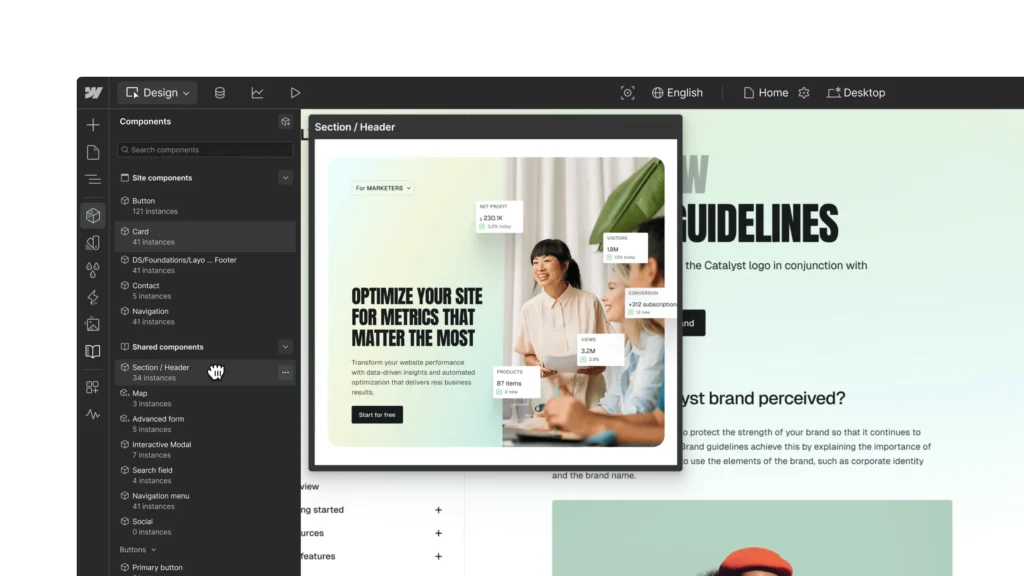
A complete Webflow AI Website Builder Review should examine the platform beyond its AI features.
AI-Powered Website Assistance
Webflow’s AI capabilities are designed to assist with website creation and management rather than simply replacing the entire website-building process.
AI can help with tasks such as generating and modifying content and speeding up repetitive workflows.
For website owners, this can reduce the time required for routine tasks.
The key advantage is that users can review and edit the AI-generated output rather than being locked into an automatically generated website.
AI Content Generation
Website content is one of the most important parts of any website.
Webflow’s AI capabilities can help users create or modify copy for different website sections.
This can be useful for:
- Headlines
- Paragraphs
- Product descriptions
- Service descriptions
- Calls to action
- Marketing copy
- Website sections
AI-generated content should still be reviewed before publication.
A professional website should use accurate information and content that reflects the actual business, products, services, and audience.
Visual Website Design
Webflow is particularly strong in visual website design.
Users can create layouts and control the relationship between different elements on the page.
This makes Webflow suitable for people who want more design freedom than basic drag-and-drop website builders provide.
Designers can create custom layouts instead of relying entirely on standard templates.
Responsive Web Design
Responsive design is essential because visitors access websites from many different devices.
Webflow allows designers to control how layouts behave across screen sizes.
You can adjust elements for desktop, tablet, and mobile experiences.
This gives designers greater control over responsive behavior than many simplified website builders.
A responsive website should be tested across multiple screen sizes before publishing.
Webflow CMS
Webflow includes a content management system that allows users to manage structured content.
A CMS can be useful for:
- Blogs
- Case studies
- Team pages
- Portfolios
- Events
- Products
- Articles
- Resources
For example, a marketing agency could create a CMS collection for case studies.
Instead of designing each case study page from scratch, the agency can create a reusable CMS structure and add new entries.
This makes Webflow suitable for content-driven websites as well as static marketing websites.
Webflow Ecommerce
Webflow also provides ecommerce capabilities for businesses that want to sell products online.
An ecommerce website requires more than a visually attractive storefront.
Businesses need to manage:
- Products
- Product images
- Prices
- Inventory
- Checkout
- Customer information
- Shipping
- Payment options
- Policies
Webflow can provide the website design environment, but ecommerce owners should carefully configure their store before accepting orders.
For very large ecommerce operations, businesses should compare Webflow’s capabilities with platforms specifically designed around ecommerce.
Webflow SEO Features
SEO is a major consideration in this Webflow AI Website Builder Review.
Webflow provides tools that allow website owners to control important SEO settings.
These can include:
- Page titles
- Meta descriptions
- URLs
- Heading structure
- Image alt text
- Redirects
- Sitemap-related settings
- Structured website content
However, SEO success depends on much more than technical settings.
A website also needs:
- Helpful content
- Search-intent alignment
- Keyword research
- Internal linking
- Strong website structure
- Mobile usability
- Good performance
- Quality backlinks
- Regular content improvements
Using Webflow does not automatically guarantee search engine rankings.
The platform provides tools, but the website owner remains responsible for the SEO strategy.
Webflow Hosting

Webflow provides an integrated hosting environment for websites published through the platform.
This can simplify website management because users do not necessarily need to configure a separate hosting environment.
Hosting performance is particularly important for business websites because slow websites can create a poor user experience.
Website owners should still optimize images, reduce unnecessary scripts, and avoid adding excessive third-party integrations.
Webflow Templates
Webflow offers templates that can help users start projects more quickly.
Templates are useful when you want a professional starting design without creating every component from the beginning.
However, templates should not prevent customization.
A business should update:
- Branding
- Colors
- Typography
- Images
- Content
- Navigation
- Calls to action
A customized website is more likely to reflect the identity and goals of the business.
Webflow Interactions and Animations
One of Webflow’s major strengths is its ability to create interactions and animations.
You can build effects such as:
- Hover animations
- Scroll animations
- Page transitions
- Animated menus
- Image effects
- Interactive buttons
- Section transitions
These features can make a website feel more dynamic.
However, animation should support the user experience rather than distract visitors.
Too many animations can make a website feel complicated and may negatively affect performance.
Is Webflow Easy to Use?
Webflow is powerful, but it is not necessarily the simplest website builder available.
Beginners can use templates and AI-assisted features to get started, but advanced customization requires learning how Webflow’s design system works.
Users may need to understand concepts such as:
- Layouts
- Containers
- Flexbox
- Grid
- Classes
- Components
- Breakpoints
- Responsive design
People with design or development experience may find this approach intuitive.
Complete beginners may need some time to become comfortable with the interface.
Webflow for Small Businesses
Small businesses can use Webflow to create professional websites that communicate their services and brand.
A typical business website might include:
- Homepage
- About page
- Services
- Testimonials
- Portfolio
- Blog
- FAQ
- Contact page
Webflow’s design flexibility can help businesses create a more customized online presence.
However, small businesses should consider whether they actually need Webflow’s advanced design capabilities before choosing it.
For a simple five-page website, a simpler website builder may provide everything needed.
Webflow for Startups
Startups often need websites that can evolve as their businesses grow.
Webflow can be used for:
- Startup landing pages
- Product websites
- SaaS marketing websites
- Waitlist pages
- Product launches
- Feature pages
- Case studies
A startup can begin with a landing page and gradually add CMS-powered content and additional pages.
This makes Webflow useful for businesses that want a design-focused website with room for growth.
Webflow for Designers
Designers are one of Webflow’s most natural audiences.
The platform provides detailed visual control without requiring designers to write every line of HTML and CSS manually.
Designers can translate visual concepts into working websites while maintaining control over layouts, typography, responsive behavior, and interactions.
AI tools can then assist with repetitive content and website tasks.
This combination can make Webflow an attractive option for designers who want to move from design concepts to published websites.
Webflow for Agencies
Digital agencies can use Webflow to build websites for clients.
Agencies can create custom layouts, reusable components, CMS structures, and interactive experiences.
AI can potentially reduce the time spent on repetitive tasks such as creating initial content or modifying sections.
Agencies should still maintain a quality-control process.
Every client website should be reviewed for:
- Branding
- Accuracy
- Mobile responsiveness
- Accessibility
- SEO
- Performance
- Forms
- Links
- Analytics
Webflow AI for Landing Pages
Landing pages are another strong use case.
A landing page needs to communicate its value quickly.
A typical landing page may include:
- Hero section
- Value proposition
- Features
- Benefits
- Social proof
- Testimonials
- FAQ
- Call to action
Webflow’s visual tools can help designers create custom layouts for these pages.
AI can assist with content generation, but conversion-focused copy still requires understanding the target audience.
Webflow AI Website Builder Pros
- Powerful Visual Website Design
- AI-Assisted Website Creation
- Responsive Design Controls
- Advanced Animations and Interactions
- Built-In CMS
- Professional Templates
- SEO Controls
- Integrated Hosting
- Custom Website Layouts
- Useful for Designers and Agencies
Webflow AI Website Builder Cons
- Learning Curve for Beginners
- Advanced Features Require More Design Knowledge
- Pricing Depends on the Required Plan
- Complex Projects May Require Professional Expertise
- AI-Generated Content Requires Editing
- Some Features May Be More Than a Small Website Needs
- Ecommerce Requirements Should Be Evaluated Carefully
Webflow vs WordPress
Webflow and WordPress take different approaches to website creation.
WordPress has a massive ecosystem of themes, plugins, hosting providers, and integrations.
Webflow focuses more heavily on visual website design and an integrated development and hosting environment.
WordPress can be useful for content-heavy websites, complex plugin requirements, and businesses that want extensive ecosystem flexibility.
Webflow can be attractive to designers and agencies that want detailed control over website layouts and interactions without managing a traditional WordPress stack.
Neither platform is automatically suitable for every project.
The right choice depends on your website requirements, technical skills, budget, content strategy, and desired level of customization.
Webflow vs Wix AI
Wix is designed to make website creation accessible to a broad range of users.
Webflow offers more detailed control over design and responsive layouts.
Wix can be suitable for users who want a straightforward website-building experience.
Webflow may be more suitable for designers and teams that want greater control over the visual structure of their websites.
AI capabilities are becoming part of both platforms, but their overall design philosophies remain different.
Webflow vs Framer
Webflow and Framer are both popular with modern web designers.
Framer emphasizes fast visual design, modern layouts, animations, and AI-assisted website creation.
Webflow provides a broader visual development environment with powerful CMS, interactions, responsive controls, and website management capabilities.
Both can be used to create professional websites.
The better fit depends on the type of project and the level of control you want over the website structure.
Webflow Pricing
Webflow offers different plans depending on website requirements.
The exact pricing and included features can change, so users should check the official Webflow pricing information before purchasing.
When evaluating Webflow pricing, consider:
- Number of websites
- Hosting requirements
- CMS needs
- Ecommerce requirements
- Traffic
- Team collaboration
- Custom domains
- Advanced features
The total cost should be compared with the features you actually need rather than simply looking at the cheapest available plan.
How to Build a Professional Website With Webflow AI
Creating a professional website with Webflow should start with a clear strategy.
First, identify the target audience.
Next, define the main goal of the website.
Then create a basic page structure.
Use AI assistance where it can save time, but review the output carefully.
After generating or adding content, customize the visual design.
Make sure the typography is readable and consistent.
Use a clear color palette.
Create obvious calls to action.
Optimize images.
Check mobile responsiveness.
Add relevant SEO information.
Test forms and links.
Finally, review the complete website before publishing.
Tips for Getting Better Results From Webflow AI
AI works better when it receives clear instructions.
Instead of requesting:
“Create a business website.”
Provide more context.
For example:
“Create a modern website for a digital marketing agency serving small businesses. The website should include a clear hero section, services, case studies, testimonials, about section, FAQ, contact form, and strong calls to action. Use a professional visual style with clear typography, generous spacing, and a responsive layout.”
After AI generates the content or structure, customize it.
Add real business information.
Replace generic images.
Review every claim.
Improve the headlines.
Make the call to action specific.
This process combines AI speed with human judgment.
Is Webflow AI Website Builder Worth It?
Whether Webflow is worth using depends on what you expect from your website builder.
If you want a simple website with minimal customization, Webflow may offer more functionality than you need.
If you want a professional website with detailed visual control, responsive layouts, animations, CMS functionality, and AI-assisted workflows, Webflow can be a compelling option to evaluate.
The platform is especially relevant for designers, agencies, startups, marketing teams, and businesses that care about website presentation.
The learning curve is the main consideration for beginners.
Webflow provides substantial control, but that control also means users have more concepts to understand.
Must Read:
- 10Web AI Website Builder Review: Can AI Build a WordPress Website?
- Durable Website Builder Review: Is It a Good Website Builder?
- Framer AI Website Builder Review: Is Framer Worth It in 2026?
Final Verdict:
This Webflow AI Website Builder Review shows that Webflow is more than a basic AI website generator. It combines AI-assisted tools with a powerful visual website development platform.
AI can help users generate and modify content and speed up parts of the website creation process. Webflow’s visual editor then gives users control over layouts, typography, responsive behavior, CMS content, interactions, and other website elements.
The platform can be particularly useful for designers, agencies, startups, freelancers, and businesses that want professional-looking websites with greater design control.
However, Webflow is not necessarily the easiest option for every beginner. Its powerful design environment requires some learning, especially if you want to take advantage of advanced responsive layouts, CMS functionality, and interactions.
AI also does not remove the need for human review. Website content, SEO, accessibility, performance, branding, and user experience should all be checked before publication.
If your goal is to build professional websites with AI while retaining strong visual and development control, Webflow is a platform worth considering in 2026.