

The demand for AI-powered no-code platforms has grown rapidly over the last few years. Businesses, freelancers, agencies, and entrepreneurs are looking for faster ways to build custom applications without hiring expensive development teams. This is where Noloco has gained attention. Designed to help users create internal tools, customer portals, CRMs, and business applications with little or no coding experience, Noloco promises to simplify app development while maintaining professional-quality results.
In this Noloco Review, we'll explore everything you need to know before investing in the platform. We'll examine its features, pricing, ease of use, integrations, security, advantages, drawbacks, and how it compares with competitors like Bubble, Glide, Softr, and Retool. By the end of this guide, you'll know whether Noloco is the right no-code platform for your business.
What Is Noloco?
Noloco is an AI-powered no-code application builder that enables users to create business software without writing code. Instead of spending months developing custom applications, users can connect existing databases such as Airtable, Google Sheets, PostgreSQL, MySQL, or Supabase and instantly transform their data into powerful web applications.
Unlike many website builders that focus on creating public websites, Noloco specialises in internal business tools, client portals, CRM systems, project management platforms, inventory management, employee dashboards, approval workflows, and customer-facing applications.
The platform combines drag-and-drop functionality with AI-powered automation, allowing users to create professional apps within hours instead of weeks.
Today, thousands of organisations worldwide use Noloco to streamline business operations and reduce software development costs.
Who Should Use Noloco?
One of the biggest strengths highlighted in this Noloco Review is its versatility. The platform serves multiple industries and business types.
Small Businesses
Small businesses can create customised CRM systems, inventory management software, appointment booking systems, employee directories, and customer databases without employing developers.
Marketing Agencies
Marketing agencies can build client portals where customers access reports, invoices, campaign updates, project progress, and shared documents securely.
Consultants
Business consultants often require secure portals for client collaboration. Noloco allows them to build branded workspaces where clients can submit information, track progress, and communicate efficiently.
Law Firms
Legal firms can manage client records, case updates, contracts, appointments, and document sharing using permission-based access.
Healthcare Organisations
Healthcare providers can develop internal dashboards for appointment scheduling, patient records, and administrative workflows while maintaining data security.
Startups
Instead of investing heavily in software development, startups can quickly validate ideas by building MVPs using Noloco.
Non-Profit Organisations
Charities and NGOs can manage volunteers, donations, beneficiaries, and project reporting using customised applications.
Key Features of Noloco

One reason this Noloco Review stands out is the impressive collection of business-focused features available without coding knowledge.
AI App Builder
The AI builder allows users to describe the application they want in plain English.
Instead of manually designing every page, AI helps generate layouts, data structures, forms, workflows, and dashboards, significantly reducing development time.
This feature is particularly valuable for beginners with no technical background.
Drag-and-Drop Interface
The visual editor makes app creation straightforward.
Users can simply drag components such as:
- Forms
- Tables
- Charts
- Calendars
- Kanban boards
- Buttons
- Dashboards
- Reports
No programming knowledge is required.
Multiple Data Sources
Noloco integrates with existing databases instead of forcing businesses to migrate data.
Supported databases include:
- Airtable
- Google Sheets
- PostgreSQL
- MySQL
- Supabase
- Xano
This flexibility allows organisations to continue using their existing infrastructure.
Client Portals
Client portals are one of Noloco's biggest selling points.
Businesses can provide secure login access where customers can:
- View invoices
- Submit requests
- Upload documents
- Check project status
- Communicate with teams
- Access reports
Everything can be customised with company branding.
Internal Tools
Many businesses purchase expensive internal software.
With Noloco, companies can build:
- HR systems
- Employee directories
- Sales CRMs
- Inventory software
- Approval workflows
- Expense trackers
- Asset management platforms
Workflow Automation
Automation saves significant administrative time.
Users can automate:
- Email notifications
- Status changes
- Record creation
- Approval requests
- Task assignments
- Customer updates
- Reminder emails
This eliminates repetitive manual work.
Advanced Permissions
Security plays an important role in every business application.
Noloco provides:
- Role-based permissions
- Record-level access
- Field-level permissions
- Team-based visibility
- Client-specific access
This ensures users only view authorised information.
Responsive Mobile Experience
Applications automatically adapt to desktops, tablets, and smartphones.
Businesses don't need separate mobile development.
Employees and customers can access apps anywhere.
Ease of Use
One highlight of this Noloco Review is its beginner-friendly interface.
After signing up, users are guided through a setup wizard that connects existing databases.
The interface feels modern, clean, and intuitive.
Creating pages requires selecting components rather than writing code.
Even users with zero programming experience can usually build functional applications within a few hours.
For experienced users, advanced customisation options remain available without making the platform overwhelming.
Overall, Noloco successfully balances simplicity with flexibility.
Templates Available
Templates significantly reduce setup time.
Popular templates include:
CRM
Manage customers, leads, sales pipelines, follow-ups, and communication history.
Project Management
Track projects using Kanban boards, calendars, milestones, and task lists.
Client Portal
Provide customers with secure dashboards containing files, invoices, updates, and messages.
Inventory Management
Monitor stock levels, suppliers, purchases, and warehouse operations.
Employee Directory
Store staff information, departments, contact details, and organisational structures.
Asset Tracking
Track company equipment, licences, hardware, and maintenance schedules.
Integrations
An important aspect of this Noloco Review is integration support.
Popular integrations include:
- Airtable
- Google Sheets
- PostgreSQL
- MySQL
- Supabase
- Stripe
- Slack
- Zapier
- Make
- OpenAI
- HubSpot
- Xero
- QuickBooks
- Gmail
These integrations help businesses automate workflows without replacing existing systems.
User Interface
Noloco offers one of the cleanest interfaces among no-code platforms.
Navigation is organised into logical sections including:
- Dashboard
- Tables
- Workflows
- Automations
- Permissions
- Branding
- Integrations
- Settings
Colour schemes, branding, and layouts can be customised according to company identity.
The overall design feels polished and professional.
Performance
Performance is another strong point covered in this Noloco Review.
Apps load quickly.
Data synchronisation happens almost instantly.
Even larger databases perform efficiently thanks to cloud infrastructure.
For business users, fast response times improve employee productivity and customer satisfaction.
Security
Business applications often contain confidential information.
Noloco includes several security features:
- SSL encryption
- Secure authentication
- Role-based permissions
- Audit logs
- User management
- Cloud backups
- GDPR support
These capabilities make the platform suitable for businesses handling sensitive customer information.
Branding and White Labelling
Paid plans allow businesses to create fully branded applications.
You can customise:
- Company logo
- Colours
- Fonts
- Login page
- Email branding
- Custom domain
Clients see your brand rather than Noloco's branding.
This is particularly valuable for agencies serving multiple customers.
Collaboration Features
Teams can collaborate within the same application.
Features include:
- Shared workspaces
- User roles
- Comments
- Activity history
- Notifications
- Team permissions
These tools improve communication and project management.
Customer Support
Noloco provides several support options:
- Documentation
- Video tutorials
- Help centre
- Email support
- Community resources
Higher-tier plans also include priority support for businesses requiring faster assistance.
Pricing
Pricing is always an important factor in any Noloco Review.
The platform offers several plans designed for businesses of different sizes.
Free Plan
Suitable for testing the platform.
Includes limited users and database capacity.
Pro Plan
Ideal for growing businesses requiring advanced workflows, branding, and collaboration.
Business Plan
Designed for larger organisations needing greater scalability, security, and higher usage limits.
Enterprise Plan
Custom pricing with enterprise-grade support, security, and deployment options.
Although Noloco isn't the cheapest no-code platform available, its feature set justifies the investment for businesses building internal software rather than simple websites.
Pros and Cons
Every software platform has strengths and weaknesses.
Pros
- Easy to use
- Modern interface
- AI-powered app generation
- Excellent client portals
- Strong security controls
- Responsive mobile experience
- Powerful automation
- Multiple database integrations
- White-label branding
- Fast deployment
Cons
- Higher pricing than some competitors
- Limited flexibility compared with fully custom development
- Learning advanced workflows takes time
- Best suited for business apps rather than public websites
Noloco vs Bubble
Choosing the right no-code platform depends on your project goals. In this section of the Noloco Review, we'll compare Noloco with Bubble, one of the most popular no-code platforms on the market.
Bubble is designed for building fully customised web applications with complete control over workflows, user interfaces, and databases. It offers tremendous flexibility, but it also comes with a steeper learning curve.
Noloco, on the other hand, focuses on helping businesses build internal tools, client portals, CRMs, and operational applications quickly. Instead of designing everything from scratch, users can connect existing databases and launch applications much faster.
| Feature | Noloco | Bubble |
|---|---|---|
| Ease of Use | ⭐⭐⭐⭐⭐ | ⭐⭐⭐ |
| Learning Curve | Easy | Moderate to Difficult |
| AI Features | Yes | Limited |
| Client Portals | Excellent | Requires Custom Setup |
| Internal Tools | Excellent | Good |
| Custom Development | Moderate | Excellent |
| Mobile Optimisation | Automatic | Manual |
| Best For | Businesses & Agencies | SaaS Startups & Developers |
Winner: If you need business applications without coding, Noloco is the better choice. If you're creating a highly customised SaaS platform, Bubble offers greater flexibility.
Noloco vs Glide
Another common comparison in any Noloco Review is Glide.
Glide transforms spreadsheets into mobile-friendly applications. It is ideal for lightweight apps and internal team tools but is less suited to complex workflows.
Noloco offers more advanced permissions, automation, and database integrations, making it a stronger option for growing businesses.
Choose Noloco if you need:
- Secure client portals
- Role-based permissions
- Workflow automation
- CRM systems
- Inventory management
- Professional business applications
Choose Glide if you need:
- Simple mobile apps
- Spreadsheet-based solutions
- Personal productivity tools
- Quick prototypes
Noloco vs Softr
Softr and Noloco are often compared because both integrate well with Airtable and other databases.
Softr focuses primarily on building websites, membership platforms, and simple portals.
Noloco is built specifically for business operations, offering more advanced workflows, permissions, and internal management features.
Businesses needing secure operational software generally prefer Noloco.
Noloco vs Retool
Retool is another powerful internal tool builder.
Unlike Noloco, Retool targets developers and technical teams. It provides greater flexibility but requires programming knowledge for many advanced features.
Noloco is much easier for non-technical users.
If your team has little or no coding experience, Noloco provides a faster learning curve and quicker deployment.
Real-World Use Cases
One reason businesses choose Noloco is its flexibility across different industries. In this Noloco Review, let's explore some practical examples.
Customer Relationship Management (CRM)
Businesses can manage:
- Leads
- Customers
- Sales opportunities
- Contact history
- Follow-up reminders
- Sales pipelines
Instead of paying for expensive CRM software, companies can create a customised solution tailored to their workflow.
Project Management
Agencies and service providers can build project management systems featuring:
- Kanban boards
- Task assignments
- Due dates
- Team collaboration
- Progress tracking
- Milestones
- File sharing
Client Portals
Client portals are one of Noloco's strongest features.
Customers can securely:
- View invoices
- Access reports
- Upload documents
- Submit support requests
- Monitor project progress
- Communicate with account managers
Human Resources
HR teams can create applications for:
- Employee records
- Leave requests
- Performance reviews
- Recruitment tracking
- Training records
- Payroll information
Inventory Management
Retailers and warehouses can track:
- Products
- Stock levels
- Purchase orders
- Suppliers
- Deliveries
- Warehouse locations
Healthcare Administration
Healthcare organisations can build secure dashboards for:
- Patient records
- Appointment scheduling
- Staff management
- Administrative reporting
Performance Testing
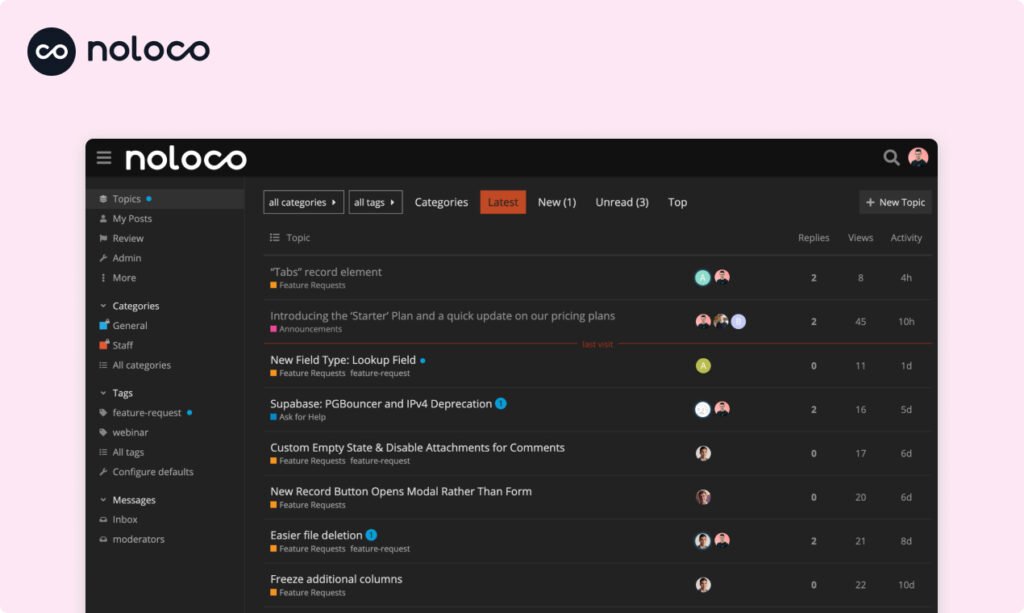
Performance plays a major role in any software platform. During this Noloco Review, the platform demonstrates reliable performance for everyday business use.
Speed
Pages load quickly, even when connected to larger databases.
Searching, filtering, and editing records feels responsive, reducing delays for employees and clients.
Scalability
As businesses grow, Noloco can support:
- Larger databases
- More users
- Additional workflows
- Multiple workspaces
- Increased automation
Small businesses can start with a basic setup and expand as requirements evolve.
Reliability
Cloud hosting ensures consistent availability and regular updates without requiring manual maintenance.
What We Like About Noloco
After testing the platform for this Noloco Review, we found several features that make Noloco a strong choice for businesses and professionals. It combines ease of use with powerful functionality, allowing users to create professional applications without coding. Here are the features we liked the most.
Beginner-Friendly Interface
Noloco offers an intuitive interface that is easy to understand, even for first-time users. The dashboard is clean, navigation is straightforward, and the drag-and-drop builder simplifies app creation. Most users can build their first business application within a few hours without any programming knowledge or technical background.
Professional Design
Applications built with Noloco have a polished and modern appearance from the start. The platform provides responsive layouts that work well across desktop and mobile devices. Businesses can easily customise colours, logos, and branding, creating professional-looking applications that deliver an excellent experience for employees and clients alike.
Excellent Security
Security is one of Noloco's strongest features. It includes role-based permissions, record-level access, secure authentication, and encrypted data connections to protect sensitive business information. These controls ensure users only access authorised data, making the platform suitable for organisations that handle confidential customer or operational records.
AI Assistance
Noloco uses AI to simplify the app-building process and reduce manual work. Users can generate application structures, forms, and workflows much faster than building everything from scratch. This intelligent assistance improves productivity, shortens development time, and helps beginners create functional business applications with greater confidence and accuracy.
Powerful Client Portals
Creating secure client portals is one of Noloco's standout capabilities. Businesses can provide customers with personalised access to documents, invoices, project updates, and support requests through a branded portal. The setup process is straightforward, making it easy to improve client communication and deliver a professional user experience.
Flexible Integrations
Noloco integrates seamlessly with popular platforms such as Airtable, Google Sheets, PostgreSQL, MySQL, and Supabase. Businesses can continue using their existing databases while adding powerful applications on top. This flexibility reduces migration efforts, saves time, and allows organisations to improve workflows without changing their current systems.
Areas That Could Improve
No platform is perfect, and this Noloco Review highlights a few limitations.
Premium Pricing
Compared with some competitors, Noloco's paid plans may feel expensive for freelancers or very small businesses.
Public Website Features
Noloco is designed primarily for business applications rather than marketing websites.
Users wanting a complete website builder may prefer alternatives such as Webflow or Squarespace.
Advanced Customisation
Although Noloco supports many workflows, developers seeking complete control may find Bubble or traditional development frameworks more flexible.
Best Noloco Alternatives
If Noloco doesn't perfectly match your requirements, several alternatives are worth considering.
Bubble
Best for fully customised SaaS applications.
Glide
Ideal for spreadsheet-based mobile apps.
Softr
Excellent for membership sites and Airtable-powered websites.
Retool
Suitable for developers building advanced internal tools.
FlutterFlow
A strong choice for creating native Android and iOS applications.
Appsmith
An open-source option for developers building internal business tools.
Is Noloco Worth the Money?
For businesses that regularly manage clients, projects, employees, or internal workflows, Noloco delivers excellent value.
Instead of purchasing multiple software subscriptions, organisations can build a single customised application that matches their exact processes.
The time saved through automation, improved collaboration, and centralised data often offsets the subscription cost.
For freelancers or hobby users, however, the higher pricing may not provide the same return on investment.
FAQs:
Is Noloco free?
Yes. Noloco offers a free plan with limited features, allowing users to explore the platform before upgrading.
Does Noloco require coding?
No. Most applications can be built without writing any code.
Can I build a CRM using Noloco?
Yes. CRM systems are one of the platform's most popular use cases.
Does Noloco support mobile devices?
Yes. Applications are responsive and work well on smartphones, tablets, and desktop computers.
Can I connect Airtable to Noloco?
Yes. Airtable integration is one of Noloco's core features.
Is Noloco suitable for agencies?
Absolutely. Agencies frequently use Noloco to create branded client portals and project management systems.
Can I automate workflows?
Yes. Noloco supports automation for emails, approvals, notifications, record updates, and other repetitive tasks.
Is Noloco secure?
Yes. Features such as SSL encryption, role-based permissions, secure authentication, and audit logs help protect business data.
Must Read:
- Figma Review: The Best Collaborative Design Tool?
- Base44 Review: Is It the Best AI App Builder?
- Emergent Review: Can It Replace Traditional Coding?
Final Verdict:
After completing this Noloco Review, it's clear that Noloco is one of the best no-code platforms for businesses looking to build internal tools, CRMs, client portals, and operational software without hiring developers.
Its clean interface, AI-powered app builder, powerful automation, strong permission controls, and extensive integration options make it an excellent solution for agencies, consultants, startups, and small to medium-sized businesses.
While the pricing may be higher than some entry-level competitors, the productivity gains and flexibility it offers can make it a worthwhile investment for organisations that rely on efficient workflows and customised business applications.
If your goal is to create customer-facing websites or highly customised SaaS products, other platforms like Bubble or Webflow may offer more flexibility. However, for internal business operations and client collaboration, Noloco stands out as one of the strongest choices available today.









