

Building internal business applications has traditionally required significant time, technical expertise, and development resources. Whether it's creating admin dashboards, customer management systems, inventory trackers, approval workflows, or reporting tools, organisations often spend weeks or even months developing applications from scratch. This can slow down productivity and increase development costs.
Retool aims to solve this problem by providing a powerful low-code development platform that enables businesses to build internal applications much faster. Instead of writing every component manually, developers and operations teams can use drag-and-drop building blocks, connect databases and APIs, automate workflows, and customise applications with JavaScript or SQL when needed.
In this Retool Review, we'll examine its features, low-code development capabilities, integrations, AI tools, workflow automation, ease of use, and overall performance to determine whether it can genuinely speed up internal app development.
What Is Retool?
Retool is a cloud-based and self-hosted low-code development platform designed to help businesses build internal tools quickly. Rather than creating public-facing websites or consumer mobile applications, Retool focuses on software used by employees to manage operations, analyse data, automate workflows, and improve productivity.
Instead of building every interface from scratch, users can assemble applications using pre-built components while connecting directly to databases, APIs, spreadsheets, cloud services, and business systems.
Businesses commonly use Retool to build:
- Admin dashboards
- Customer management systems
- Inventory management tools
- Order management applications
- Support dashboards
- Data management portals
- Internal approval systems
- HR applications
- Reporting dashboards
- Workflow automation tools
Its flexibility makes it suitable for organisations of different sizes, from startups to large enterprises.
Key Features of Retool
One of the biggest reasons businesses choose Retool is its comprehensive collection of development tools. The platform combines visual development with coding flexibility, allowing both technical and non-technical users to build applications efficiently.
Low-Code App Builder
The Low-Code App Builder is Retool's core feature.
Users can build applications by dragging and dropping interface components onto a visual canvas.
Available components include:
- Tables
- Forms
- Buttons
- Charts
- Maps
- File uploaders
- Text editors
- Dropdown menus
- Date pickers
- Dashboards
Developers can further customise these components using JavaScript when advanced functionality is required.
Database Connectivity
Retool supports direct connections to numerous databases.
Examples include:
- PostgreSQL
- MySQL
- MongoDB
- SQL Server
- Snowflake
- BigQuery
- Oracle
- Amazon Redshift
Rather than manually importing data, applications retrieve live information directly from connected databases.
API Integration
Modern businesses rely heavily on APIs.
Retool supports connections with:
- REST APIs
- GraphQL APIs
- SOAP services
- Internal APIs
- Third-party applications
This allows organisations to combine information from multiple systems into one unified application.
Workflow Automation
Businesses often perform repetitive manual tasks.
Retool helps automate workflows such as:
- Approval requests
- Notifications
- Scheduled reports
- Database updates
- Customer record management
- Data synchronisation
Automation reduces repetitive work while improving consistency.
AI Features
Retool has expanded its platform by adding AI-powered functionality.
Businesses can incorporate AI into applications for:
- Content generation
- Data summarisation
- Customer support
- Workflow assistance
- Document processing
- AI-powered search
These capabilities allow organisations to integrate modern AI features directly into their internal tools.
Authentication and Permissions
Security is essential for internal business software.
Retool provides:
- User authentication
- Role-based permissions
- Team management
- Secure access controls
This helps organisations ensure employees access only the information relevant to their roles.
Mobile App Builder
In addition to desktop applications, Retool supports internal mobile applications.
Businesses can create mobile tools for:
- Field employees
- Sales teams
- Warehouse staff
- Delivery operations
- Service technicians
This extends business workflows beyond traditional office environments.
How Does Retool Work?

One of the biggest strengths highlighted in this Retool Review is how efficiently the platform simplifies internal application development. Instead of building every component from scratch, Retool combines a visual drag-and-drop interface with live database and API connections, allowing businesses to create powerful internal tools much faster than traditional development methods.
Whether you're building an admin dashboard, CRM, inventory management system, or approval workflow, Retool provides a structured development process that minimises manual coding while still allowing advanced customisation when required.
A typical Retool workflow includes the following steps:
Create a Retool Workspace
The first step is creating a Retool workspace for your organisation or team. This workspace acts as the central environment where applications, data sources, workflows, and users are managed.
Depending on your business requirements, you can choose either:
- Retool Cloud
- Self-hosted Retool
Once your workspace is ready, you can invite team members and assign user permissions.
Connect Databases or APIs
After setting up the workspace, connect your business data.
Retool supports connections to numerous databases and external services, including:
- PostgreSQL
- MySQL
- SQL Server
- MongoDB
- BigQuery
- Snowflake
- Oracle Database
- REST APIs
- GraphQL APIs
- Third-party SaaS applications
These live connections allow your applications to display and update real-time business information without duplicating data.
Design the User Interface
Once your data sources are connected, you can begin designing the application's interface using Retool's drag-and-drop builder.
Available components include:
- Tables
- Forms
- Buttons
- Charts
- Text fields
- Dropdown menus
- Date pickers
- File uploaders
- Maps
- Navigation panels
Each component can be resized, rearranged, and customised to match your business workflow.
Configure Queries
Retool allows users to create queries that retrieve, update, insert, or delete information from connected databases and APIs.
Common query types include:
- SQL queries
- REST API requests
- GraphQL queries
- JavaScript actions
Queries can also be triggered automatically when users perform actions such as clicking buttons, submitting forms, or updating records.
Add Business Logic
After building the interface and connecting your data, you can add business logic to automate processes and improve functionality.
Examples include:
- User authentication
- Role-based permissions
- Conditional workflows
- Data validation
- Automated notifications
- Approval processes
- Custom calculations
For advanced requirements, developers can use JavaScript to extend application behaviour beyond the standard low-code components.
Test the Application
Before deployment, thoroughly test every feature to ensure the application performs as expected.
Review areas such as:
- Database connections
- API responses
- User permissions
- Form validation
- Workflow automation
- Mobile responsiveness
- Error handling
Testing helps identify issues before employees begin using the application.
Deploy to Users
Once testing is complete, the application can be deployed to authorised users within your organisation.
Retool provides secure access controls that allow administrators to decide:
- Who can access each application
- Which data users can view
- What actions users can perform
- Which workflows users can execute
This makes it easier to roll out internal tools while maintaining security and compliance.
Built-In Infrastructure Saves Development Time
One of the biggest advantages of Retool is that much of the underlying infrastructure is already built into the platform. Authentication, hosting, database connectivity, API integrations, user management, and deployment are handled within the Retool ecosystem, allowing developers to focus on solving business problems rather than building foundational components.
Instead of spending weeks writing boilerplate code, configuring servers, and creating user interfaces from scratch, teams can build functional internal applications in a fraction of the time.
Overall, Retool streamlines the entire development lifecycle by combining visual design, live data connections, workflow automation, and custom coding capabilities into a single platform. This enables organisations to deliver secure, scalable, and feature-rich internal applications much faster than traditional software development approaches.
User Interface and Ease of Use
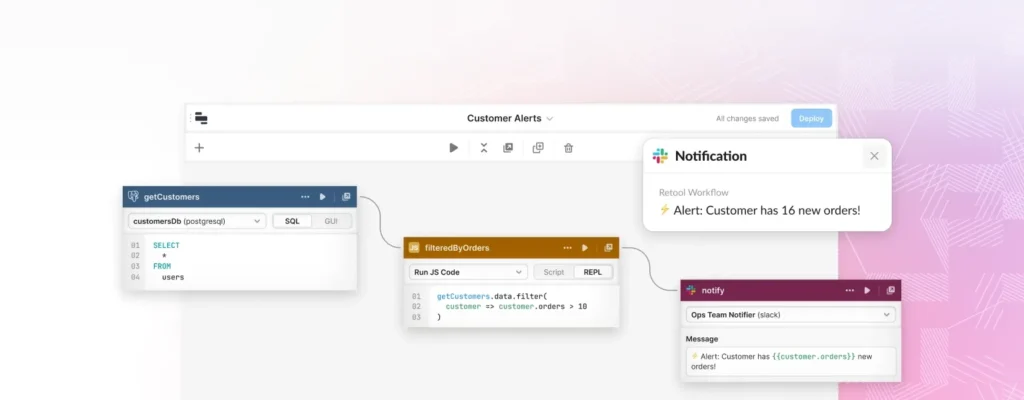
Despite supporting advanced application development, Retool offers a clean and organised interface.
The workspace typically includes:
- Component Library
- Canvas
- Queries
- Database Connections
- APIs
- Workflows
- AI Tools
- Deployments
- Settings
Users drag components onto the canvas while configuring their behaviour through visual settings panels.
Developers can also access code editors whenever custom functionality is required.
The interface strikes a good balance between simplicity and flexibility.
Low-Code App Builder
The Low-Code App Builder is Retool's biggest selling point.
Instead of writing HTML, CSS, and JavaScript for every screen, users assemble applications visually.
Common interface components include:
- Data tables
- Charts
- Forms
- Buttons
- Containers
- Navigation menus
- Images
- Text fields
- Tabs
- Progress indicators
Each component can connect directly to live business data.
Developers can also add custom scripts for more advanced business logic.
This hybrid approach makes Retool attractive for organisations with both technical and non-technical team members.
Database Connectivity
Business applications are only valuable when connected to accurate data.
Retool supports a wide variety of database systems.
Popular integrations include:
- PostgreSQL
- MySQL
- Microsoft SQL Server
- MongoDB
- Snowflake
- BigQuery
- Amazon Aurora
- Oracle Database
Applications can:
- Read data
- Insert records
- Update information
- Delete records
- Execute SQL queries
Because data remains within connected systems, businesses avoid unnecessary duplication.
API Integrations
Many organisations use dozens of cloud services every day.
Retool makes it easy to combine these systems into a single application through API integrations.
Supported connections include:
- REST APIs
- GraphQL APIs
- Internal business APIs
- Third-party SaaS platforms
- Authentication services
Developers can retrieve data from multiple sources and display everything within one interface.
This significantly reduces the need for employees to switch between different software platforms.
Workflow Automation
Automation is another area where Retool performs exceptionally well.
Instead of requiring employees to perform repetitive tasks manually, workflows automate routine business processes.
Examples include:
- Employee approvals
- Customer onboarding
- Report generation
- Scheduled database updates
- Inventory synchronisation
- Email notifications
Workflows can also interact with APIs and databases automatically, reducing manual effort across multiple departments.
AI Features
Artificial intelligence is becoming increasingly important in business software, and Retool has responded by adding AI capabilities that help developers build smarter internal applications.
Users can integrate AI into their workflows for tasks such as:
- Generating content
- Summarising documents
- Answering user questions
- Classifying information
- Automating repetitive decisions
- Enhancing search experiences
By combining AI with existing business data, organisations can create intelligent tools that improve productivity and support faster decision-making.
Early Impressions
After exploring its core capabilities, Retool leaves a strong first impression as one of the most capable low-code platforms for internal application development. Its combination of drag-and-drop design, database connectivity, API integrations, workflow automation, and AI-powered features allows businesses to build sophisticated tools without starting every project from scratch.
The platform's intuitive interface makes it accessible to operations teams and analysts, while its support for JavaScript, SQL, and APIs ensures developers have the flexibility to customise applications when required. For organisations looking to accelerate internal software development and streamline business processes, Retool offers a powerful and scalable solution.
Retool Pricing
Choosing the right low-code platform involves more than comparing features. Pricing also plays an important role, especially for startups, growing businesses, and enterprise teams. Retool offers several pricing plans designed for individual developers, small teams, and large organisations.
The available plans generally differ based on the number of users, application limits, workflow executions, AI usage, security features, and deployment options. As Retool regularly updates its platform, pricing and features may change over time, so it is advisable to check the latest plans before subscribing.
Most paid plans typically include:
- Low-code application builder
- Database connectivity
- API integrations
- Workflow automation
- User authentication
- Team collaboration
- AI-powered development tools
- Cloud hosting
Higher-tier plans generally offer:
- Advanced security controls
- Single Sign-On (SSO)
- Audit logs
- Enterprise permissions
- Self-hosted deployment
- Higher workflow limits
- Priority support
- Advanced administration features
A free plan is also available for individuals and small projects, making it easy to evaluate the platform before upgrading.
Pros and Cons
Like every development platform, Retool has strengths and limitations. Understanding both helps determine whether it fits your organisation's requirements.
Pros
Retool provides an impressive combination of speed, flexibility, and enterprise functionality.
- Rapid internal application development.
- Excellent drag-and-drop interface.
- Extensive database connectivity.
- Powerful API integrations.
- Supports JavaScript and SQL customisation.
- Built-in workflow automation.
- AI-powered development features.
- Cloud and self-hosted deployment options.
- Strong security and access controls.
- Suitable for organisations of all sizes.
Cons
Although Retool is highly capable, there are some limitations.
- Designed primarily for internal applications rather than customer-facing products.
- Advanced customisation requires coding knowledge.
- Enterprise pricing may be expensive for larger teams.
- New users may need time to understand data connections and queries.
Overall, Retool delivers excellent value for businesses looking to accelerate internal software development.
Who Should Use Retool?
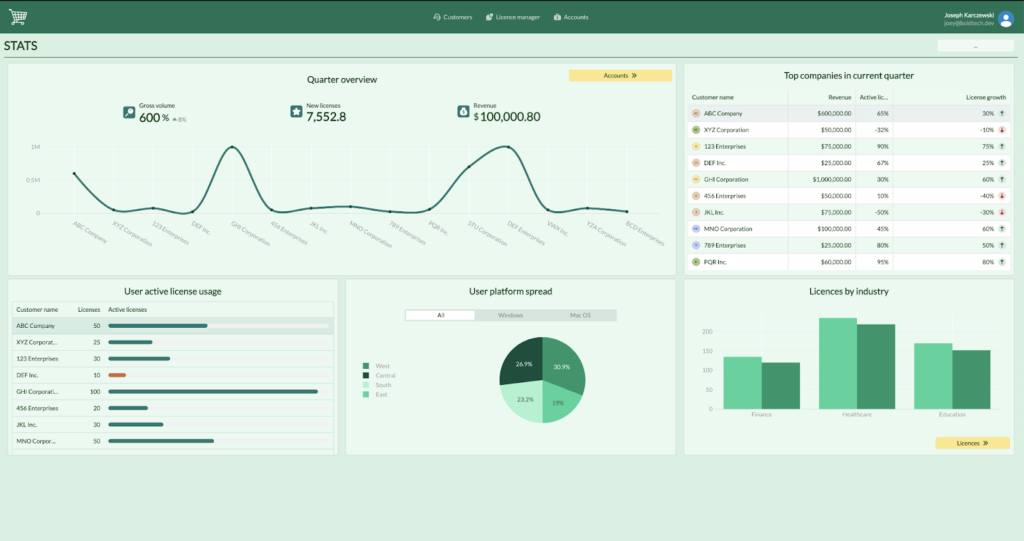
Retool is designed for organisations that want to build business applications quickly while reducing traditional development time.
Software Developers
Developers can accelerate application delivery by combining visual development with custom code.
Typical use cases include:
- Admin dashboards
- Database management
- Internal tools
- Reporting systems
- Customer support portals
Operations Teams
Operations teams frequently require internal applications for managing business processes.
Retool helps automate:
- Order management
- Inventory tracking
- Employee approvals
- Internal reporting
- Workflow management
Product Managers
Product managers can build internal dashboards that monitor:
- Product performance
- Customer activity
- Business metrics
- Feature requests
- Operational KPIs
IT Departments
IT teams can create tools for:
- User management
- Access requests
- Device tracking
- Infrastructure monitoring
- Internal ticketing systems
Startups
Growing companies often lack the resources for lengthy development projects.
Retool enables startups to:
- Launch internal tools quickly
- Reduce development costs
- Improve operational efficiency
- Scale business processes
Enterprise Businesses
Large organisations benefit from:
- Advanced security
- Role-based permissions
- Self-hosting
- Enterprise integrations
- Centralised application management
Deployment Options
One of Retool's strengths is its flexibility in deployment. Businesses can choose a hosting model that aligns with their security, compliance, and operational requirements.
Cloud Deployment
Retool Cloud is managed by Retool, allowing businesses to start building applications without maintaining servers or infrastructure. Updates, maintenance, and scalability are handled automatically, making it an excellent option for teams that want a fast and straightforward setup.
Self-Hosted Deployment
For organisations with strict security or regulatory requirements, Retool also supports self-hosted deployment. This allows businesses to run the platform within their own infrastructure while maintaining greater control over data, networking, and compliance.
The choice between cloud and self-hosted deployment gives businesses the flexibility to adopt Retool in a way that suits their technical and governance needs.
Retool vs Appsmith
Retool and Appsmith are both popular low-code platforms, but they differ in their target audience and feature sets.
| Feature | Retool | Appsmith |
|---|---|---|
| Low-Code Builder | ✔ | ✔ |
| Database Connectivity | ✔ | ✔ |
| API Integration | ✔ | ✔ |
| Workflow Automation | ✔ | Basic |
| AI Features | ✔ | Limited |
| Enterprise Security | Excellent | Good |
| Cloud & Self-Hosted | ✔ | ✔ |
| Drag-and-Drop Interface | Excellent | Very Good |
Retool is generally stronger for enterprise organisations that require advanced workflows, AI capabilities, and extensive integrations.
Retool vs Microsoft Power Apps
Microsoft Power Apps is another leading low-code platform, particularly for organisations already using Microsoft products.
| Feature | Retool | Microsoft Power Apps |
|---|---|---|
| Low-Code Development | ✔ | ✔ |
| Database Support | Extensive | Excellent |
| API Integration | ✔ | ✔ |
| Workflow Automation | ✔ | ✔ |
| AI Features | ✔ | ✔ |
| Cloud Deployment | ✔ | ✔ |
| Self-Hosted Option | ✔ | Limited |
| Microsoft 365 Integration | Limited | Excellent |
Power Apps is often the preferred choice for businesses deeply invested in the Microsoft ecosystem, while Retool offers broader flexibility across a wide range of databases, APIs, and cloud services.
Tips for Getting the Most from Retool
Using Retool effectively can significantly reduce development time while improving application quality. The following best practices help maximise the platform's capabilities.
Plan Your Application Before Building
Start by identifying:
- User roles
- Required data sources
- Business workflows
- Reporting needs
- Security requirements
A well-defined plan reduces unnecessary redesign later in the project.
Connect Reliable Data Sources
Ensure your databases and APIs are well structured before connecting them to Retool. Clean and consistent data improves application performance and reduces troubleshooting.
Use Pre-Built Components
Retool includes a wide selection of ready-made interface components. Reusing these elements speeds up development while maintaining a consistent user experience.
Automate Repetitive Tasks
Take advantage of Retool Workflows to automate routine business processes such as approvals, scheduled reports, notifications, and database updates. Automation reduces manual work and improves operational efficiency.
Apply Role-Based Permissions
Configure user permissions carefully to ensure employees only access the information and actions relevant to their responsibilities. This strengthens security and helps protect sensitive business data.
Integrate AI Where It Adds Value
Use Retool's AI features to enhance productivity through tasks such as document summarisation, intelligent search, content generation, and workflow assistance. Focus AI on repetitive or time-consuming activities where it can deliver measurable benefits.
Test Before Deployment
Before releasing an application to users, verify:
- Data accuracy
- Workflow behaviour
- API responses
- User permissions
- Mobile responsiveness
- Error handling
Thorough testing helps reduce issues after deployment.
Monitor and Improve
Review application usage, gather user feedback, and update workflows regularly. Continuous improvement ensures internal tools remain effective as business processes evolve.
FAQs:
Is Retool suitable for beginners?
Yes. Retool provides a visual interface that allows beginners to build applications using drag-and-drop components. However, knowledge of SQL or JavaScript can be helpful for more advanced projects.
Can Retool connect to databases?
Yes. Retool supports connections to numerous databases, including PostgreSQL, MySQL, MongoDB, SQL Server, BigQuery, Snowflake, Oracle, and many others.
Does Retool support APIs?
Yes. Developers can integrate REST, GraphQL, SOAP, internal APIs, and third-party services into Retool applications.
Can Retool build public websites?
Retool is primarily designed for internal business applications rather than public-facing consumer websites.
Does Retool include AI features?
Yes. Retool provides AI capabilities that can be integrated into applications for tasks such as content generation, document summarisation, workflow assistance, and intelligent search.
Is Retool available as a cloud service?
Yes. Businesses can choose between Retool Cloud and self-hosted deployment depending on their operational and compliance requirements.
Must Read:
- Square Review: Can It Simplify Your Business Payments?
- ElevenLabs Review: Can It Create Human-Like AI Voices?
- Manus AI Review: Is It the Best Autonomous AI Agent?
Final Verdict:
After evaluating its features, integrations, deployment flexibility, and development experience, Retool stands out as one of the most powerful low-code platforms for building internal business applications. Its combination of visual development tools, database connectivity, API integrations, workflow automation, and AI-powered features enables organisations to create sophisticated internal software in a fraction of the time required for traditional development.
One of Retool's greatest strengths is its ability to balance simplicity with flexibility. Business users can assemble applications using drag-and-drop components, while developers can extend functionality with JavaScript, SQL, and custom APIs whenever needed. This hybrid approach makes the platform suitable for both technical and operational teams.
Although Retool is not intended for public consumer applications and advanced customisation may require coding knowledge, its productivity gains and enterprise capabilities make it a compelling solution for organisations looking to modernise internal operations.
If your goal is to build secure, scalable, and feature-rich internal tools without starting every project from scratch, Retool is an excellent choice.









