

Choosing the right website-building platform is one of the most important decisions for freelancers, agencies, and businesses. A good platform should make it easy to create professional websites while providing the flexibility to customise layouts, manage content, optimise for search engines, and collaborate with clients. This is where Wix Studio Review becomes an important topic for anyone considering a modern website builder.
Wix has long been known for its beginner-friendly website builder, but the company introduced Wix Studio to meet the needs of professional designers, developers, and agencies. Unlike the traditional Wix Editor, Wix Studio offers responsive design tools, AI-powered website creation, advanced CMS capabilities, reusable components, collaboration features, and developer tools powered by Velo.
In this Wix Studio Review, we'll explore everything you need to know before investing your time and money. We'll cover its features, usability, design capabilities, AI tools, performance, pricing, SEO features, advantages, disadvantages, and whether it offers enough value for professional users.
If you're a freelancer building client websites, an agency managing multiple projects, or a business looking for a scalable website platform, this review will help you decide whether Wix Studio deserves a place in your workflow.
What Is Wix Studio?
The Wix Studio Review starts with understanding what the platform actually is.
Wix Studio is a professional website creation platform developed by Wix specifically for agencies, freelancers, web designers, and developers. It combines visual drag-and-drop editing with advanced responsive design controls and developer functionality.
Unlike the classic Wix Editor, Wix Studio focuses on building websites that work perfectly across desktops, tablets, and smartphones without creating separate mobile layouts manually.
It also includes collaboration tools, allowing multiple team members to work on the same project simultaneously. This makes it especially useful for agencies managing dozens or even hundreds of client websites.
Some of its biggest highlights include:
- AI-powered website generation
- Responsive editor
- Advanced layout controls
- Dynamic CMS
- Velo development platform
- Client management dashboard
- Built-in hosting
- Enterprise-level security
- SEO optimisation tools
- eCommerce capabilities
Instead of relying on third-party plugins for every feature, Wix Studio includes most essential business tools within one platform.
Who Is Wix Studio Designed For?
One of the biggest questions in any Wix Studio Review is identifying the ideal audience.
Although beginners can use Wix Studio, it was primarily created for professionals.
It works particularly well for:
Freelance Web Designers
Freelancers can design custom websites without writing large amounts of code. The responsive editor significantly reduces development time while still offering creative flexibility.
Digital Agencies
Agencies benefit from shared workspaces, reusable design assets, templates, client permissions, and collaborative editing.
Managing multiple client websites becomes much easier compared to traditional website builders.
Developers
Developers can extend websites using Velo by Wix.
This includes:
- JavaScript
- APIs
- Backend code
- Custom databases
- Integrations
- Dynamic pages
Small Businesses
Businesses wanting complete control over their websites without hiring a full development team may also find Wix Studio appealing.
Marketing Teams
Marketing teams appreciate the built-in SEO tools, analytics, forms, automation, CRM integration, and landing page creation features.
Wix Studio Interface
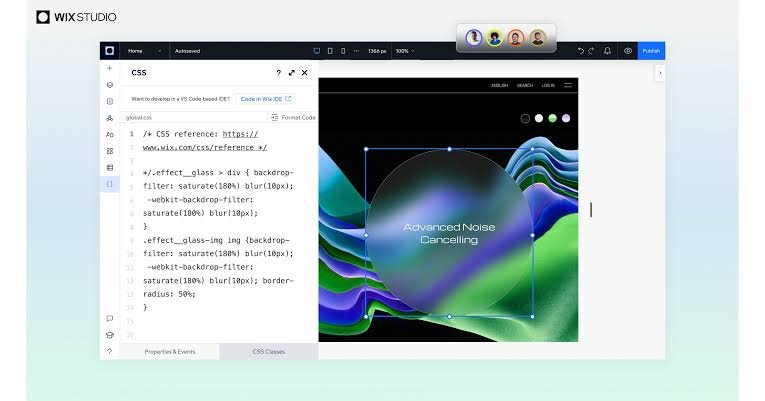
An important aspect of every Wix Studio Review is usability.
Although Wix Studio includes advanced tools, the interface remains surprisingly organised.
After creating an account, users arrive at the Studio Dashboard where they can:
- Create websites
- Manage clients
- Access templates
- View analytics
- Manage CMS collections
- Access AI tools
- Edit projects
- Invite collaborators
The dashboard feels clean and modern without overwhelming users.
The editor itself resembles professional design software while remaining accessible to non-developers.
Everything from typography and spacing to animations and responsive layouts can be adjusted visually.
AI Website Creation
Artificial intelligence has become one of the biggest selling points in modern website builders.
The Wix Studio Review wouldn't be complete without discussing its AI capabilities.
Instead of starting from a blank canvas, users can describe their business and let AI generate an initial website.
The AI creates:
- Homepage layouts
- Navigation menus
- Colour palettes
- Content sections
- Images
- Call-to-action blocks
- Contact forms
- Service pages
This dramatically reduces design time.
Instead of spending hours building wireframes, users receive a functional starting point within minutes.
Designers remain free to customise every section afterwards.
Responsive Design Tools
One of Wix Studio's biggest strengths is responsive design.
Older website builders often required separate desktop and mobile editing.
Wix Studio takes a completely different approach.
Layouts automatically adapt across:
- Desktop
- Laptop
- Tablet
- Mobile
Users can customise breakpoints without rebuilding entire pages.
The responsive editor includes:
Flexible Grids
Elements resize intelligently according to screen size.
Containers
Content stays organised inside responsive containers rather than breaking on smaller devices.
Docking Controls
Users can anchor elements relative to page edges.
Relative Sizing
Objects resize proportionally rather than remaining fixed.
These features make Wix Studio far more professional than many traditional drag-and-drop builders.
Design Flexibility
Another major point in this Wix Studio Review is creative freedom.
Unlike simple website builders that restrict layouts, Wix Studio provides extensive design control.
Users can customise:
- Fonts
- Colours
- Buttons
- Navigation
- Animations
- Borders
- Shadows
- Background videos
- Shapes
- Icons
- Gradients
- Section spacing
Design consistency becomes easier thanks to Global Styles.
Instead of editing every page individually, designers can change fonts or colours once and apply updates across the entire website.
This saves significant time on larger projects.
Templates
Wix Studio includes professionally designed templates across multiple industries.
Popular categories include:
- Agencies
- Restaurants
- Photography
- Fashion
- SaaS
- Technology
- Healthcare
- Real Estate
- Online Stores
- Education
- Personal Brands
Unlike basic templates found elsewhere, Studio templates focus heavily on responsiveness and modern layouts.
They also include animations, interactive elements, and clean typography.
Users can customise every component without restrictions.
CMS Capabilities
A major strength highlighted in this Wix Studio Review is its built-in Content Management System.
Instead of manually updating dozens of pages, users can create collections that automatically populate dynamic content.
Examples include:
- Property listings
- Team members
- Blog articles
- Services
- Testimonials
- Events
- Courses
- Products
- Job listings
- Portfolios
Updating content becomes much faster because changes only need to be made once.
For agencies managing large client websites, this feature saves considerable time.
Blogging Features
Content marketing remains essential for SEO.
Wix Studio includes a complete blogging system with features such as:
- Categories
- Tags
- Featured images
- Author profiles
- Scheduling
- Drafts
- SEO settings
- Social sharing
- Rich text editor
The blogging experience feels polished and suitable for businesses publishing content regularly.
Although dedicated platforms like WordPress still offer more advanced blogging flexibility, Wix Studio provides more than enough tools for most companies.
Collaboration Tools
Collaboration is another area where Wix Studio stands out.
Unlike traditional website builders designed for individual users, Studio supports entire teams.
Features include:
- Multiple editors
- Shared workspaces
- Permissions
- Client access
- Role management
- Comments
- Activity history
Agencies can invite designers, developers, marketers, copywriters, and clients into the same project without sharing passwords.
This improves workflow efficiency and reduces communication delays.
Developer Features

Although Wix Studio focuses on visual design, developers are not left behind.
Using Velo by Wix, developers can build advanced functionality.
Capabilities include:
- JavaScript programming
- APIs
- Custom forms
- Database collections
- Backend functions
- Third-party integrations
- Dynamic pages
- User authentication
This hybrid approach makes Wix Studio appealing to both designers and developers.
Visual editing handles most layout work, while code enables custom business logic when required.
App Marketplace
No Wix Studio Review would be complete without mentioning the App Market.
Users can install hundreds of apps covering:
- Live chat
- Booking systems
- Email marketing
- CRM
- Analytics
- Forms
- Social media
- Reviews
- Accounting
- Shipping
- Payments
- Memberships
- Marketing automation
Popular integrations include payment gateways, marketing tools, scheduling platforms, and customer support software.
This allows businesses to expand website functionality without building everything from scratch.
User Experience
From the first login, Wix Studio feels polished and professionally designed.
Navigation is intuitive, tools are logically organised, and projects remain easy to manage even as they grow.
While beginners may need a short learning period to understand responsive layouts and advanced design controls, the interface is much easier to learn than traditional web development tools.
For experienced designers, the workflow feels fast, efficient, and highly customisable.
Wix Studio Pricing
No Wix Studio Review would be complete without looking at pricing. Wix Studio follows a flexible pricing model that allows users to start with a free plan before upgrading to premium plans as their projects grow.
The free version lets you explore the editor, experiment with templates, and become familiar with the platform. However, websites published on the free plan include Wix branding and use a Wix subdomain.
Premium plans unlock features such as:
- Custom domain connection
- Increased storage and bandwidth
- Ad-free websites
- Online payments
- Advanced marketing tools
- Additional collaboration features
- Premium customer support
- Higher CMS limits
For agencies, Wix Studio also offers workspace and enterprise solutions that make managing multiple client projects much easier.
Although Wix Studio costs more than some beginner website builders, the included hosting, security, maintenance, CMS, and collaboration tools provide excellent value for professionals.
SEO Features
Search engine optimisation plays a major role in website success, and this Wix Studio Review shows that the platform has significantly improved its SEO capabilities over recent years.
Wix Studio includes many built-in SEO tools without requiring third-party plugins.
Custom Meta Titles and Descriptions
Users can create unique SEO titles and meta descriptions for every page to improve visibility in search results.
Custom URLs
Clean, readable URLs can be customised for better indexing and user experience.
XML Sitemap
Every website automatically generates an XML sitemap, helping search engines discover pages more efficiently.
Robots.txt
Advanced users can customise robots.txt settings to control how search engines crawl specific sections of the website.
Canonical Tags
Canonical URLs help reduce duplicate content issues, which is especially useful for dynamic pages and online stores.
Structured Data
Users can add schema markup to improve search appearance and increase the chances of earning rich results.
Image Optimisation
Wix Studio automatically compresses images while maintaining quality, helping pages load faster.
SEO Checklist
The built-in SEO Setup Checklist guides beginners through the optimisation process step by step.
Overall, Wix Studio provides enough SEO functionality for most businesses, bloggers, and agencies without needing additional SEO plugins.
eCommerce Features
Businesses planning to sell products online will appreciate the powerful eCommerce tools available in Wix Studio.
The platform supports:
- Physical products
- Digital downloads
- Subscription products
- Service bookings
- Gift cards
- Discount codes
- Inventory management
- Order tracking
- Multiple payment gateways
- Tax management
- Shipping rules
Store owners can also manage products through a central dashboard and customise product pages using the responsive editor.
For small and medium-sized online stores, Wix Studio offers a complete solution without relying on external plugins.
Marketing and Business Tools
Another advantage highlighted in this Wix Studio Review is the collection of built-in marketing features.
Instead of installing several third-party services, businesses can access many tools directly from the dashboard.
These include:
- Email marketing
- Customer Relationship Management (CRM)
- Lead capture forms
- Live chat
- Appointment bookings
- Marketing automations
- Social media integrations
- Analytics dashboard
- Customer management
Having these tools integrated into one platform simplifies daily website management.
Website Performance
Website speed affects both user experience and search engine rankings.
Wix Studio has made major improvements in performance by using modern technologies and a global content delivery network (CDN).
Performance features include:
- Automatic image optimisation
- Lazy loading
- Global CDN
- Fast cloud hosting
- SSL encryption
- Automatic caching
- Responsive image delivery
Actual performance depends on factors such as image sizes, animations, and third-party apps, but websites built with Wix Studio generally achieve good loading speeds when following best practices.
Security
Security is an essential consideration for businesses and agencies managing client websites.
Wix Studio includes enterprise-grade security features without requiring manual configuration.
Security highlights include:
- Free SSL certificates
- Automatic updates
- DDoS protection
- Secure cloud hosting
- Data encryption
- Two-factor authentication
- Continuous security monitoring
Unlike self-hosted platforms where users must update software manually, Wix manages infrastructure and security in the background.
This reduces maintenance while improving website reliability.
Customer Support
Reliable customer support is another important factor when evaluating any website builder.
Wix Studio offers several support channels, including:
- Help Centre
- Tutorials
- Video guides
- Community forums
- Live chat (for eligible plans)
- Ticket support
- Priority support on selected plans
The Help Centre contains extensive documentation covering design, development, SEO, CMS, eCommerce, and troubleshooting.
Most users can solve common issues without contacting support directly.

Pros of Wix Studio
After testing its features, several strengths stand out in this Wix Studio Review.
Modern Responsive Editor
The responsive editor allows websites to adapt beautifully across desktop, tablet, and mobile devices without creating separate layouts.
Professional Design Flexibility
Designers enjoy extensive control over spacing, typography, animations, and layouts while still benefiting from drag-and-drop simplicity.
Powerful AI Features
AI-generated layouts, content suggestions, and design assistance help speed up website creation.
Excellent CMS
The built-in CMS simplifies the management of blogs, portfolios, directories, and dynamic content.
Collaboration Tools
Shared workspaces, permissions, and client collaboration make Wix Studio ideal for agencies.
Built-in Hosting
Hosting, SSL, updates, and maintenance are included, eliminating the need for server management.
Strong SEO Features
Modern SEO tools make it easier to optimise websites for Google and other search engines.
Extensive App Marketplace
Businesses can expand functionality through hundreds of integrations.
Cons of Wix Studio
Although Wix Studio has many strengths, no platform is perfect.
Learning Curve
The advanced editor contains more features than the traditional Wix Editor, which may overwhelm complete beginners.
Limited Migration
Moving an existing Wix Studio website to another platform is more difficult than migrating a self-hosted WordPress website.
Premium Costs
Professional plans may become expensive for agencies managing many websites.
App Dependency
Some advanced features require installing additional apps, which can increase monthly costs.
Limited Backend Flexibility
Although Velo provides powerful development tools, it still offers less server-level control than fully custom development.
Wix Studio vs Webflow
Many professionals compare these two platforms.
| Feature | Wix Studio | Webflow |
|---|---|---|
| Ease of Use | Excellent | Moderate |
| Responsive Design | Excellent | Excellent |
| CMS | Excellent | Excellent |
| AI Tools | Built-in | Limited |
| Hosting | Included | Included |
| Learning Curve | Lower | Higher |
| Collaboration | Excellent | Good |
| Coding Flexibility | Good | Excellent |
Webflow offers deeper developer control, while Wix Studio provides a faster workflow for designers and agencies.
Wix Studio vs Framer
Framer focuses heavily on modern visual design and interactive animations.
Wix Studio offers broader business functionality, including:
- CMS
- CRM
- Online stores
- Booking systems
- Marketing automation
- Client management
For agencies building business websites rather than design portfolios, Wix Studio often provides a more complete solution.
Wix Studio vs Squarespace
Squarespace remains one of the easiest website builders available.
However, Wix Studio offers:
- Better responsive editing
- More advanced CMS
- Better collaboration
- AI website creation
- Developer features
- Larger app marketplace
Squarespace still excels in simplicity and elegant templates, while Wix Studio delivers greater flexibility for professional users.
Who Should Use Wix Studio?
This Wix Studio Review clearly shows that the platform is best suited for professionals rather than casual users.
It is an excellent choice for:
- Freelancers
- Digital agencies
- Creative studios
- Marketing teams
- Small businesses
- Online stores
- Portfolio websites
- Consultants
- SaaS companies
- Service providers
Users seeking complete design freedom without managing hosting or security will benefit the most.
Who Should Avoid Wix Studio?
Although Wix Studio suits many businesses, it may not be the best option for everyone.
You may prefer another platform if you:
- Want a completely free website long-term
- Require full server access
- Need advanced enterprise software development
- Prefer fully open-source platforms
- Already manage large custom WordPress installations
Final Verdict:
After evaluating every major feature in this Wix Studio Review, it is clear that Wix Studio is one of the most capable professional website builders available today.
It successfully bridges the gap between beginner-friendly drag-and-drop builders and complex web development platforms. Designers can create visually stunning, responsive websites without writing extensive code, while developers can extend functionality using Velo when needed.
The platform also stands out with its built-in AI tools, responsive editor, powerful CMS, collaboration features, integrated hosting, and strong SEO capabilities. Agencies managing multiple client websites will particularly appreciate the shared workspaces, reusable components, and streamlined workflows.
While premium pricing and a slight learning curve may discourage some beginners, the overall value is impressive. Businesses receive hosting, security, updates, performance optimisation, and business tools in one integrated ecosystem.
For freelancers, agencies, and businesses seeking a modern, scalable website-building solution, Wix Studio is a strong investment that can support projects from simple landing pages to complex business websites.
Must Read:
- Squarespace Review: Is It the Best Website Builder?
- Zutrix Review: The Smart SEO Rank Tracking Tool?
- PressMeGPT Review: Can It Write SEO-Friendly Blog Posts?
FAQs:
Is Wix Studio better than the regular Wix Editor?
Yes. Wix Studio offers advanced responsive design tools, improved collaboration, AI-powered features, reusable components, and developer capabilities, making it more suitable for professionals and agencies.
Is Wix Studio suitable for beginners?
Yes, but beginners should expect a short learning curve. The interface is intuitive, though the additional design controls may take some time to master.
Can I build an online store with Wix Studio?
Yes. Wix Studio supports physical products, digital products, subscriptions, bookings, inventory management, payment gateways, shipping, taxes, and promotional tools.
Does Wix Studio include hosting?
Yes. Every Wix Studio website includes secure cloud hosting, SSL certificates, automatic updates, and a global CDN.
Is Wix Studio good for SEO?
Yes. Wix Studio provides custom meta tags, structured data support, XML sitemaps, canonical URLs, robots.txt management, image optimisation, and built-in SEO guidance.
Can developers customise Wix Studio websites?
Yes. Developers can use Velo by Wix to create custom functionality with JavaScript, APIs, backend code, databases, and integrations.
Is Wix Studio worth it for agencies?
Absolutely. Agencies benefit from collaboration tools, client management, reusable assets, responsive design, integrated hosting, and efficient workflows that reduce development time while maintaining professional quality.









