

Artificial intelligence is making app development faster and more accessible than ever before. Today, you no longer need years of programming experience to create functional web applications or mobile apps.
Modern AI-powered platforms can generate interfaces, databases, authentication systems, and business logic using simple text prompts. One of the newest platforms attracting attention is the OnSpace AI App Builder.
In this OnSpace AI Review, we’ll explore whether OnSpace AI is truly one of the best no-code AI app builders available today. We’ll examine its features, AI capabilities, ease of use, supported app types, integrations, and overall value for AI tool reviewers, bloggers, entrepreneurs, and businesses. By the end of this review, you’ll know whether OnSpace AI is the right platform for your next project.
What Is OnSpace AI App Builder?
The OnSpace AI App Builder is an AI-powered no-code platform that enables users to create web applications, mobile apps, SaaS products, dashboards, and internal business tools using natural language prompts.
Instead of writing code manually, users simply describe the app they want to build. The AI then generates the interface, backend, database, authentication, and application logic automatically.
This approach dramatically reduces development time and makes app creation accessible to beginners while still providing flexibility for experienced developers.
Why OnSpace AI Is Gaining Popularity
The OnSpace AI App Builder has become increasingly popular because it combines artificial intelligence with a no-code workflow. Rather than spending days building a project from scratch, users can generate a working prototype within minutes.
Some of the main reasons people choose OnSpace AI include:
- AI-powered app generation
- No coding required
- Full-stack application support
- Built-in backend
- Authentication system
- Database integration
- Responsive app design
- GitHub export
- Stripe payment support
- Fast deployment
These features make it an attractive option for startups, agencies, bloggers, and AI enthusiasts.
How Does OnSpace AI Work?
One of the biggest highlights in this OnSpace AI Review is its simple workflow.
The platform follows a prompt-based approach.
Step 1: Describe Your App
Users explain what they want to build using plain English.
For example:
- Build a hotel booking website.
- Create an AI chatbot.
- Design a CRM dashboard.
- Generate a task management app.
Step 2: AI Generates the Application
The OnSpace AI App Builder automatically creates:
- User interface
- Backend
- Database
- Authentication
- Navigation
- Basic business logic
Step 3: Customise
Users can edit:
- Colours
- Layout
- Buttons
- Forms
- Images
- Branding
- Features
Step 4: Publish
Once satisfied, the application can be deployed or exported for further development.
Key Features of OnSpace AI App Builder
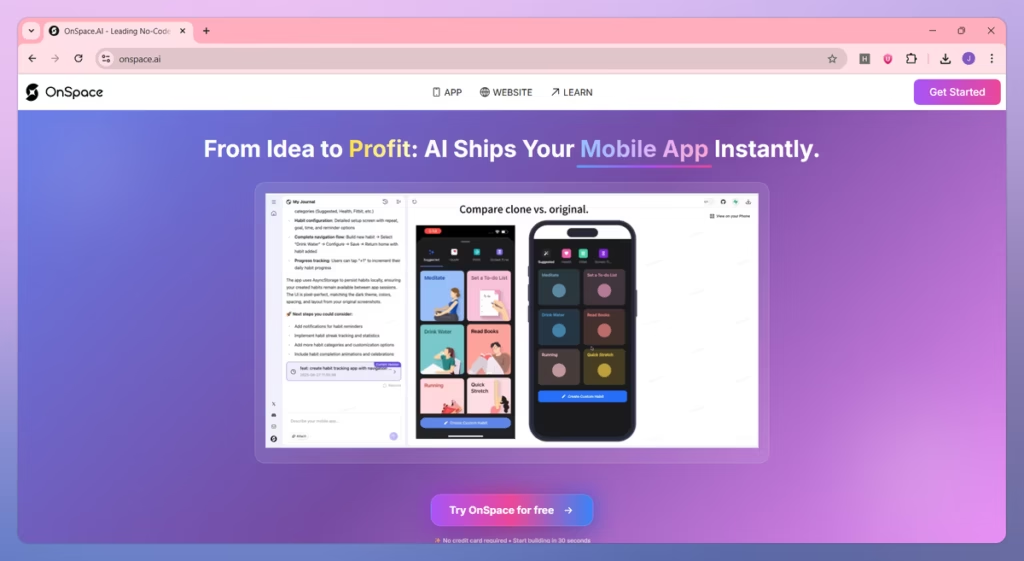
The OnSpace AI App Builder includes a wide range of features that simplify app development for both beginners and professionals.
AI App Generation
The platform converts natural language prompts into complete applications.
Instead of manually writing code, users simply describe the desired functionality.
The AI generates:
- Pages
- Navigation
- Backend
- Database
- User authentication
- Business logic
This significantly reduces development time.
No-Code Development
One of the strongest advantages discussed in this OnSpace AI Review is that users can build applications without programming knowledge.
The drag-and-drop interface allows beginners to customise projects visually while AI handles most of the technical work.
Built-In Backend
Unlike many no-code platforms, the OnSpace AI App Builder includes backend functionality.
Users can manage:
- User authentication
- Data storage
- APIs
- Business logic
- Cloud databases
This eliminates the need to configure backend services separately.
AI User Interface Generation
The platform automatically creates attractive user interfaces based on your prompt.
Generated layouts are responsive and suitable for:
- Desktop
- Tablet
- Mobile
Users can later customise colours, typography, spacing, and branding.
Authentication
Applications can include secure user authentication features.
Common options include:
- Email login
- Password authentication
- User accounts
- Session management
Authentication is generated automatically for many application types.
Database Integration
The OnSpace AI App Builder supports integrated databases for storing application data.
Examples include:
- Customer information
- Products
- Orders
- Tasks
- User profiles
Users do not need extensive database knowledge to manage application data.
Supported Application Types
The OnSpace AI App Builder can generate many different application categories.
Web Applications
Users can create:
- Business websites
- SaaS products
- Dashboards
- CRM systems
- Internal tools
- Landing pages
Mobile Applications
The platform also supports mobile-friendly applications suitable for Android and iOS deployment.
Examples include:
- Fitness apps
- Booking apps
- Educational apps
- Productivity apps
- AI assistants
AI Applications
The OnSpace AI App Builder is particularly useful for AI-powered projects.
Examples include:
- AI chatbots
- AI writing assistants
- Image generation tools
- AI search tools
- Customer support assistants
Business Tools
Companies can quickly generate internal business software.
Examples include:
- HR portals
- Inventory management
- Employee dashboards
- CRM software
- Reporting systems
Integrations
Modern applications often rely on external services.
The OnSpace AI App Builder supports integrations with several popular tools.
Examples include:
- GitHub
- Stripe
- Authentication providers
- APIs
- Cloud services
These integrations help users extend application functionality without extensive coding.
GitHub Export
One feature highlighted in this OnSpace AI Review is GitHub integration.
Developers can export generated projects to GitHub.
Benefits include:
- Version control
- Team collaboration
- Code ownership
- Further customisation
This makes the platform attractive for professional developers as well as beginners.
Payment Integration
Applications can integrate payment gateways for monetisation.
Examples include:
- Subscription services
- Digital products
- Online courses
- Membership websites
- SaaS applications
Stripe integration allows businesses to begin accepting payments quickly.
User Interface
The OnSpace AI App Builder offers a modern and beginner-friendly interface.
The dashboard is organised into sections for:
- Projects
- Templates
- AI prompts
- Deployment
- Integrations
- Code editing
Most users can begin building applications with very little training.
Templates
Templates reduce the amount of work required when starting new projects.
Popular template categories include:
- Ecommerce
- AI chatbot
- SaaS dashboard
- Portfolio
- CRM
- Landing page
- Booking system
- Blog
- Productivity app
Templates can be customised after generation.
Performance
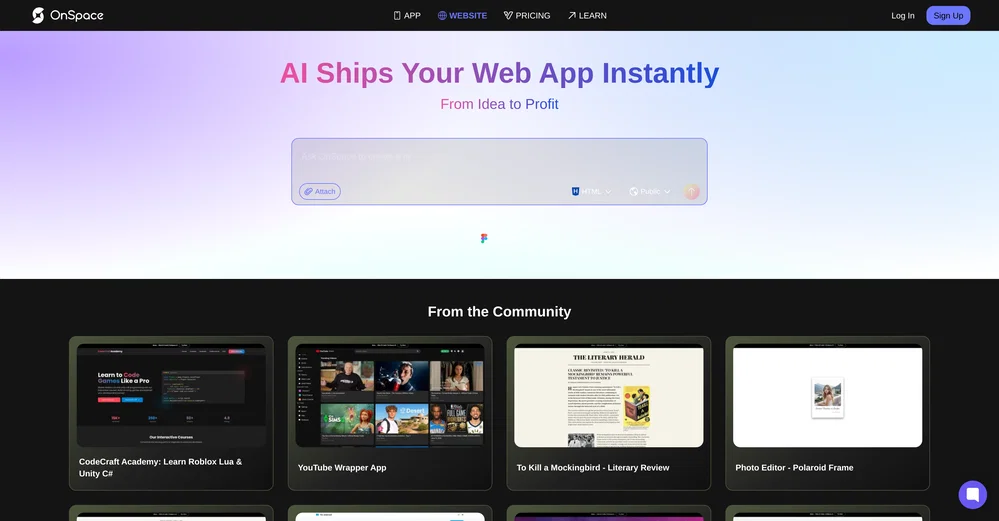
Application performance depends on project complexity.
However, the OnSpace AI App Builder generally produces lightweight, responsive applications suitable for rapid prototyping and MVP development.
Fast generation allows users to experiment with multiple ideas before committing to a final product.
Ease of Use
One of the strongest points in this OnSpace AI Review is ease of use.
Even users without technical backgrounds can:
- Generate applications
- Edit layouts
- Manage data
- Deploy projects
- Connect integrations
The combination of AI prompts and visual editing significantly reduces the learning curve.
Benefits for AI Tool Reviewers and Bloggers
The OnSpace AI App Builder is especially valuable for AI reviewers and bloggers who regularly test new software and demonstrate practical use cases.
Key benefits include:
- Quickly build demo applications for reviews.
- Create interactive tools for blog visitors.
- Prototype AI ideas without coding.
- Showcase real-world workflows in tutorials.
- Build landing pages for affiliate campaigns.
- Develop simple SaaS MVPs for content experiments.
- Generate examples to include in YouTube videos and blog articles.
These capabilities allow content creators to produce more engaging reviews while demonstrating the platform’s features through real projects.
OnSpace AI Pricing Plans
Pricing is an important factor in this OnSpace AI Review, especially for bloggers, AI reviewers, and startups looking for an affordable no-code solution. OnSpace AI offers multiple plans to suit different user needs.
Free Plan
The Free plan is ideal for beginners who want to explore the platform before purchasing a subscription.
It generally includes:
- Limited AI app generation
- Public projects
- Basic templates
- Limited monthly credits
- Code editor access
Pro Plan
The Pro plan is designed for creators and professionals building applications regularly.
Common features include:
- Private projects
- More AI credits
- Faster app generation
- Custom domains
- Advanced AI models
- Priority support
Enterprise Plan
Large businesses and organisations can choose an enterprise solution with features such as:
- Team collaboration
- Advanced security
- SSO support
- API access
- Dedicated account management
- Custom pricing
Pros of OnSpace AI App Builder
This OnSpace AI Review found several strengths that make the OnSpace AI App Builder a compelling no-code platform.
- AI-powered app generation from simple prompts.
- Beginner-friendly with no coding required.
- Built-in backend and database support.
- Responsive web and mobile app creation.
- GitHub integration for code export.
- Stripe payment integration.
- Fast MVP and prototype development.
- Modern user interface.
- Supports custom domains.
- Suitable for startups, bloggers, and agencies.
Cons of OnSpace AI App Builder
Although the OnSpace AI App Builder offers many useful features, there are some limitations to consider.
- Advanced projects may require manual refinement.
- Some premium features require a paid subscription.
- Limited integrations compared to established platforms.
- AI-generated apps may need optimisation before production.
- Credit-based usage may limit heavy users.
- Not ideal for highly complex enterprise applications.
OnSpace AI vs Lovable
Both platforms use AI to simplify application development, but they target slightly different users.
| Feature | OnSpace AI | Lovable |
|---|---|---|
| AI App Generation | Excellent | Excellent |
| No-Code Experience | Excellent | Very Good |
| Backend Support | Built-in | Limited |
| GitHub Export | Yes | Yes |
| Stripe Integration | Yes | Limited |
| Beginner Friendly | Excellent | Excellent |
Which One Is Better?
Choose OnSpace AI if you need a complete no-code platform with backend functionality and deployment options.
Choose Lovable if your focus is rapid frontend prototyping with AI assistance.
OnSpace AI vs Bolt
Bolt is another AI-powered development platform focused on speed.
| Feature | OnSpace AI | Bolt |
|---|---|---|
| Full-Stack Generation | Excellent | Very Good |
| Backend Integration | Built-in | Limited |
| AI Prompt Workflow | Excellent | Excellent |
| Beginner Friendly | Excellent | Very Good |
| Deployment | Yes | Yes |
Which One Is Better?
Choose OnSpace AI if you want a more complete no-code experience with integrated backend services.
Choose Bolt if you prefer a developer-focused workflow with greater manual control.

OnSpace AI vs Replit
Replit combines AI coding with an online development environment.
| Feature | OnSpace AI | Replit |
|---|---|---|
| No-Code Development | Excellent | Limited |
| AI Code Generation | Excellent | Excellent |
| Built-In Backend | Yes | Manual Setup |
| Beginner Friendly | Excellent | Good |
| Visual App Builder | Yes | Limited |
Which One Is Better?
Choose OnSpace AI if you want to build applications visually without writing code.
Choose Replit if you prefer coding while using AI to improve productivity.
Real-World Use Cases
The OnSpace AI App Builder supports a wide range of practical projects, making it suitable for entrepreneurs, bloggers, agencies, and businesses looking to build applications quickly without extensive coding.
AI Tool Review Websites
AI reviewers and bloggers can use the OnSpace AI App Builder to create interactive demo applications, comparison tools, and landing pages that showcase AI software in action. These hands-on demonstrations help increase audience engagement, improve user experience, and make product reviews more informative and credible.
SaaS MVPs
Startups and entrepreneurs can quickly build minimum viable products (MVPs) to test business ideas before investing in full-scale development. The OnSpace AI App Builder accelerates product validation by generating functional applications that can collect user feedback and support early customer acquisition.
Internal Business Tools
Businesses can develop internal applications such as employee portals, CRM systems, inventory management software, reporting dashboards, and workflow automation tools. These applications help improve operational efficiency while reducing the time and cost associated with traditional software development.
Booking Platforms
The OnSpace AI App Builder can generate booking applications for hotels, healthcare clinics, beauty salons, consultants, and event organisers. Users can include appointment scheduling, customer registration, booking management, and automated notifications to simplify reservations and improve customer experience.
Ecommerce Projects
Entrepreneurs can create ecommerce applications featuring product catalogues, shopping carts, secure payment integration, customer accounts, and order management. The OnSpace AI App Builder provides a fast way to launch online stores and validate new business ideas without building everything from scratch.
Who Should Use OnSpace AI?
The OnSpace AI App Builder is an excellent choice for:
- AI tool reviewers
- Bloggers
- Startup founders
- Freelancers
- Agencies
- Small businesses
- Content creators
- Entrepreneurs
- Students learning app development
Who Should Avoid OnSpace AI?
OnSpace AI may not be the best choice if you:
- Need advanced enterprise software.
- Require extensive custom backend architecture.
- Build highly specialised applications with complex workflows.
- Prefer complete manual coding from the beginning.
Is OnSpace AI Worth the Money?
For most users, especially bloggers, AI reviewers, and startups, the answer is yes.
The OnSpace AI App Builder significantly reduces development time by generating interfaces, backend functionality, authentication, and application logic automatically. This allows users to focus on testing ideas, creating content, and launching projects instead of writing repetitive code.
Although advanced users may still customise exported code, the platform provides excellent value for rapid development and prototyping.
Final Verdict
After completing this OnSpace AI Review, it is clear that the OnSpace AI App Builder is one of the most promising no-code AI development platforms available today.
Its ability to generate full-stack applications from simple text prompts makes app development accessible to beginners while still offering flexibility for experienced developers. Features such as built-in backend support, GitHub export, payment integration, responsive design, and visual editing provide everything needed to build modern applications quickly.
While complex enterprise projects may still require manual development, OnSpace AI is an outstanding solution for MVPs, AI tools, business applications, and rapid prototyping. If your goal is to turn ideas into working applications without extensive coding, the OnSpace AI App Builder is well worth considering.
Overall Rating
| Category | Rating |
|---|---|
| Ease of Use | ⭐⭐⭐⭐⭐ (5/5) |
| AI App Generation | ⭐⭐⭐⭐⭐ (5/5) |
| No-Code Experience | ⭐⭐⭐⭐⭐ (5/5) |
| Features | ⭐⭐⭐⭐⭐ (5/5) |
| Performance | ⭐⭐⭐⭐☆ (4.5/5) |
| Integrations | ⭐⭐⭐⭐☆ (4/5) |
| Pricing | ⭐⭐⭐⭐☆ (4/5) |
| Overall Score | 4.7/5 |
FAQs:
Is OnSpace AI free to use?
Yes. OnSpace AI offers a free plan with limited AI credits and public projects. Paid plans unlock private projects, additional AI credits, custom domains, and premium features.
Can beginners use OnSpace AI?
Yes. The OnSpace AI App Builder is designed for users with little or no coding experience. Its AI prompt-based workflow and visual editor make app creation straightforward.
What types of apps can OnSpace AI build?
OnSpace AI can generate web applications, mobile apps, SaaS platforms, AI tools, booking systems, dashboards, internal business software, and ecommerce prototypes.
Does OnSpace AI export code?
Yes. Users can export projects to GitHub, allowing developers to customise and extend the generated code.
Is OnSpace AI suitable for bloggers?
Absolutely. Bloggers and AI reviewers can use OnSpace AI to create demo applications, interactive tools, landing pages, and examples for tutorials and product reviews.
Is OnSpace AI better than Lovable?
Both platforms are excellent, but OnSpace AI offers stronger backend integration and no-code functionality, making it a better choice for building complete applications.
Must Read:
- Duda Website Builder Review: Is It the Best AI Website Builder?
- HeyGen AI Review: The Best AI Avatar Video Generator?
- Kling AI Review: How Good Is Its Text-to-Video Technology?
Conclusion:
The OnSpace AI App Builder is redefining how applications are created by combining artificial intelligence with a powerful no-code development environment. It enables users to transform simple ideas into functional web and mobile applications without extensive programming knowledge.
Whether you’re an AI tool reviewer demonstrating software, a blogger creating interactive content, or a startup founder validating a business idea, OnSpace AI provides an efficient way to build, customise, and launch applications. Its AI-driven workflow, built-in backend, GitHub integration, and deployment options make it a valuable platform for anyone looking to accelerate app development.









