

Artificial intelligence has transformed the way content creators produce videos, images, voiceovers, music, and social media content. Instead of relying on multiple software subscriptions, many creators are now searching for an all-in-one platform that can handle every stage of the creative process. This is where Viddo AI enters the market.
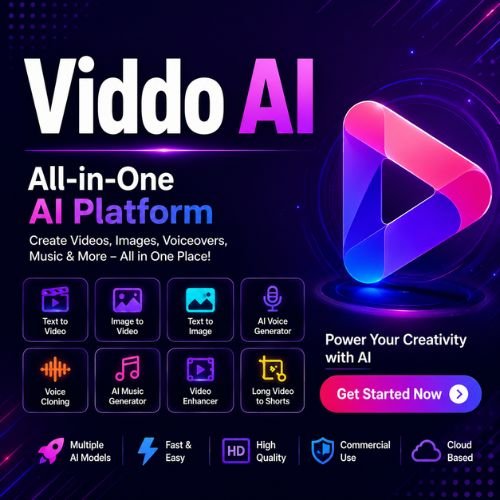
In this Viddo AI Review, we’ll take an in-depth look at one of the fastest-growing AI content creation platforms available today. Viddo AI brings together some of the world’s leading AI models into a single dashboard, allowing users to generate videos, images, voiceovers, music, and more without switching between different tools.
Whether you’re a YouTuber, digital marketer, freelancer, business owner, or social media creator, this review will help you decide whether Viddo AI is worth your investment. We’ll explore its features, ease of use, pricing, strengths, weaknesses, and how it compares with other popular AI platforms.
What Is Viddo AI?
Viddo AI is an all-in-one AI content creation platform designed to simplify the creative workflow for individuals and businesses. Instead of subscribing to separate services for video generation, image creation, AI voiceovers, music production, and editing, users can access all these tools from one platform.
One of Viddo AI’s biggest advantages is that it integrates multiple industry-leading AI models into a single workspace. Depending on your project, you can choose different models for text-to-video, image generation, voice cloning, music creation, and animation, giving you greater flexibility without managing multiple subscriptions.
The platform is built for speed and convenience. Whether you want to create a YouTube video, Instagram Reel, TikTok clip, marketing advertisement, or promotional content, Viddo AI provides tools that significantly reduce production time while maintaining impressive output quality.
Key Features
One of the biggest highlights of this Viddo AI Review is the platform’s extensive feature set. Rather than focusing on a single AI capability, Viddo AI combines multiple creative tools into one dashboard, making it a versatile solution for modern content creators.
AI Video Generator
The AI Video Generator is one of Viddo AI’s core features. Users can simply enter a text prompt describing the scene they want, and the platform generates a video using advanced AI models.
Whether you’re creating cinematic scenes, promotional videos, educational content, or social media clips, the AI can produce visually engaging results in just a few minutes. Users can experiment with different styles, camera angles, and motion settings to achieve the desired look.
Image-to-Video Generation
Viddo AI can transform static images into animated videos with realistic movement and camera effects. This feature is particularly useful for marketers, photographers, and content creators who want to make their visuals more engaging without traditional video editing.
The AI intelligently adds motion, zoom effects, and transitions, giving still images a dynamic and professional appearance.
Text-to-Image Generator
Creating high-quality images is just as easy as generating videos. Users simply describe what they want, and Viddo AI produces detailed AI-generated artwork, illustrations, product visuals, or marketing graphics within seconds.
This feature is ideal for blog illustrations, YouTube thumbnails, advertisements, presentations, and social media content.
AI Voice Generator
Viddo AI includes powerful text-to-speech technology that converts written scripts into natural-sounding voiceovers. Users can choose from multiple voices, accents, languages, and speaking styles to match different types of content.
This eliminates the need for expensive recording equipment or professional voice actors, making video production much faster and more affordable.
Voice Cloning
Voice cloning allows users to create AI-generated speech using a custom voice. This feature is particularly valuable for content creators who want consistent narration across videos or businesses looking to maintain a recognisable brand voice.
The cloned voice can be used for tutorials, presentations, advertisements, podcasts, and educational content.
AI Music Generator
Viddo AI also includes an AI music generator capable of producing original background music for videos. Instead of searching for royalty-free tracks, users can generate custom music that matches the mood and style of their projects.
This is especially useful for YouTube creators, advertisers, and social media marketers who require unique audio for commercial use.
Lip Sync Technology
Lip sync technology automatically matches spoken audio with facial movements in videos. This creates more realistic AI avatars and animated characters, making presentations and promotional content appear far more natural.
For creators producing multilingual videos or digital presenters, this feature can save considerable editing time.
Video Enhancement
The platform includes AI-powered video enhancement tools that improve resolution, sharpen details, reduce noise, and optimise colour quality. Older or lower-quality videos can be enhanced to create a more professional final result.
Long Video to Shorts
Repurposing long-form content into short videos has become increasingly important for platforms like YouTube Shorts, TikTok, Instagram Reels, and Facebook Reels.
Viddo AI can automatically identify key moments in a longer video and generate shorter clips suitable for social media. This helps creators maximise the value of existing content while saving hours of manual editing.
How Does Viddo AI Work?
Using Viddo AI is surprisingly straightforward. After creating an account, users can choose the type of content they want to generate, such as a video, image, voiceover, or music track.
The next step is entering a prompt or uploading existing content, depending on the chosen feature. For example, users can describe a scene for text-to-video generation, upload an image for animation, or paste a script for AI voice creation.
Once the settings are selected, the platform processes the request using the appropriate AI model. Depending on the complexity of the project and the selected model, results are typically generated within a few minutes.
After generation, users can preview the output, make adjustments if necessary, and export the finished content for commercial or personal use.
The workflow is simple enough for beginners while offering sufficient flexibility for experienced creators.
Who Should Use Viddo AI?
One of the strengths highlighted in this Viddo AI Review is the platform’s broad appeal. It is suitable for a wide range of users across different industries.
YouTubers
YouTube creators can use Viddo AI to generate videos, create thumbnails, produce voiceovers, add background music, and repurpose long videos into Shorts, all from one platform.
Digital Marketers
Marketing teams can quickly produce advertisements, promotional videos, social media campaigns, product demonstrations, and branded visuals without hiring multiple specialists.
Social Media Creators
Creators producing content for TikTok, Instagram, Facebook, LinkedIn, and X can significantly speed up content production while maintaining consistent quality.
Freelancers
Freelancers offering content creation services can expand their capabilities by producing videos, graphics, voiceovers, and animations without investing in several expensive software subscriptions.
Small Businesses
Business owners can create marketing materials, promotional videos, training content, customer presentations, and product demonstrations with minimal production costs.
Agencies
Creative agencies managing multiple clients can streamline production workflows by handling video generation, voice creation, image design, and editing from one dashboard.
User Interface and Ease of Use
Another positive aspect of this Viddo AI Review is the platform’s clean and organised interface.
The dashboard is designed with beginners in mind, allowing users to navigate between different AI tools without confusion. Major features are clearly categorised, reducing the time needed to learn the platform.
Most content generation tasks follow a simple three-step process: choose a tool, enter your prompt, and generate the result. This intuitive workflow makes Viddo AI accessible even for users with no previous experience in AI content creation.
The interface also performs well across different devices, allowing users to manage projects from desktop computers, laptops, or tablets.
AI Models Available
One feature that distinguishes Viddo AI from many competitors is its access to multiple leading AI models through a single platform. Instead of limiting users to one proprietary model, Viddo AI allows creators to choose the most suitable model for each type of project.
Depending on the selected tool, users can access technologies from well-known providers such as Google Veo, Runway, Kling AI, Seedance, Hailuo AI, GPT Image, ElevenLabs, and Suno. This flexibility enables creators to experiment with different outputs and select the model that best matches their creative vision.
Having multiple AI models available within one subscription reduces the need to purchase separate services, making Viddo AI a convenient solution for creators who regularly produce different types of content.
Real-World Use Cases

Viddo AI is designed to support a wide variety of creative projects across industries. Content creators can use it to produce YouTube videos, Shorts, tutorials, product reviews, and educational content with minimal editing effort. Businesses can create promotional videos, advertisements, product demonstrations, and customer presentations without hiring a production team.
Marketing agencies can generate branded content for multiple clients, while educators can produce engaging training materials and online courses. Even e-commerce sellers can benefit by creating product videos, promotional images, and social media campaigns that attract more customers.
Its ability to combine video, image, voice, and music generation within a single platform makes Viddo AI suitable for nearly every stage of modern digital content creation.
Pricing Plans
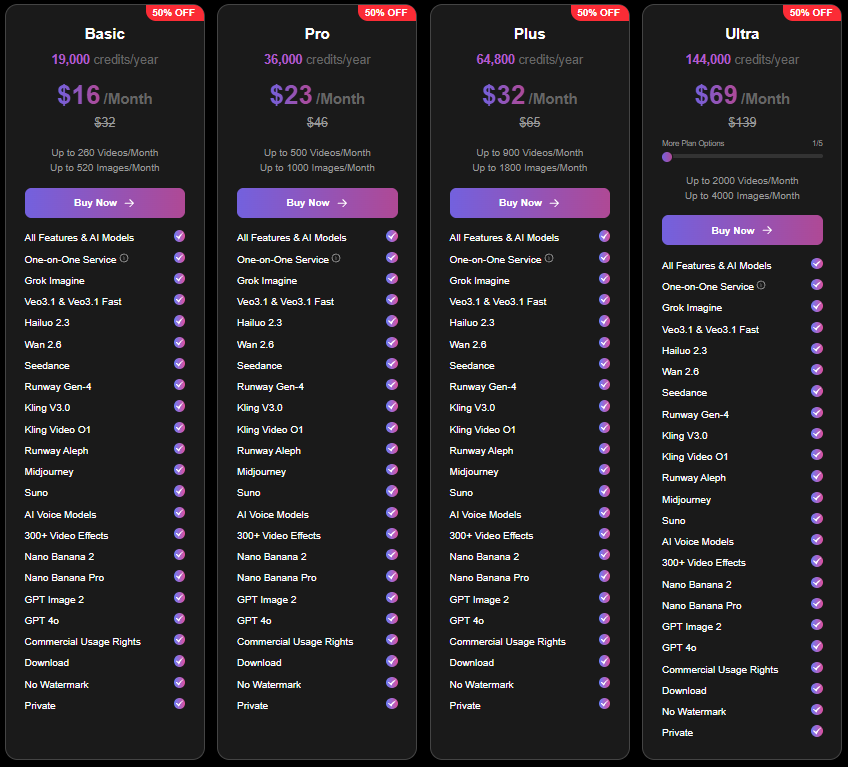
Pricing is an important consideration in any Viddo AI Review, especially for creators who regularly generate videos, images, and audio content. Viddo AI offers several subscription plans designed for individuals, professionals, and businesses. The available plans mainly differ in the number of AI credits, export limits, access to premium AI models, and commercial usage rights.
New users can usually explore the platform with a free plan or trial, although it comes with limited credits and watermarked exports. Paid plans unlock faster processing, higher-quality outputs, watermark-free downloads, priority access to premium AI models, and additional monthly credits. Businesses and agencies can also choose higher-tier plans that support larger production volumes and collaborative workflows. Before subscribing, it’s worth comparing your monthly content requirements with the available credit allocation to select the most cost-effective plan.
Performance and Output Quality
Performance is one of the most important aspects of any AI content creation platform, and Viddo AI delivers impressive results across most of its creative tools. Video generation speeds vary depending on the selected AI model and the complexity of the prompt, but most projects are completed within a few minutes.
The overall visual quality is excellent, particularly when using premium AI models. Videos feature smooth motion, realistic lighting, detailed textures, and cinematic camera movements that require very little post-production. The image generator also produces high-resolution artwork with sharp details and vibrant colours, making it suitable for marketing materials, blog graphics, and social media content.
Voice generation performs equally well, offering natural pronunciation and expressive speech across multiple languages and accents. While occasional refinements may be needed for complex prompts, the overall quality is consistently high and suitable for professional content creation.
What We Like About Viddo AI
After testing the platform for this Viddo AI Review, several features stood out for their ability to simplify the content creation process while maintaining professional-quality results.
All-in-One AI Platform
One of Viddo AI’s greatest strengths is that it combines multiple AI tools into a single platform. Instead of managing separate subscriptions for video generation, image creation, voiceovers, music, and editing, users can complete their entire creative workflow from one dashboard. This saves both time and money while improving overall productivity.
Access to Multiple AI Models
Unlike platforms that rely on a single AI engine, Viddo AI provides access to several industry-leading AI models. This flexibility allows creators to choose the best model for each project, resulting in better creative control and more consistent output quality across different types of content.
Beginner-Friendly Interface
Viddo AI has a clean and intuitive interface that makes it accessible even for users with no previous experience in AI content creation. Most tasks require only a few simple steps, allowing beginners to generate professional videos and images without spending hours learning complicated software.
High-Quality Content Generation
The platform consistently produces impressive videos, images, voiceovers, and music. Modern AI models generate realistic visuals, natural speech, and polished creative assets that require minimal editing before publication. This makes Viddo AI suitable for professional marketing campaigns and commercial content production.
Time-Saving Workflow
Creating content traditionally involves several different software applications and time-consuming editing. Viddo AI streamlines this process by bringing everything together in one workspace. The ability to generate, edit, and export content quickly allows creators to publish more frequently without sacrificing quality.
Commercial Usage
Paid plans allow users to create content for commercial purposes, making Viddo AI an attractive solution for agencies, freelancers, businesses, and professional creators. This provides confidence that generated content can be used for client work, advertising campaigns, and monetised social media channels.
Areas That Could Improve
Although Viddo AI performs well in many areas, no platform is without limitations. During this Viddo AI Review, we identified a few aspects that could be improved.
Credit-Based Pricing
Viddo AI uses a credit-based system for content generation. While this provides flexibility, heavy users may consume credits quickly, particularly when working with premium AI models. Businesses producing large volumes of content should carefully evaluate the available plans before subscribing.
Output Consistency
Although the AI generally delivers impressive results, some prompts may require multiple attempts to achieve the desired outcome. As with most generative AI platforms, the quality of the final output depends heavily on the clarity and detail of the prompt.
Internet Dependency
Since Viddo AI is a cloud-based platform, a stable internet connection is required for all content generation. Users cannot create projects offline, which may be inconvenient for those working in areas with unreliable connectivity.
Best Viddo AI Alternatives
While Viddo AI offers an impressive collection of AI tools, it may not suit every creator’s workflow. Depending on your content requirements and budget, several alternatives are worth considering.
Runway
Runway is one of the most advanced AI video generation platforms available today. It is well known for cinematic-quality videos, powerful editing features, and professional creative tools.
Best for: Professional video production and filmmakers.
Kling AI
Kling AI has gained popularity for generating highly realistic videos with natural movement and impressive visual quality. It is particularly effective for cinematic storytelling and creative animations.
Best for: High-quality AI-generated videos and creative storytelling.
InVideo AI
InVideo AI focuses on helping users generate complete marketing videos from simple text prompts. It includes templates, stock media, subtitles, and editing tools that make video production extremely accessible.
Best for: Marketing videos, YouTube content, and social media creators.
Pika
Pika enables users to generate animated videos quickly using text prompts. It offers a beginner-friendly interface and is well suited to creators experimenting with AI video generation.
Best for: Short-form creative videos and animations.
Synthesia
Synthesia specialises in AI avatar videos and multilingual presentations. Businesses frequently use it for employee training, educational content, and corporate communication.
Best for: AI presenters, training videos, and business communication.
Viddo AI vs Runway
Runway is widely recognised as one of the leading AI video generation platforms, offering professional editing tools and exceptional video quality. It provides greater creative control, making it a preferred choice for filmmakers and advanced users.
Viddo AI, however, offers a broader range of creative tools by combining video generation, image creation, voice synthesis, music generation, and editing within one platform. Users looking for a complete AI content creation solution may find Viddo AI more convenient, while professionals focused solely on advanced video production may prefer Runway.
Viddo AI vs InVideo AI
Both platforms aim to simplify video creation, but they target slightly different audiences. InVideo AI focuses primarily on transforming scripts into marketing videos using templates and stock footage.
Viddo AI provides greater creative flexibility by supporting text-to-video, image generation, AI voiceovers, music creation, and access to multiple AI models. Content creators who require a wider range of creative tools are likely to benefit more from Viddo AI.
Viddo AI vs Kling AI
Kling AI has earned a reputation for producing exceptionally realistic AI-generated videos with advanced motion and cinematic effects. Its visual quality is among the best currently available.
Viddo AI offers access to Kling AI while also including additional AI models and creative tools. Rather than choosing a single AI engine, users can experiment with multiple models for different projects, making Viddo AI a more versatile platform overall.
FAQs:
Is Viddo AI free?
Yes. Viddo AI offers a free plan or trial that allows users to explore the platform with limited credits. Paid subscriptions unlock additional features, premium AI models, and higher generation limits.
Does Viddo AI require editing experience?
No. The platform is designed for beginners and experienced creators alike. Most projects can be completed by entering prompts and selecting the desired settings.
Can I use Viddo AI for YouTube videos?
Yes. Viddo AI is an excellent choice for creating YouTube videos, Shorts, tutorials, product reviews, advertisements, and promotional content.
Does Viddo AI support commercial use?
Yes. Paid plans generally include commercial usage rights, allowing businesses and creators to monetise their content.
Can Viddo AI generate AI voiceovers?
Yes. The platform includes text-to-speech technology and voice cloning capabilities that produce natural-sounding narration in multiple languages.
Is Viddo AI suitable for businesses?
Absolutely. Businesses can create marketing videos, product demonstrations, presentations, training materials, and social media campaigns without hiring a full production team.
Must Read:
- Noloco Review: Is It the Best AI No-Code App Builder?
- Figma Review: The Best Collaborative Design Tool?
- Base44 Review: Is It the Best AI App Builder?
Final Verdict:
After completing this Viddo AI Review, it’s clear that Viddo AI is one of the most comprehensive AI content creation platforms currently available. Its biggest advantage is the ability to combine multiple leading AI models with a wide range of creative tools in a single, easy-to-use workspace.
Whether you need AI-generated videos, images, voiceovers, music, or animated content, Viddo AI provides an efficient solution that reduces production time and eliminates the need for multiple software subscriptions. The platform is particularly well suited to YouTubers, marketers, agencies, freelancers, educators, and businesses that produce content regularly.
While the credit-based pricing model may not be ideal for every user, the platform delivers excellent value through its versatility, high-quality outputs, and streamlined workflow. If you’re looking for a single platform that can support almost every aspect of AI-powered content creation, Viddo AI is certainly worth considering.










