Creating a website with artificial intelligence can be much faster than building every page manually, but the quality of the final website depends heavily on the instructions you give the AI. A vague prompt may produce a generic website, while a detailed prompt can help generate a more useful structure, stronger content, better user experience, and a design that fits your business.
That is why learning how to write effective AI Website Builder Prompts can make a significant difference. Whether you are creating a business website, blog, portfolio, landing page, online store, agency website, or personal brand website, the right prompt gives the AI clear information about what you want.
In this guide, you will find 50 AI Website Builder Prompts covering website creation, homepage design, landing pages, ecommerce, SEO, content, navigation, mobile optimization, conversion optimization, redesigns, portfolios, blogs, and more.
What Are AI Website Builder Prompts?
AI Website Builder Prompts are instructions written in natural language that tell an AI website builder what kind of website or website element you want to create.
Instead of manually selecting every section, you can describe your requirements in a prompt.
For example, instead of simply asking:
“Build a website.”
You could write:
“Create a modern website for a digital marketing agency that provides SEO, Google Ads, social media marketing, and content marketing services. Use a clean professional layout, strong typography, clear calls to action, and a mobile-friendly design. Include Home, About, Services, Case Studies, Blog, FAQ, and Contact pages.”
The second prompt provides much more context, which gives the AI a better understanding of your requirements.
The best AI Website Builder Prompts usually include information about the business, audience, design style, pages, features, content, and desired outcome.
Why Good AI Website Builder Prompts Matter
AI website builders can generate websites quickly, but AI cannot automatically know every detail about your business.
A prompt acts as a set of instructions.
A well-written prompt can help you:
- Create a more relevant website
- Generate better layouts
- Improve website content
- Build clearer navigation
- Target a specific audience
- Create stronger calls to action
- Improve mobile usability
- Generate SEO-friendly structures
- Build product pages
- Create landing pages
- Redesign existing websites
The more specific your requirements are, the easier it is for an AI website builder to generate a useful starting point.
How to Write Better AI Website Builder Prompts
Before using the 50 prompts below, understand the basic structure of a good prompt.
A useful prompt can include:
Business: What does the company do?
Audience: Who is the website for?
Goal: What should visitors do?
Design: What should the website look like?
Pages: Which pages should be included?
Features: What functionality is required?
Content: What information should be displayed?
SEO: Which topics or keywords should be targeted?
Mobile: How should the website work on smartphones?
For example:
“Create a clean ecommerce website for a skincare brand targeting women aged 25 to 45. Use a premium minimalist design with large product images, simple navigation, product categories, customer reviews, shopping cart, secure checkout, and clear calls to action. Make the website mobile-friendly and SEO-friendly.”
This is much more useful than simply saying “Create a skincare website.”
50 AI Website Builder Prompts
Below are 50 practical AI Website Builder Prompts that you can copy, customize, and use with your preferred AI website builder.
1. Business Website Prompt
Prompt:
“Create a professional website for a small business that provides [services]. The target audience is [audience]. Use a modern, clean, trustworthy design with clear navigation and strong calls to action. Include Home, About, Services, Testimonials, FAQ, Blog, and Contact pages. Make the website responsive, fast-loading, and easy to navigate.”
This is a good starting prompt for almost any service-based business.
2. Digital Marketing Agency Prompt

Prompt:
“Create a modern digital marketing agency website offering SEO, PPC advertising, social media marketing, content marketing, and website development. Use a professional technology-focused design with clear service sections, client testimonials, case studies, pricing information, and strong contact buttons. Create a mobile-friendly layout with clear conversion paths.”
3. AI Company Website Prompt
Prompt:
“Build a modern website for an AI software company offering artificial intelligence tools for businesses. Use a clean technology-inspired design with a professional color palette, product screenshots, feature sections, customer testimonials, pricing, FAQ, and a strong call to action. Make the website responsive and optimized for fast loading.”
4. Startup Website Prompt
Prompt:
“Create a modern startup website for [company name]. Explain the problem the company solves, how the product works, its main benefits, pricing, customer results, and key features. Use a clean SaaS-style layout with a strong hero section and prominent signup buttons.”
5. Freelancer Portfolio Prompt
Prompt:
“Create a professional portfolio website for a freelance [designer/developer/writer/marketer]. Include a homepage, About section, services, portfolio projects, client testimonials, skills, experience, and contact form. Use a modern minimalist design with strong typography and clear calls to action.”
6. Personal Brand Website Prompt
Prompt:
“Create a personal brand website for [name], a [profession]. Showcase expertise, experience, achievements, services, articles, social media profiles, and contact information. Use a professional but approachable design with strong personal branding and a responsive layout.”
7. Consultant Website Prompt
Prompt:
“Build a professional consulting website for a consultant specializing in [industry]. Clearly explain the services, target clients, business problems solved, methodology, results, testimonials, and contact options. Use a trustworthy corporate design with simple navigation.”
8. Local Business Website Prompt
Prompt:
“Create a local business website for [business name] located in [city]. Include services, business hours, location, phone number, contact form, customer reviews, FAQs, and directions. Use a clean mobile-first design and make the contact information easy to find.”
9. Restaurant Website Prompt
Prompt:
“Create a modern restaurant website for [restaurant name]. Include a visually appealing homepage, menu, food categories, restaurant story, location, opening hours, customer reviews, reservation information, and contact details. Use high-quality food imagery and a mobile-friendly design.”
10. Real Estate Website Prompt
Prompt:
“Build a professional real estate website for an agency selling and renting properties in [location]. Include property listings, search filters, property details, agent profiles, contact forms, location information, and featured properties. Use a modern trustworthy design optimized for mobile users.”
11. Ecommerce Website Prompt
Prompt:
“Create a modern ecommerce website selling [products]. Include product categories, search, filters, product pages, product images, descriptions, reviews, shopping cart, checkout, customer account functionality, shipping information, and contact support. Use a clean design that encourages customers to purchase.”
12. Fashion Ecommerce Prompt
Prompt:
“Create a premium fashion ecommerce website selling [clothing/products]. Use a stylish editorial design with large product photography, category navigation, product filters, size information, customer reviews, shopping cart, checkout, and promotional sections. Make the website mobile-friendly.”
13. Product Landing Page Prompt
Prompt:
“Create a high-converting landing page for [product]. Start with a clear headline explaining the main benefit. Include product benefits, features, screenshots, customer testimonials, pricing, FAQs, trust signals, and repeated calls to action. Keep the design focused and remove unnecessary navigation.”
14. SaaS Landing Page Prompt
Prompt:
“Create a SaaS landing page for [software name]. Explain the main problem, product solution, key features, benefits, pricing, integrations, customer results, testimonials, FAQs, and signup options. Use a modern SaaS design with clear conversion-focused sections.”
15. Lead Generation Website Prompt
Prompt:
“Create a lead generation website for [business]. The primary goal is collecting qualified leads. Use a clear value proposition, benefits, social proof, service information, FAQs, lead capture form, and strong calls to action. Keep the layout simple and conversion-focused.”
16. SEO-Friendly Website Prompt
Prompt:
“Create an SEO-friendly website for [business]. Organize the website around relevant customer search topics. Use clear page titles, descriptive headings, logical URLs, internal linking opportunities, descriptive image alt text, fast-loading layouts, and mobile-friendly design. Create useful content rather than keyword-stuffed pages.”
17. Blog Website Prompt
Prompt:
“Create a professional blog website focused on [topic]. Include categories, featured articles, recent posts, author information, search functionality, newsletter signup, social sharing, related articles, and a clean reading experience. Make the website responsive and easy for search engines to understand.”
18. Technology Blog Prompt
Prompt:
“Build a technology blog focused on AI, software, website development, and digital tools. Use a modern editorial layout with featured articles, categories, search, author profiles, related posts, newsletter signup, and a sidebar for popular content.”
19. Affiliate Website Prompt
Prompt:
“Create an affiliate marketing website focused on [niche]. Include product reviews, comparisons, buying guides, category pages, featured products, pros and cons sections, FAQs, and clear affiliate calls to action. Use a trustworthy design and make product information easy to compare.”
20. Comparison Website Prompt

Prompt:
“Create a comparison website for [industry]. Allow visitors to compare products or services based on pricing, features, ratings, benefits, limitations, and use cases. Use clean comparison tables, category filters, detailed reviews, and clear navigation.”
21. Course Website Prompt
Prompt:
“Create an online course website for [course topic]. Include course overview, instructor profile, curriculum, lessons, benefits, testimonials, pricing, FAQs, and enrollment buttons. Use a professional educational design with clear calls to action.”
22. Coaching Website Prompt
Prompt:
“Build a coaching website for a [type] coach. Include a strong personal introduction, coaching programs, benefits, client results, testimonials, about section, FAQs, booking information, and contact form. Use a warm professional design.”
23. Medical Website Prompt
Prompt:
“Create a professional healthcare website for [clinic or practice]. Include services, doctor information, appointment details, opening hours, location, FAQs, contact information, and patient resources. Use a clean accessible design and make important information easy to find.”
24. Legal Website Prompt
Prompt:
“Create a professional website for a law firm specializing in [practice areas]. Include attorney profiles, legal services, case experience, FAQs, locations, consultation information, and contact details. Use a trustworthy corporate design with clear navigation.”
25. Travel Website Prompt
Prompt:
“Create a travel website focused on [destination or travel niche]. Include destination guides, travel tips, itineraries, hotels, activities, travel resources, featured articles, and search functionality. Use an attractive visual design with large destination images.”
26. Photography Portfolio Prompt
Prompt:
“Create a visual photography portfolio for a professional photographer specializing in [type of photography]. Include galleries, project categories, About page, testimonials, services, booking information, and contact form. Use a minimalist design that keeps attention on the photographs.”
27. Agency Portfolio Prompt
Prompt:
“Create a creative agency portfolio website showcasing branding, web design, advertising, and marketing projects. Include project case studies, services, client results, team information, testimonials, and contact details. Use a bold but professional visual style.”
28. Mobile-First Website Prompt
Prompt:
“Create a mobile-first website for [business]. Prioritize fast loading, readable typography, simple navigation, large touch-friendly buttons, responsive images, short content sections, and an easy mobile contact experience. Make sure the desktop version remains professional.”
29. Minimalist Website Prompt
Prompt:
“Create a minimalist website for [business]. Use generous white space, simple typography, limited colors, clean navigation, concise content, and strong visual hierarchy. Avoid unnecessary animations and decorative elements.”
30. Premium Website Prompt
Prompt:
“Create a premium website for [brand]. Use sophisticated typography, high-quality imagery, elegant spacing, subtle animations, refined colors, and a luxury visual style. Highlight the brand story, products, benefits, testimonials, and primary call to action.”
31. Website Redesign Prompt
Prompt:
“Redesign this existing website to make it look modern, professional, fast, mobile-friendly, and easier to navigate. Keep important existing content and SEO pages. Improve typography, spacing, navigation, calls to action, page hierarchy, and overall user experience without unnecessarily removing valuable content.”
32. Homepage Redesign Prompt
Prompt:
“Redesign the homepage for [business]. Create a stronger hero section, clear value proposition, benefits, services, social proof, testimonials, FAQs, and calls to action. Improve visual hierarchy and make the page easier to understand within the first few seconds.”
33. Conversion Optimization Prompt
Prompt:
“Improve this website for conversions. Identify confusing sections, weak calls to action, unnecessary content, and unclear customer journeys. Suggest a better page structure that guides visitors toward [purchase/contact/signup/booking]. Keep the design professional and user-friendly.”
34. Website Navigation Prompt
Prompt:
“Create a simple and logical navigation structure for a website about [topic]. Organize pages into clear categories and avoid unnecessary menu items. Make the navigation easy to use on desktop and mobile devices.”
35. Website Accessibility Prompt
Prompt:
“Improve this website for accessibility. Use readable typography, sufficient contrast, descriptive image alt text, clear form labels, logical heading structure, keyboard-friendly navigation, accessible buttons, and a simple layout that works for different users.”
36. Website Speed Optimization Prompt
Prompt:
“Review this website design and suggest ways to improve page speed. Reduce unnecessary animations, optimize images, simplify heavy sections, minimize unnecessary scripts, and recommend a clean structure that provides a fast user experience without sacrificing important functionality.”
37. FAQ Page Prompt
Prompt:
“Create an FAQ page for [business/product]. Identify the most common questions customers may have about pricing, features, products, services, delivery, returns, support, and usage. Organize the questions into clear categories and provide concise, useful answers.”
38. Service Page Prompt
Prompt:
“Create a detailed service page for [service]. Explain what the service is, who it is for, key benefits, how the process works, expected outcomes, pricing information, FAQs, testimonials, and a strong call to action. Use clear headings and easy-to-read sections.”
39. Product Page Prompt
Prompt:
“Create a high-converting product page for [product]. Include product images, title, price, benefits, features, specifications, customer reviews, FAQs, shipping information, return policy, related products, and a prominent purchase button.”
40. Pricing Page Prompt
Prompt:
“Create a clear pricing page for [product/service]. Present three pricing plans with features, limitations, ideal customer types, and clear calls to action. Highlight the recommended plan without making the page confusing. Include FAQs about pricing and billing.”
41. About Page Prompt
Prompt:
“Create an engaging About Us page for [business]. Explain the company’s story, mission, values, experience, team, achievements, and reason for serving customers. Use a human and trustworthy tone rather than generic corporate language.”
42. Contact Page Prompt
Prompt:
“Create a professional contact page for [business]. Include a simple contact form, email, phone number, location, business hours, social media links, and relevant support information. Make the primary contact options easy to find on mobile and desktop.”
43. Testimonial Section Prompt
Prompt:
“Create a customer testimonial section for [business]. Display customer names, roles where appropriate, short testimonials, ratings, and relevant results. Keep the layout clean and trustworthy. Avoid making testimonials look exaggerated or unrealistic.”
44. Case Study Page Prompt
Prompt:
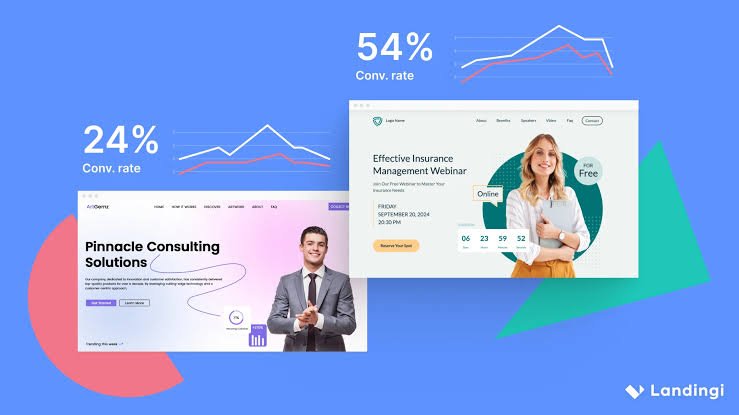
“Create a professional case study page for [project]. Explain the client’s problem, starting situation, strategy, implementation, results, lessons learned, and final outcome. Include relevant statistics, screenshots, quotes, and a clear call to action.”
45. Website Footer Prompt
Prompt:
“Create a clean professional website footer containing important navigation links, contact information, social media links, newsletter signup, privacy policy, terms of service, copyright information, and relevant business details. Keep the footer organized and easy to use.”
46. Blog Content Structure Prompt
Prompt:
“Create a structured blog article layout for [topic]. Include an introduction, clear H2 and H3 sections, short paragraphs, bullet points where useful, examples, FAQs, internal linking opportunities, and a conclusion. Prioritize readability and useful information.”
47. Ecommerce Homepage Prompt
Prompt:
“Create an ecommerce homepage for [store name] selling [products]. Include a promotional hero banner, featured categories, best-selling products, benefits, customer reviews, special offers, brand story, FAQs, newsletter signup, and clear shopping calls to action.”
48. SaaS Dashboard Prompt
Prompt:
“Create a modern SaaS dashboard interface for [product]. Include a sidebar navigation, overview metrics, user activity, charts, notifications, account settings, search, and responsive mobile behavior. Use a clean interface with clear information hierarchy.”
49. Website Trust Prompt
Prompt:
“Improve this website’s trust signals. Add appropriate testimonials, customer reviews, certifications, guarantees, transparent business information, case studies, contact details, security information, FAQs, and clear policies. Keep the presentation professional and avoid unsupported claims.”
50. Complete Website Prompt
Prompt:
“Create a complete professional website for [business name], a company that provides [products/services] to [target audience]. The main goal is [goal]. Create Home, About, Services, Products, Pricing, Case Studies, Blog, FAQ, and Contact pages. Use a modern responsive design, clear navigation, strong calls to action, readable typography, optimized images, SEO-friendly page structures, fast-loading layouts, and a consistent brand style. Make the website easy to use on desktop and mobile devices.”
This final prompt can serve as a starting point when you want an AI website builder to generate a complete website rather than a single page.
How to Get Better Results From AI Website Builder Prompts
Using a prompt once is not always enough.
The best results often come from an iterative process.
Start with your main website prompt and allow the AI to generate the first version. Then review the result and provide specific instructions for improvement.
For example:
First prompt:
“Create a website for a web design agency.”
Then improve it:
“Make the hero section more conversion-focused and clearly explain that we build websites for small businesses.”
Then:
“Reduce the amount of text in the hero section and make the primary CTA more prominent.”
Then:
“Improve the services section by using four service cards with short descriptions and clear benefits.”
This approach gives you more control.
Use Specific Instructions
Avoid vague instructions such as:
“Make it better.”
Instead, explain exactly what you want.
For example:
“Increase the spacing between sections, simplify the navigation menu, use shorter paragraphs, make the primary CTA more visible, and reduce unnecessary animations.”
Specific instructions are easier for AI tools to follow.
Tell AI Who Your Audience Is
Your website should speak to your customers.
Include information about your target audience in your AI Website Builder Prompts.
For example:
“Design this website for small business owners who have limited technical knowledge and want an affordable website solution.”
This can influence the design, language, navigation, and calls to action.
Include Your Brand Style
If you already have a brand identity, tell the AI about it.
You can include:
- Brand colors
- Fonts
- Logo style
- Tone of voice
- Image style
- Design preferences
- Competitor references
For example:
“Use a professional blue and white color palette with clean typography and subtle technology-inspired visual elements.”
Review AI-Generated Content
AI can generate content quickly, but you should always review it.
Check:
- Facts
- Product specifications
- Pricing
- Company information
- Claims
- Grammar
- Brand tone
- Customer promises
AI-generated content should support your website strategy rather than replace your judgment.
Optimize AI-Generated Websites for SEO
The AI Website Builder Prompts above can help create an SEO-friendly foundation, but SEO requires ongoing work.
Make sure your website has:
- Clear page titles
- Useful meta descriptions
- Logical headings
- Descriptive URLs
- Internal links
- Helpful content
- Optimized images
- Mobile-friendly pages
- Fast performance
- Search-friendly architecture
Avoid filling every section with keywords.
Write for people first.
Use AI Prompts for Website Improvements
You do not have to use AI only when creating a new website.
AI Website Builder Prompts can also help improve an existing website.
You can ask AI to:
- Simplify navigation
- Improve a homepage
- Rewrite service pages
- Create better CTAs
- Improve product pages
- Make layouts more mobile-friendly
- Create FAQ sections
- Improve readability
- Suggest internal links
- Redesign outdated sections
This makes AI useful throughout the entire website lifecycle.
Must Read:
- How to Redesign Your Website Using AI in 2026?
- AI Website Builder vs AI Coding Tools: Key Differences
- How to Create a Website With AI From Scratch?
Final Thoughts:
The quality of an AI-generated website depends heavily on the instructions you provide. A short and vague prompt may create a generic website, while detailed AI Website Builder Prompts can give the AI enough information to build a more relevant and useful starting point.
The 50 prompts in this guide cover many common website projects, including business websites, ecommerce stores, blogs, portfolios, agencies, SaaS platforms, landing pages, local businesses, and website redesigns.
You can copy these prompts directly, but the best approach is to customize them. Replace the placeholders with your business name, industry, target audience, products, services, design preferences, and goals.
Remember that AI is most effective when you treat it as a creative and technical assistant. Generate a first version, review it carefully, provide additional instructions, and continue refining the website until it matches your requirements.
Whether you are building your first website or redesigning an existing one, well-written AI Website Builder Prompts can save time, improve the creative process, and help you turn a simple idea into a professional website.
The goal is not to let AI make every decision. The goal is to give AI clear instructions so it can help you build a better website faster.