Artificial intelligence is changing the way websites are planned, designed, built, and improved. Learning how to use AI to improve your website design can help businesses create better layouts, write stronger website copy, improve user experience, generate visuals, and identify design problems faster.
In the past, improving a website often required a designer, developer, copywriter, SEO specialist, and data analyst. Today, AI website design tools can assist with many of these tasks. They can generate design ideas, suggest color combinations, create images, analyze content, improve layouts, and help businesses understand what visitors may need.
However, AI does not mean you should let a tool make every design decision automatically. The best results usually come from combining AI with human creativity, brand knowledge, customer research, and testing.
In this guide, you will learn how to use AI to improve your website design, from the initial planning stage to visual design, content, mobile optimization, SEO, accessibility, and ongoing improvements.

What Can AI Do for Website Design?
Before learning how to use AI to improve your website design, it is important to understand what AI can actually help you accomplish.
AI can support almost every stage of the website design process. Depending on the tool you use, AI can help with:
- Website structure
- Page layouts
- Color palettes
- Typography suggestions
- Website copy
- Images and graphics
- User experience ideas
- Responsive design
- SEO recommendations
- Accessibility improvements
- Conversion optimization
- Competitor research
- Content organization
- Landing page creation
- A/B testing ideas
- Website performance analysis
AI can also help you generate multiple design concepts quickly. Instead of spending hours creating several layouts manually, you can ask an AI tool to produce different approaches and then select the one that best matches your brand.
Start With Your Website Goals
The first step in learning how to use AI to improve your website design is understanding what the website needs to accomplish.
A beautiful website is not automatically an effective website.
Your website might be designed to:
- Generate leads
- Sell products
- Promote services
- Build brand awareness
- Publish articles
- Collect email subscribers
- Generate affiliate revenue
- Provide customer support
- Promote an application
- Build an online community
AI can help you create better design ideas, but the instructions you provide should be connected to your business goal.
For example, instead of asking an AI tool to create a “modern website,” provide more specific information.
You could ask for a website layout for a digital marketing agency that wants to generate consultation requests from small businesses.
The resulting recommendations are likely to be much more useful because AI understands the intended audience and conversion goal.
Use AI to Create Website Layout Ideas
One of the easiest ways to use AI for website design is to generate layout ideas.
AI can suggest the sections that should appear on a page based on the type of business and target audience.
For example, a service website might benefit from a structure such as:
- Hero section
- Main value proposition
- Services
- Benefits
- Case studies
- Testimonials
- Process
- Frequently asked questions
- Contact section
The exact structure should depend on the website.
AI can provide several possible layouts, allowing you to compare different approaches before starting the actual design.
This is especially useful when you are creating a website from scratch and are unsure which sections should appear above or below the fold.
Improve Your Website Navigation With AI
Navigation has a major impact on user experience.
Visitors should be able to understand where they are and find important information without unnecessary effort.
AI can help analyze your existing navigation structure and suggest improvements.
For example, if your website contains dozens of pages, AI can help organize them into logical categories.
A simple navigation structure might include:
- Home
- About
- Services
- Products
- Blog
- Contact
A larger website may require dropdown menus, category pages, filters, search functionality, and breadcrumbs.
When learning how to use AI to improve your website design, do not focus only on colors and graphics. Information architecture is equally important.
Use AI to Improve Website Copy
Design and content work together.
A website may have an attractive layout, but unclear content can still prevent visitors from taking action.
AI can help improve:
- Headlines
- Subheadings
- Product descriptions
- Service descriptions
- Calls to action
- Feature explanations
- FAQs
- Landing page copy
- Button text
For example, a generic CTA such as “Submit” could potentially be replaced with something more descriptive, such as “Get My Free Consultation.”
The best copy depends on the audience and context, so AI-generated content should be reviewed before publishing.
AI should help you communicate your message more clearly, not replace your understanding of your customers.
Use AI to Choose Better Colors
Color affects how visitors perceive a website.
AI design tools can help generate color palettes based on your brand identity, industry, target audience, or existing logo.
For example, an AI tool may suggest combinations involving:
- Primary brand color
- Secondary color
- Background color
- Text color
- Accent color
- Button color
However, you should not select colors simply because an AI tool says they look attractive.
Check contrast and readability across different devices.
Important interface elements such as buttons and links should also be visually recognizable.
A strong color system should create consistency throughout your website rather than making every section look different.
Use AI for Typography Suggestions
Typography is another important element of website design.
AI can recommend font combinations based on your website style.
For example, a professional financial website may need a different typography style than a creative portfolio.
AI can help you compare:
- Serif and sans-serif combinations
- Heading fonts
- Body fonts
- Font sizes
- Line spacing
- Text hierarchy
The goal is readability.
Your website visitors should be able to scan headings, read paragraphs, understand buttons, and identify important information easily.
Avoid using too many fonts simply because AI provides numerous suggestions.
A small, consistent typography system is usually easier to manage.
Generate Better Images With AI
Images can have a major effect on website design.
AI image generation tools can help create:
- Hero images
- Product concepts
- Background graphics
- Illustrations
- Marketing visuals
- Social media graphics
- Icons
- Decorative elements
This can be particularly useful for small businesses that do not have access to professional photography.
However, images should support the page rather than distract visitors.
For example, a product page should prioritize accurate product visuals rather than decorative AI-generated artwork.
When using AI-generated images, make sure the visuals match your brand and do not create misleading impressions about your products or services.
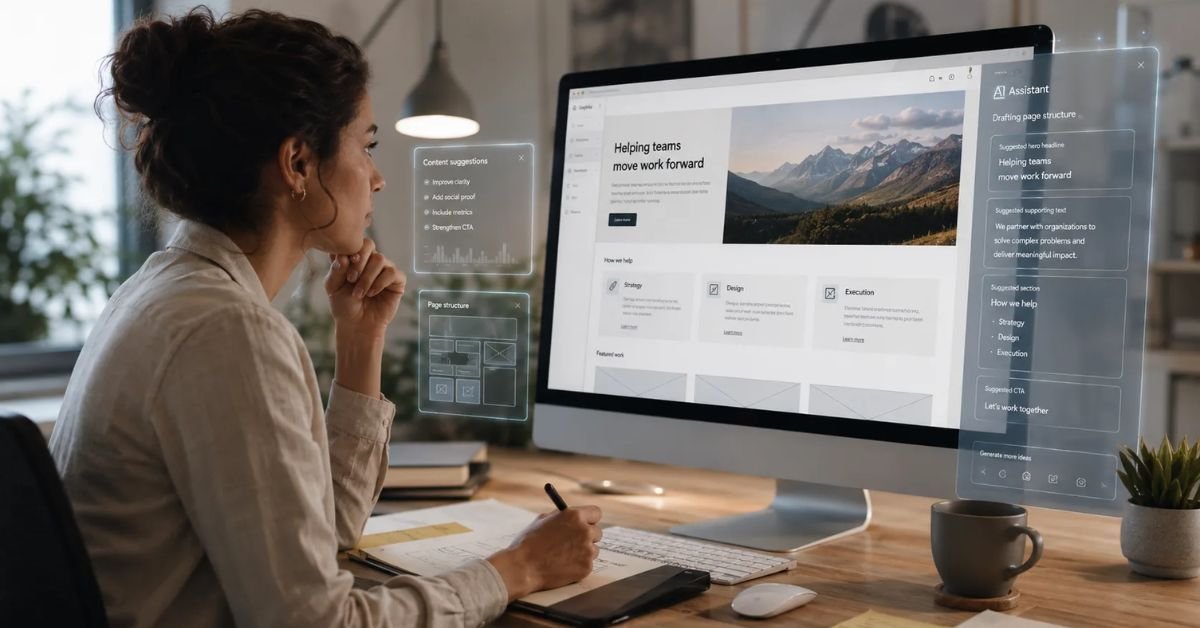
Use AI to Improve the Hero Section

The hero section is usually one of the first elements visitors see.
It should quickly communicate:
- What your business offers
- Who it is for
- Why it matters
- What the visitor should do next
AI can help you test different hero section structures.
For example:
Headline: Clear statement of the main benefit
Supporting text: Short explanation of the product or service
CTA: Specific next step
Visual: Relevant image, product screenshot, illustration, or video
AI can generate multiple versions so you can compare different messaging styles.
The important point is to avoid making the hero section unnecessarily complicated.
Visitors should understand the purpose of the page quickly.
Use AI to Improve User Experience
User experience is one of the most valuable areas where AI can assist website design.
AI can help identify possible problems such as:
- Confusing navigation
- Long forms
- Weak CTAs
- Excessive text
- Poor content hierarchy
- Unclear buttons
- Distracting elements
- Repetitive sections
- Difficult checkout processes
You can provide AI with information about your website structure and ask it to review the experience from the perspective of a first-time visitor.
For example, ask:
“Review this landing page from the perspective of a visitor who has never heard of this company. Identify anything that could create confusion before they submit the form.”
This type of analysis can reveal problems that may be overlooked by someone who knows the website too well.
Use AI to Design Better Landing Pages
Landing pages are often designed around a specific conversion goal.
AI can help create landing page structures for:
- Lead generation
- Product launches
- Software trials
- Newsletter subscriptions
- Webinar registrations
- Affiliate promotions
- Paid advertising campaigns
AI can suggest different layouts based on the campaign objective.
For example, a lead-generation landing page may focus on:
- Strong headline
- Problem statement
- Benefits
- Social proof
- Short form
- CTA
- FAQs
The exact design should depend on the audience and offer.
Use AI for Mobile Website Design
A large portion of website traffic comes from mobile devices, making responsive design essential.
AI can help review your website from a mobile perspective and identify potential issues.
Look for:
- Text that is too small
- Buttons that are difficult to tap
- Images that overflow
- Long navigation menus
- Poor spacing
- Slow-loading elements
- Horizontal scrolling
- Forms that are difficult to complete
When learning how to use AI to improve your website design, always consider mobile users separately.
A layout that looks excellent on a desktop monitor may not work equally well on a smartphone.
Use AI to Improve Website Accessibility
Accessibility should be part of modern website design.
AI tools can help identify potential accessibility problems, including:
- Low color contrast
- Missing image descriptions
- Poor heading structure
- Difficult-to-read text
- Unclear links
- Inconsistent navigation
- Forms without clear labels
AI can suggest improvements, but accessibility should also be checked using appropriate testing tools and, when possible, real users.
A more accessible website can provide a better experience for a wider range of visitors.
Use AI for SEO-Friendly Website Design
SEO is closely connected with website structure.
When learning how to use AI to improve your website design, consider search engine optimization from the beginning rather than adding it after the website is finished.
AI can help organize:
- Page titles
- Meta descriptions
- Headings
- Internal links
- Image alt text
- URL structures
- Content clusters
- FAQ sections
- Keyword themes
AI can also help identify gaps in your content structure.
However, avoid creating pages simply to include keywords.
Search engines increasingly focus on useful content and user experience. Your website should be designed for people first.
Improve Page Speed With AI
Website speed can affect user experience and business performance.
AI tools can help identify possible performance problems involving:
- Large images
- Unused code
- Excessive scripts
- Third-party integrations
- Slow server responses
- Render-blocking resources
- Poor caching configuration
AI can also suggest ways to optimize website assets.
For example, if your homepage contains several large images, an AI-powered analysis tool may recommend compressing them, changing their formats, or loading them more efficiently.
Always verify technical recommendations before making major changes to a production website.
Use AI to Analyze Your Competitors
AI can help you study competitor websites and identify design patterns.
You can compare areas such as:
- Navigation
- Homepage structure
- Content hierarchy
- Calls to action
- Product presentation
- Pricing sections
- Testimonials
- Blog structure
- Mobile experience
The goal should not be to copy competitors.
Instead, use competitor research to understand what customers may already expect and identify opportunities to create a better experience.
For example, if competitors have complicated pricing pages, your website could focus on making pricing easier to understand.
Use AI to Improve Conversion Rates

A website should not only look good. It should encourage visitors to take meaningful actions.
AI can help you brainstorm conversion improvements such as:
- Stronger CTAs
- Better form placement
- Clearer benefits
- Improved trust signals
- Better testimonials
- Simplified checkout
- Better product descriptions
- More relevant landing pages
For example, AI may suggest moving a CTA closer to a section explaining the primary benefit.
These suggestions should be tested rather than accepted automatically.
A/B testing can help determine whether a design change actually improves performance.
Use AI to Create Personalized Experiences
Advanced AI systems can help websites provide more personalized experiences.
For example, an e-commerce website could recommend products based on browsing behavior.
A content website could recommend related articles based on the visitor’s interests.
A SaaS website could display different onboarding information depending on the user’s account type.
Personalization can improve relevance, but it should be implemented responsibly.
Businesses should consider privacy, transparency, data protection, and user expectations when using customer data.
Use AI to Test Different Design Ideas
One of the biggest benefits of AI is the ability to generate alternatives quickly.
Instead of creating one homepage design, you can ask AI to generate several concepts.
For example:
- Minimal design
- Bold design
- Conversion-focused design
- Editorial design
- Corporate design
- Product-focused design
You can then compare them based on your goals.
This approach can save time during the brainstorming stage.
However, the final decision should consider your brand, audience, business goals, and actual user behavior.
Use AI to Improve Existing Websites
You do not need to rebuild your website to benefit from AI.
AI can also help improve an existing website.
Start by reviewing your:
- Homepage
- Navigation
- Service pages
- Product pages
- Blog
- Contact forms
- Checkout
- Mobile experience
- Page speed
- SEO structure
Ask AI to identify the highest-priority improvements.
Instead of making dozens of changes at once, focus on the issues that could have the biggest effect on visitors and conversions.
Best Practices for Using AI in Website Design
Knowing how to use AI to improve your website design is only part of the process. You also need to use AI responsibly.
Give AI Detailed Instructions
The quality of AI recommendations often depends on the information you provide.
Include details about:
- Business type
- Target audience
- Website purpose
- Brand style
- Main products
- Customer problems
- Conversion goal
- Preferred design style
Specific instructions generally produce more useful results.
Review AI-Generated Content
Do not publish every AI-generated sentence automatically.
Check:
- Accuracy
- Brand voice
- Grammar
- Claims
- Product information
- SEO quality
- Customer relevance
AI-generated content should be edited and reviewed before publication.
Keep Your Brand Consistent
Your website should have a consistent visual identity.
Use a defined system for:
- Colors
- Fonts
- Buttons
- Spacing
- Images
- Icons
- Headings
AI can generate many different styles, but too much variation can make your website look inconsistent.
Do Not Overdesign
AI can generate endless design ideas.
That does not mean you should use all of them.
Too many animations, pop-ups, colors, widgets, videos, and interactive elements can make a website difficult to use.
Good design often comes from removing unnecessary elements.
Common Mistakes When Using AI for Website Design
There are several mistakes businesses should avoid.
One common mistake is accepting the first AI-generated design without customization.
Another mistake is relying completely on AI-generated content.
Some businesses also add unnecessary visual elements because AI recommends them.
Other common problems include:
- Ignoring mobile users
- Using generic stock-style visuals
- Publishing inaccurate AI content
- Overusing animations
- Ignoring accessibility
- Forgetting SEO
- Failing to test changes
- Making the website too complicated
AI should be treated as a design assistant, not the final decision-maker.
How to Use AI to Improve Your Website Design: A Simple Process
You can follow a practical workflow to improve your website.
Step 1: Define your goal.
Decide what you want visitors to do.
Step 2: Understand your audience.
Identify who visits your website and what they need.
Step 3: Analyze your current website.
Find problems with navigation, content, mobile design, speed, and conversions.
Step 4: Ask AI for improvement ideas.
Give AI detailed information about your website.
Step 5: Prioritize recommendations.
Start with changes that can provide the greatest value.
Step 6: Improve the visual design.
Work on colors, typography, spacing, images, and layout.
Step 7: Improve your content.
Make headlines, descriptions, CTAs, and product information clearer.
Step 8: Optimize mobile design.
Check every important page on smartphones.
Step 9: Test the website.
Use analytics, user feedback, performance tools, and A/B testing where appropriate.
Step 10: Continue improving.
Website design should be an ongoing process rather than a one-time project.
Must Read:
- AI Website Builder vs Web Developer: Which Is Better?
- How to Create an AI-Powered Business Website?
- Best AI Tools for Website Design and Development
Final Thoughts:
Learning how to use AI to improve your website design can save time, reduce design costs, and help you create a better online experience. AI can assist with layouts, content, images, navigation, SEO, accessibility, mobile optimization, conversion ideas, and performance analysis.
However, AI should not replace strategic thinking.
The strongest websites combine AI assistance with human creativity, customer knowledge, testing, and clear business objectives. Use AI to generate ideas, identify problems, automate repetitive tasks, and explore different solutions. Then review those recommendations and make decisions based on your audience and goals.
Whether you are creating a new website or improving an existing one, AI gives you more ways to experiment and improve. Start with the biggest problems, make practical changes, measure the results, and continue refining your website over time.
When used correctly, AI can become a valuable part of your website design workflow, helping you build websites that are not only attractive but also easier to use, faster, more accessible, SEO-friendly, and focused on real business results.